

 zed-industries
Keymap does not work
Check for existing issues
- [X] Completed
Describe the bug / provide steps to reproduce it
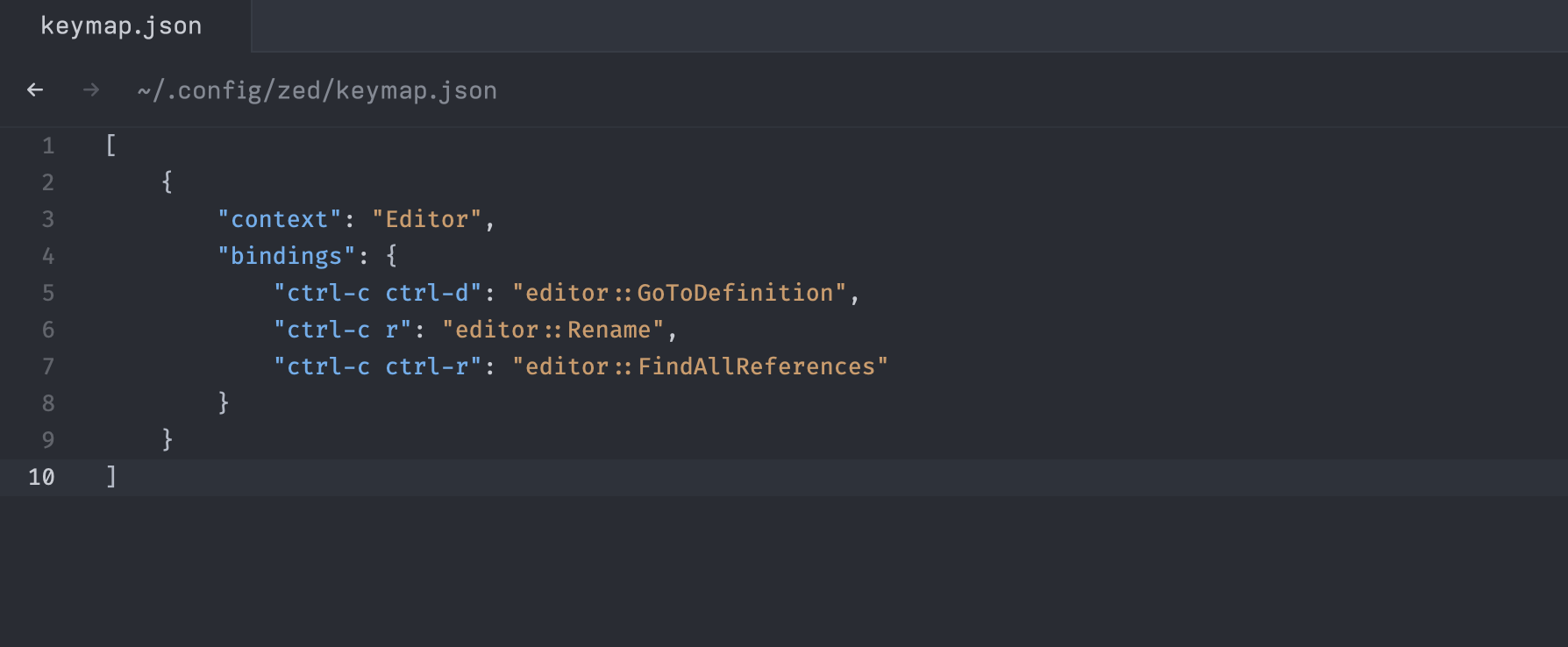
I defined customized keymap but it doesn't work.
Environment
Zed: v0.73.3 (stable)
OS: macOS 13.1.0
Memory: 16 GiB
Architecture: aarch64
If applicable, add mockups / screenshots to help explain present your vision of the feature
If applicable, attach your ~/Library/Logs/Zed/Zed.log file to this issue.
If you only need the most recent lines, you can run the zed: open log command palette action to see the last 1000.
Althougth the below log has an invalid keystore ctrl-c-d error, but I already changed it to ctrl-c ctrl-d, but doesn't work either.
log.txt

ctrl-c is bound to menu::Cancel in the default keymap, so your bindings dont have a chance to reach the second key.
This issue is a ux and understandability problem with our keybinding system. Some ways forward:
- We must give users a way to understand what action is being dispatched by a given keypress maybe through a toggleable setitng or log
- We should surface to the user when there are pending keys in the matcher. This would make it more obvious when a key has already been consumed
- We must give the user a way to override these default bindings. Today later bindings match first, but this doesn't properly handle when bindings have multiple steps as shown above.

Yes exactly, I think the 3rd point is the most important for an ending user.
@Kethku Will Zed allow users to override the default bindings in the next release? So I can use ctrl-c ctrl-d to trigger goToDefiniton action, it is an important and useful shortcut for me like in other editors
Unfortunately no. I will make sure to discuss this with the team to come up with a fix soon
I guess this is the same thing I reported some time ago in https://github.com/zed-industries/zed/issues/5649 I'll close that one as it didn't manage to get any comment

Unfortunately no. I will make sure to discuss this with the team to come up with a fix soon
Is it possible to bind g-d to goToDefinition? I tried it but did not work either.
Unfortunately no. I will make sure to discuss this with the team to come up with a fix soon
Is it possible to bind
g-dto goToDefinition? I tried it but did not work either.
I'm looking for this too

Unfortunately no. I will make sure to discuss this with the team to come up with a fix soon
Is it possible to bind
g-dto goToDefinition? I tried it but did not work either.
What do you mean by this? Do you mean pressing the g and d keys together and queueing a goToDefinition action?
Press g and immediately with a d to trigger the goToDefinition action, it's a very common action in VIM
Oh I see. This can be done today using some vim specific keymap contexts.
Most of the operators in vim mode will set the vim_operator context variable for active editors to the operator key. So for this case, you can use vim_operator == g to create bindings locked behind the g key in normal mode.
Binding g d to goToDefinition looks like this:
{
    "context": "Editor && vim_operator == g",
    "bindings": {
        "d": "editor::GoToDefinition"
    }
}
Add that to your personal keymap and you should be good to go.
Oh I see. This can be done today using some vim specific keymap contexts.
Most of the operators in vim mode will set the
vim_operatorcontext variable for active editors to the operator key. So for this case, you can usevim_operator == gto create bindings locked behind thegkey in normal mode.Binding
gdtogoToDefinitionlooks like this:{ "context": "Editor && vim_operator == g", "bindings": { "d": "editor::GoToDefinition" } }Add that to your personal keymap and you should be good to go.
It works, thanks Kethku
I am also having an issue where I am not sure what happens when I press keys.
I tried to add some shortcuts I am familiar with from VS Code, but none of them are working:
{
  "context": "Editor",
  "bindings": {
    "cmd-shift-k": "editor::DeleteLine",
    "alt-up": "editor::MoveLineUp",
    "alt-down": "editor::MoveLineDown",
    "alt-shift-up": "editor::DuplicateLine",
    "alt-shift-down": "editor::DuplicateLine"
  }
}

I am trying to re-bind ctrl-1 to shift-1 because my pinky hurts 🤕
{
    "context": "Editor && vim_mode == normal && !VimWaiting && !menu",
    "bindings": {
      // put key-bindings here if you want them to work only in normal mode
      "space l": "pane::SplitRight",
      "space h": "pane::SplitLeft",
      "space p": "file_finder::Toggle",
      "space k": "editor::MoveRight",
      "shift-1": ["pane::ActivateItem", 0],
      "shift-2": ["pane::ActivateItem", 2],
      "shift-3": ["pane::ActivateItem", 3]
    }
  },
However, it does not seem to be working 😞

However, it does not seem to be working 😞
Yeah, I think the problem is that we don't send shift-1 but ! (on my keyboard) to the editor. Can you open a separate ticket for that?

Is there any movement on this? I want to map editor:MoveLineUp to ctrl-k, but that's already taken by editor::CutToEndOfLine.
I've spent so long trying to figure this out. It seems like this is an ordering issue, the default's shouldn't take precedence when evaluating a key binding, the user's should have priority.
Are there plans to address in an upcoming release? 🙏

I just tested the original keymap submitted in this issue and all of the bindings work for me, so I think the original issue here is solved. For any other issues brought up in this thread, please open up a new issue!
