

 zed-industries
Light theme: git gutter is too thin and not really visable
Check for existing issues
- [X] Completed
Describe the bug / provide steps to reproduce it
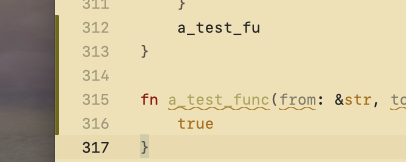
Hi, I just found that git gutter is not really visiable in light theme, and it's width is various from buffer_font_size setting.
Using SF Mono font with font size 15:
Using SF Mono font with font size 14:
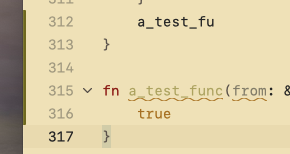
To me, it seems that it's too thin to notice that a change happened in the specific code block.
And I'm using Gurvbox Light Soft theme, I can reproduce in other other light themes, except One Light theme, the git gutter color in One Light theme is good. But it's still too thin..
Environment
Zed 0.78.1 OS: macOS 13.2.1 Memory: 16 GiB Architecture: x86_64
If applicable, add mockups / screenshots to help explain present your vision of the feature
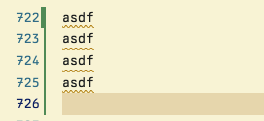
Maybe we can put git gutter to the right side of line-number like vscode, it's thin too, but it's more readable to me:
If applicable, attach your ~/Library/Logs/Zed/Zed.log file to this issue.
If you only need the most recent lines, you can run the zed: open log command palette action to see the last 1000.
No response


We've increased the width of the gutter since this issue was filed, so I'm going to close this issue out. If you think it's still too hard to see, feel free to open a new issue. Thank you!


Came here searching for a way to make it thinner :) Coming from VS Code I find the Git gutter lines in Zed way too thick.
