
vscode-markdown-pdf
 vscode-markdown-pdf copied to clipboard
 yzane
yzane
relative stylesheet paths are not working when multiple folders in workspace
if I have multiple folders added to my workspace, stylesheets that are within the same folder as the markdown file aren't applied.
For example I have added the folders D:\Code\abc and D:\Code\def to the workspace and open a file from D:\Mark\ABC\doc.md where the stylesheet is located at D:\Mark\ABC\md-style.css
with the following settings:
"markdown-pdf.styles": [
    "md-styles.css"
],
If I remove all the folders from the workspace, the styles are applied again.
I hope you unterstand my issue. Feel free to ask if something is unclear. Thanks.
OS: Win10


Nope, it's still broken. Im testing with the styles:
./md-styles.css
img{
    width: 50px;
    max-width: 50px;
    height: auto;
    max-height: none;
}
p{
    color: red;
}
and the config
    "markdown-pdf.styles": [
        "D:\\Documents\\md-styles.css",
        "..\\md-styles.css",
        "md-styles.css"
    ],
Perhaps helps some:
On macOS 11.52 with VSC 1.60.1 and Markdown PDF v1.4.4 the following works for a relative path:
"markdown-pdf.styles": ["../assets/css/markdown-pdf-phd.css"],
full code:
{
    "folders": [
        {
            "path": "."
        }
    ],
    "settings": {
        "markdown-pdf.headerTemplate": "<div style=\"font-size: 9px; margin-left: 1cm;\"></div> <div style=\"font-size: 9px; margin-left: auto; margin-right: 1cm; \"> </div>",
        "markdown-pdf.emoji": false,
        "markdown-pdf.breaks": true,
        "markdown-pdf.margin.top": "1cm",
        "markdown-pdf.footerTemplate": "<div style=\"font-size: 9px; margin: 0 auto;\"> <span class='pageNumber'; text-align: auto;></span> / <span class='totalPages'></span></div>",
        "markdown-pdf.margin.bottom": "1.5cm",
        "markdown-pdf.omitBackground": true,
        "markdown-pdf.margin.left": "2cm",
        "markdown-pdf.margin.right": "2cm",
        "markdown-pdf.stylesRelativePathFile": true,
        "markdown-pdf.styles":
        ["../assets/css/markdown-pdf-phd.css"],
        "markdown-pdf.highlightStyle": "a11y-dark.css"
    }
}
Note: In settings: Markdown-pdf: Styles Relative Path File is ticked/selected
The 'Markdown-pdf: Styles' setting was updated after I edited the '.code.workspace' file to what you see in the screenshot below:
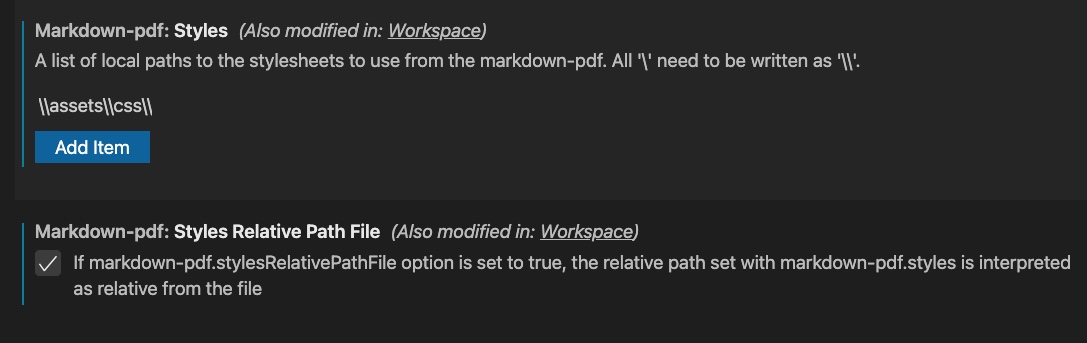 .
.
