
vscode-markdown-pdf
 vscode-markdown-pdf copied to clipboard
 yzane
yzane
Task List Bug
Hello, When I use task list, the exported pdf has dots and squares。 Below is markdown codes;
# Header One
## Header Two
- [x] One Task
- [x] Two Task
- [x] Three Task

Hello, When I use task list, the exported pdf has dots and squares。 Below is markdown codes;
`
Header One
Header Two
- [x] One Task
- [x] Two Task
- [x] Three Task `
Is this ticket attempting to report the exported HTML/PDF tasks lists including a bullet with the ticked or unticked task box next to it ?
If so, I'll second the issue, but not clear if that is the issue being reported here ?
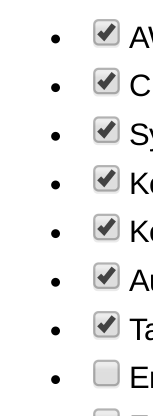

I also tried to get rid of the additional bullet points in front of the to-do list. The VS Code preview does not show the points and I would like to replicate that, but I was not able to target the bullet points via css.
Maybe it would be possible to give the list a certain class if the list items are checkboxes? Then it would be possible to remove the bullet points via css only for to-do lists.

I also tried to get rid of the additional bullet points in front of the to-do list. The VS Code preview does not show the points and I would like to replicate that, but I was not able to target the bullet points via css.
Maybe it would be possible to give the list a certain class if the list items are checkboxes? Then it would be possible to remove the bullet points via css only for to-do lists.
I've managed to do this by wrapping the place where you use lists with ticks in a div with class "ticks", like so:
<div class="ticks">

- [x] ...whatever...
...

</div>
Then simply added this into one of the css files:
div.ticks ul {
    list-style-type: none;
}
Also, to remove the padding that ul's add by default, add the following css, which targets just the first child of the list, so that if you have nested lists, those would keep the indentation:
div.ticks > ul {
    padding: 0;
}
According to this answer, css does not have parent selectors, which is why one will have to wrap the list with ticks in a div. So, implementing this purely through css, without additional markup (i.e div) / changing the underlying converter to html seems to be impossible.

For some reason, though, this works for md into html conversion, but the bullets appear back again upon conversion to pdf, which seems weird to me, because Chrome is able to convert it just fine, without the bullets coming back.
Thank you for your replies, I just tested adding the div around my list and, as you stated, it works nicely for the html export but not for the export to pdf.
I am aware that there are no parent selectors for css. However I imagined it may be possible to add that same div with a certain class through the markdown pdf extension during the export process. But I do not know enough about the actual inner workings of the extension to say if this would be possible or not.
I think I found the issue. This repository doesn't render checkboxes and uses the markdown-it-checkbox repository. The markdown-it-checkbox's repository defines the checkbox as [ ], and not - [ ]. So, we will have to change in that repository to get the result we want when rendering our md as HTML or PDF.
