yumauri
Race condition when automatically synced between more tabs
Hi. Interested in this module. The description states that the store can sync between tabs. Has the race problem been resolved? What happens if more tabs simultaneously update the repository? Who will be the first / last? Is there a locking state?

Hm.
Can you describe case example with potential race condition?
There is no any special mutex in this library, it just standard storage event listener. So, I guess, in case of simultaneous update from two tabs browser will handle that somehow. localStorage is thread-safe by itself.

Hi. I tried to make a simple example with a working race condition. In this example, everything is primitive. In practice, these can be other update triggers and other sources. I think the problem is that you need to block before updating. But at the moment I don't know how to do it.
import { createEvent, createStore } from 'effector';
import { persist as localPersist } from 'effector-storage/local';

const setBalance = createEvent();

const $balance = createStore(0)
    .on(setBalance, (_, balance) => balance);
localPersist({ store: $balance, key: 'balance' });

const getBalanceFromServerInitMock = async () => {
    await new Promise(r => setTimeout(r, 2000));
    setBalance(5000);
};
getBalanceFromServerInitMock();

const randomIncrementFromServer = Math.floor(Math.random() * 100);
console.log(randomIncrementFromServer);
//socket, AJAX Long Polling, AJAX Multipart Stream,

let incrementComplete = false;
const incrementBalanceFromServerMock = () => {
    const timer = setInterval(() => {
      const now = new Date();
      const currentMinutes = now.getMinutes();
        if(!incrementComplete && currentMinutes === 30){
            const currentBalance = $balance.getState();
            const newBalance = currentBalance + randomIncrementFromServer;
            setBalance(newBalance);
            incrementComplete = true;
            clearInterval(timer);
        }
    }, 10);
};

incrementBalanceFromServerMock();

$balance.watch(c => {
    console.log(c)
});
I launched three tabs and this is what I got:
1:
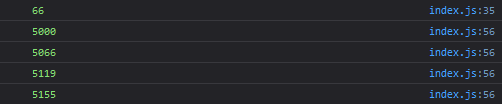 2:
2:
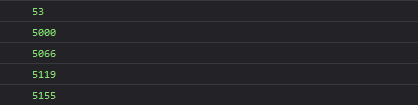 3:
3:
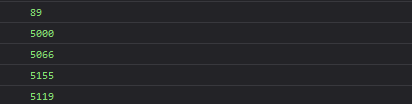 As a result, the storage will have 5155, not 5208.

Possibly bad example, but RC is visible here.
Hmm... This is very interesting, actually :)
I bet same results you will get when working with plain JS values, stored in localStorage, using sync with "storage" event. Without effector and effector-storage at all.
But would be cool to think about improvement of this library, or, maybe, new blocking adapter.
Yes, you are absolutely right, you will get the same result when working with plain js.
I just recently have known about Web Locks API, maybe it could be used to avoid race conditions, need to investigate
I was considering your issue and playing around your code, and I have a solution :)
First of all, I disagree with you, that localStorage value in your example should be 5208. To be so, you should add some mutex around all logic, from reading value from store to writing value to store. This is definitely out of scope for this library, this should be user-land code (maybe using above-mentioned Web Locks API).
But! I agree that problem exists that store value on the third tab in your example is 5119 and not 5155 — thus on the third tab store got unsynchronized with actual value in localStorage. This is the bug. localStorage value in your example could be any, without user-land mutex it depends on micro-fluctuations of event loops on a different tabs, and what was executed first, BUT browser guaranties, that this value is the same on every tab (because it is actually the only value in a shared storage). So, stores also should be synchronized to the same value.
After some time playing with code I realized, that in any situation with simultaneous or almost simultaneous localStorage updates and more than one tab — there always will be loser tab, which will become unsynchronized. This happens because due to micro performance optimizations I use new value from 'storage' event, and active tab is not receiving this event for its own value! I've drawn an image with two tabs: each tab receives update from another tab, and one of the tab inevitably become unsynchronized with localStorage.
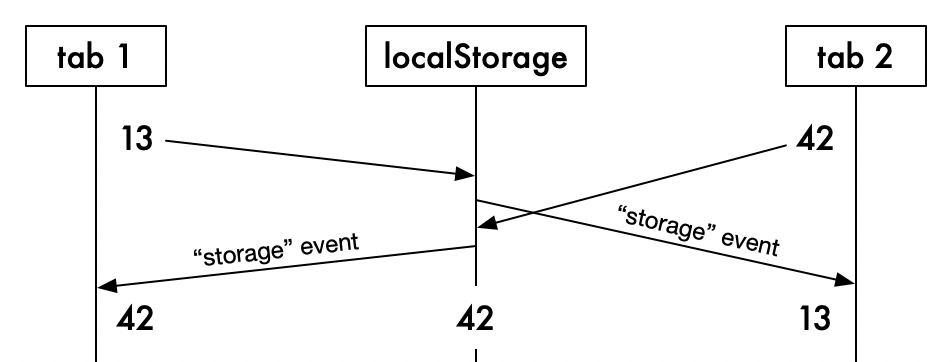
After realizing this, solution was easy — just read value from actual localStorage, and not from 'storage' event!
I consider this very rare case, so, I will not change default behaviour, but will add new possible value for sync instead — 'force'.
persist({
  store: $balance,
  key: 'balance',
  sync: 'force'
});
This will ignore new value from 'storage' event, and will read new value from localStorage instead.
Here is an example of using Web Locks API in your code. Not clean, but you can get an idea:
// ---8<---
    if (!incrementComplete && currentMinutes === 30) {
      navigator.locks.request("$balance", async () => { // <-- acquire lock
        const currentBalance = $balance.getState()
        console.log('$balance.getState:', currentBalance)
        const newBalance = currentBalance + randomIncrementFromServer
        console.log('update balanse to:', newBalance)
        setBalance(newBalance)
        await new Promise((resolve) => setTimeout(resolve, 10)) // <-- hacky way to wait for 'storage' event to be handled
      }); // <-- release lock
      incrementComplete = true
      clearInterval(timer)

      setTimeout(() => {
        console.log('current $balance value:', $balance.getState())
        console.log('current localStorage value:', localStorage.getItem('balance'))
      }, 1000)
    }
// ---8<---
I don't like using timeout of 10ms, but I couldn't find information, how 'storage' event is executed related to the event loop... Hope this timeout will place callback in stack after 'storage' event listener callback.
Here is a screenshot of four windows/tabs, and it is plainly visible, that they acquire lock one by one in queue: