

 yshrkt
Using this example with overlaySKScene
I'm trying to add a fixed UI on top of my app built with this sample code, using overlaySKScene, but having some trouble. Here are the details:
The EAGLView has a _renderer property, which is the renderer for the SceneKit view I provide. I assign this renderer a overlaySKScene that I wish to show over the augmented reality content (for content that is fixed in position). I do that as follows:
let overlay = SKScene(size: CGSize(width: 640, height: 1136))
overlay.backgroundColor = UIColor.clear

let rect = SKShapeNode(rectOf: CGSize(width: 700, height: 500))
rect.fillColor = SKColor.purple
rect.position = CGPoint(x: 0, y: 0)
rect.blendMode = SKBlendMode.replace

overlay.scaleMode = .fill
overlay.addChild(rect)

_renderer.overlaySKScene = overlay
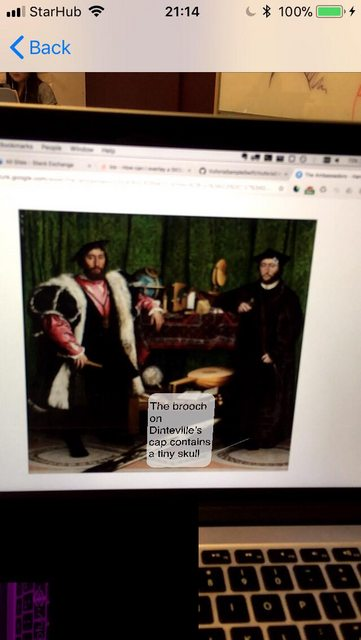
This does appear in the final render when it should, but visually there are many issues. First of all, the rectangle is not purple, it is black, with a small subset of the original view inset, rotated and tinted purple (you can just make out my laptop keyboard in purple in the bottom left corner of the photo below). Secondly, it is the wrong size - however it is clear the width: and height: properties do change this rectangle's size, as I modified those and they changed.
Just wondering if you have any idea what the problem might be here :) thank you!
