
OpenPype
 OpenPype copied to clipboard
 ynput
ynput
Maya: Rendersettings unify logic towards single library
Brief description
This tries to reduce the scattered hardcoded values for renderer attribute names, types and tries to clean up the same things on the RenderSettings class. I've also refactored the usage of it across the code.
Description
- Delays getting image prefixes per renderer instead of loading project settings three times on import of
lib_rendersettings - Move over missing image prefixes values that existed on validator but not in
lib_rendersettings - Move over AOV char logic to
lib_rendersettings - Readability cosmetic tweaks on some lines which did more complex formatting than needed.
- Removed
lib.RENDER_ATTRSin favor of the now addedRenderSettings.get_padding_attr(other logic oflib.RENDER_ATTRSwas unused)
Additional info
Relates to #3878, #3879 and #3821 since they touch a similar area of the codebase. Also relates to #3873 which also touches an aspect of rendering in Maya.
Testing notes:
- Test creation, validating and publishing of Render instances.
- Ensure "Reset render settings" works as expected.

@mkolar @antirotor what do we think of adding this https://github.com/BigRoy/OpenPype/pull/7 to RenderSettings as well?
EDIT: Done with https://github.com/pypeclub/OpenPype/pull/3880/commits/90667f341ba68a4cc382cb4cfeefe8bfd6d1fff8

I ve done the testing and it gives error when validating the scene during pyblish same as in #3884
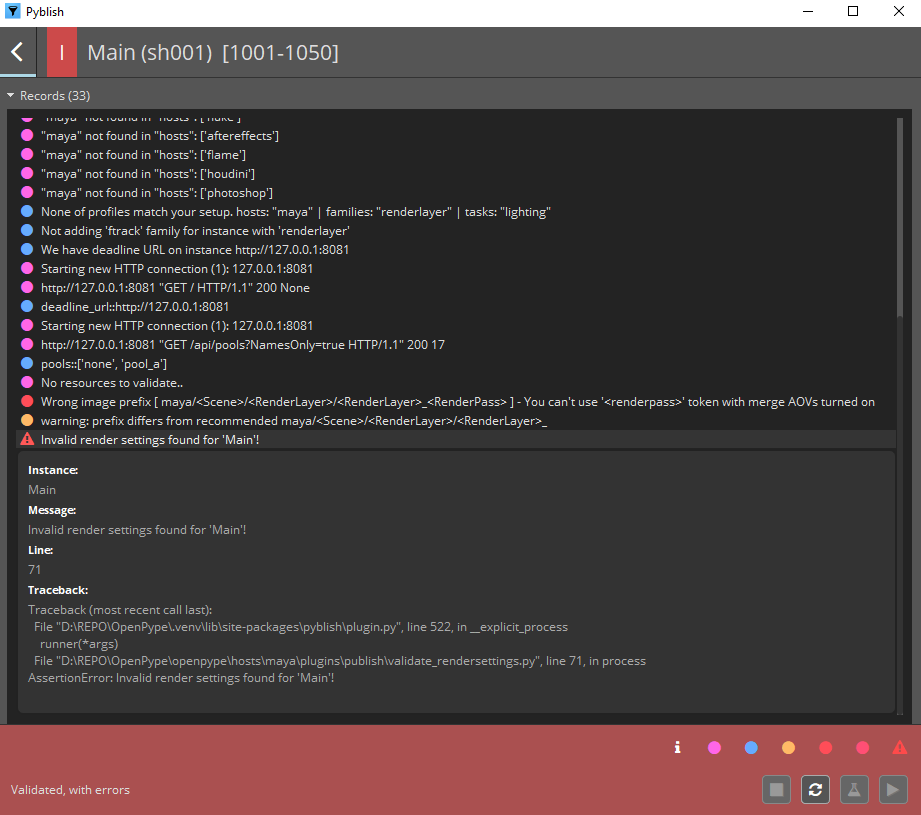
so I guess the preset should be resolved first and test this PR later then...

Oh - this is so close! Because note how it does recommend a prefix without the <RenderPass> as the end but unfortunately it has a trailing underscore. And that's because this particular PR does not contain the preset fix from #3884. Let me resolve that quickly.
Ok, I have changed the default prefix for Arnold. I've also added an error log for when Render Settings get applied and the Multilayer EXR does not match the Image Prefix.
And have also added a label to the Settings UI so it's mentioned to the user that the Image Prefix should contain both {aov_separator} and <RenderPass> when Multilayer EXR is disabled. It looks like this:
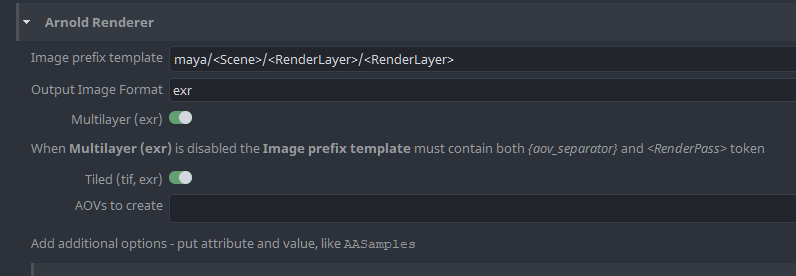
@LiborBatek - I expect the default settings to now pass.
Tested it out, I have freshly created "renderMain" family and runned Publish. Also applied OP>Set Render Settings before publish.
Still gives me these errors when validating...
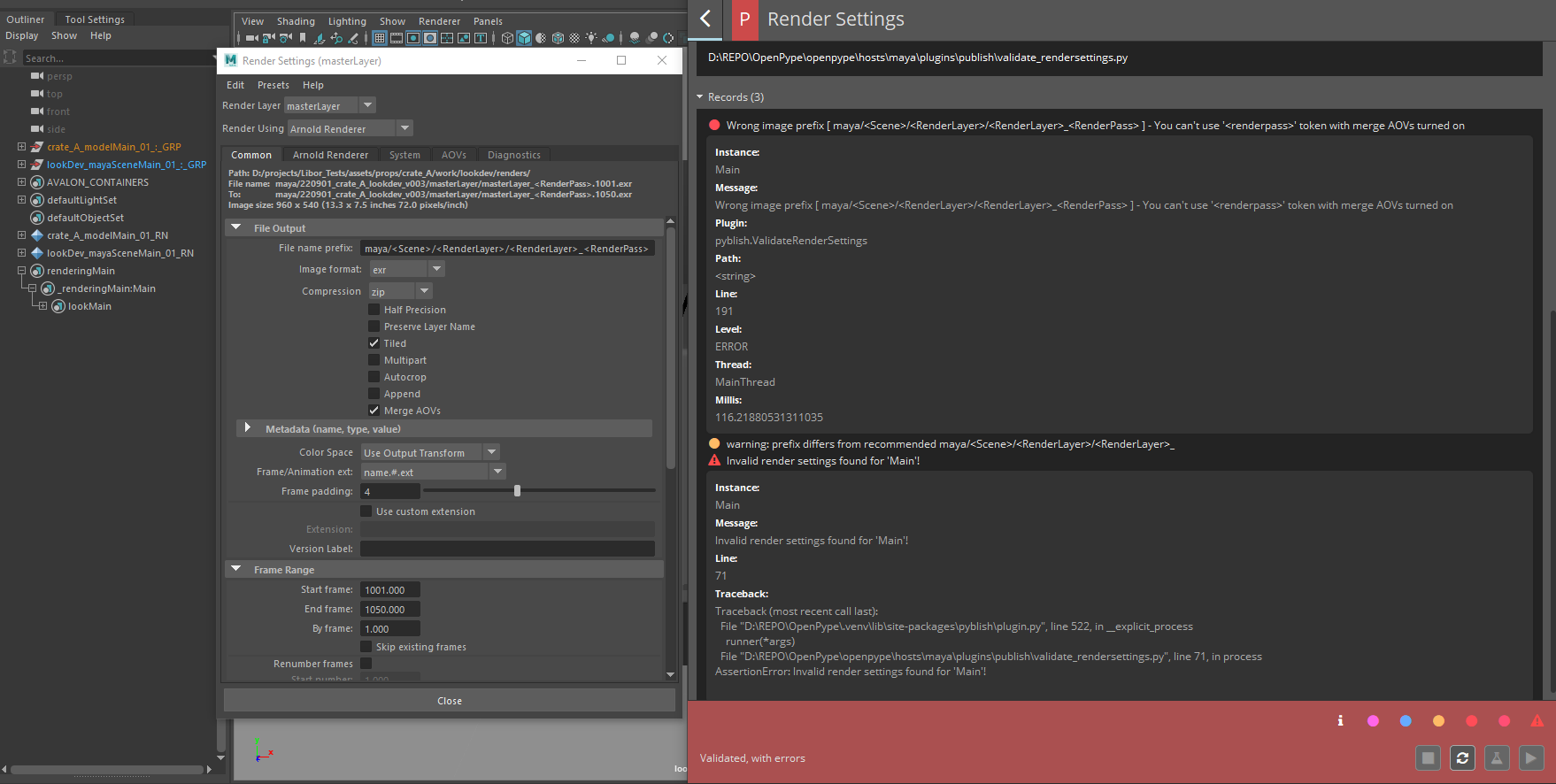
if I change Name Prefix to .... maya/<Scene>/<RenderLayer>/<RenderLayer> (removing <RenderPass> token)
it just gives me this Warning msg but Publish can be triggered.
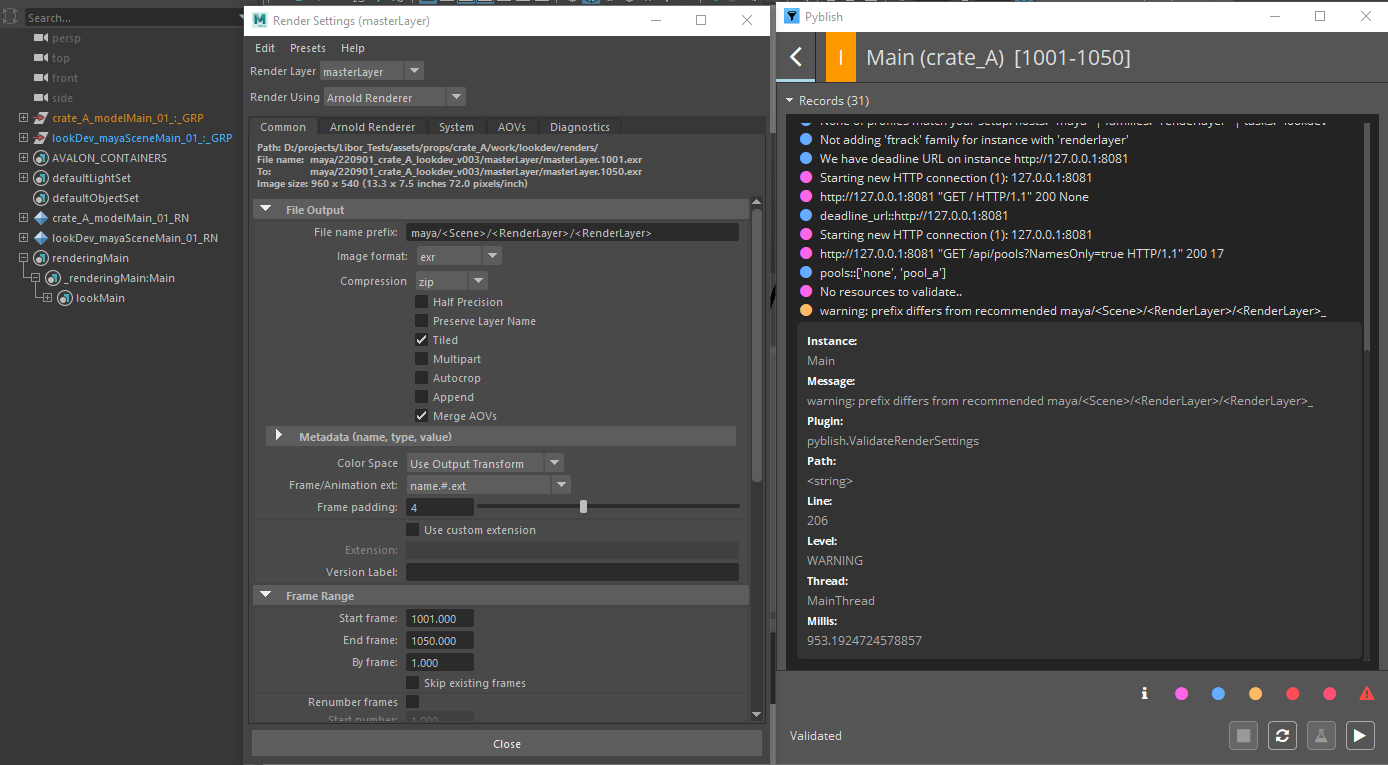
Thanks @LiborBatek - I've tested on my end and it consistently seems to work.
I have tested:
"project_settings/maya/RenderSettings/arnold_renderer/image_prefix":
    "maya/<Scene>/<RenderLayer>/<RenderLayer>{aov_separator}<RenderPass>"
"project_settings/maya/RenderSettings/arnold_renderer/multilayer_exr":
    false
"project_settings/maya/RenderSettings/arnold_renderer/image_prefix":
    "maya/<Scene>/<RenderLayer>/<RenderLayer>"
"project_settings/maya/RenderSettings/arnold_renderer/multilayer_exr":
    true
Resetting the render settings works fine. Validating works fine.
It looks instead like your settings currently have an override compared to the default and {aov_separator} is not present.
So likely you image prefix was set to but you had multipart enabled:
maya/<Scene>/<RenderLayer>/<RenderLayer>_<RenderPass>
Anyway, I have made some news commits and tweaked the validations now so that hopefully you'll get a clearer response as to what it's validating against from settings. It will now just report if your prefix mismatches what is defined in settings.
Also, with your specific settings it sounds like you should have had a logged warning on Set Render Settings as well.
@BigRoy sorry but seems its not working correctly.
here are my OP project settings:
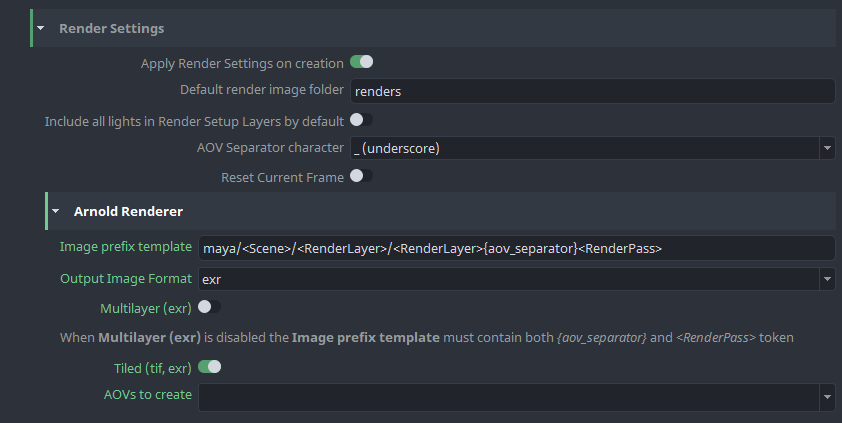
and here my publish error I get:
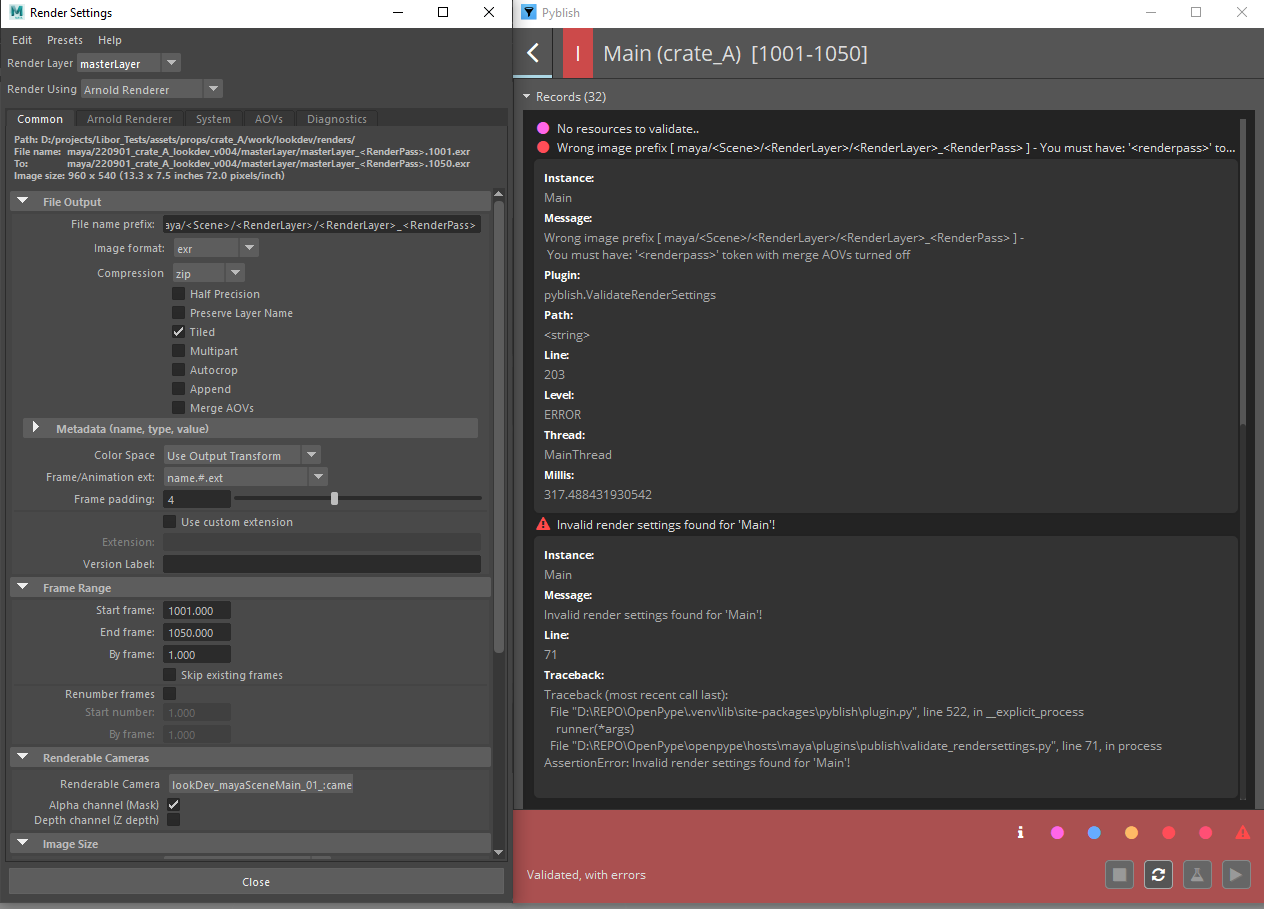
this msg You must have: '<renderpass>' token with merge AOVs turned off seems to be off because I clearly have this token in my name prefix as seen on the second scrnshot.
When using this OP settings:
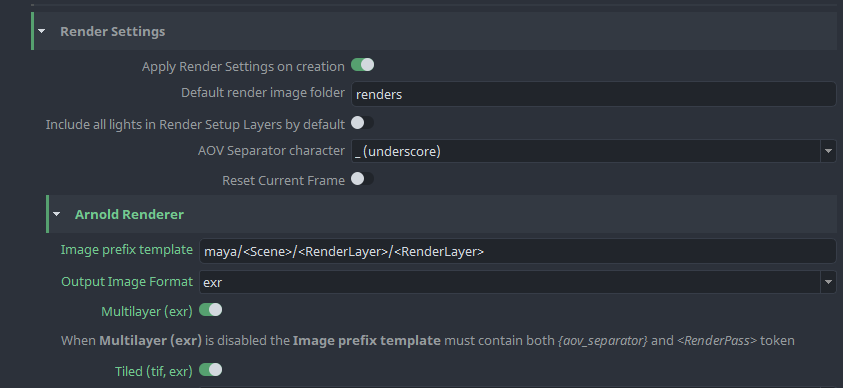
Publish gives no errors and works ok!
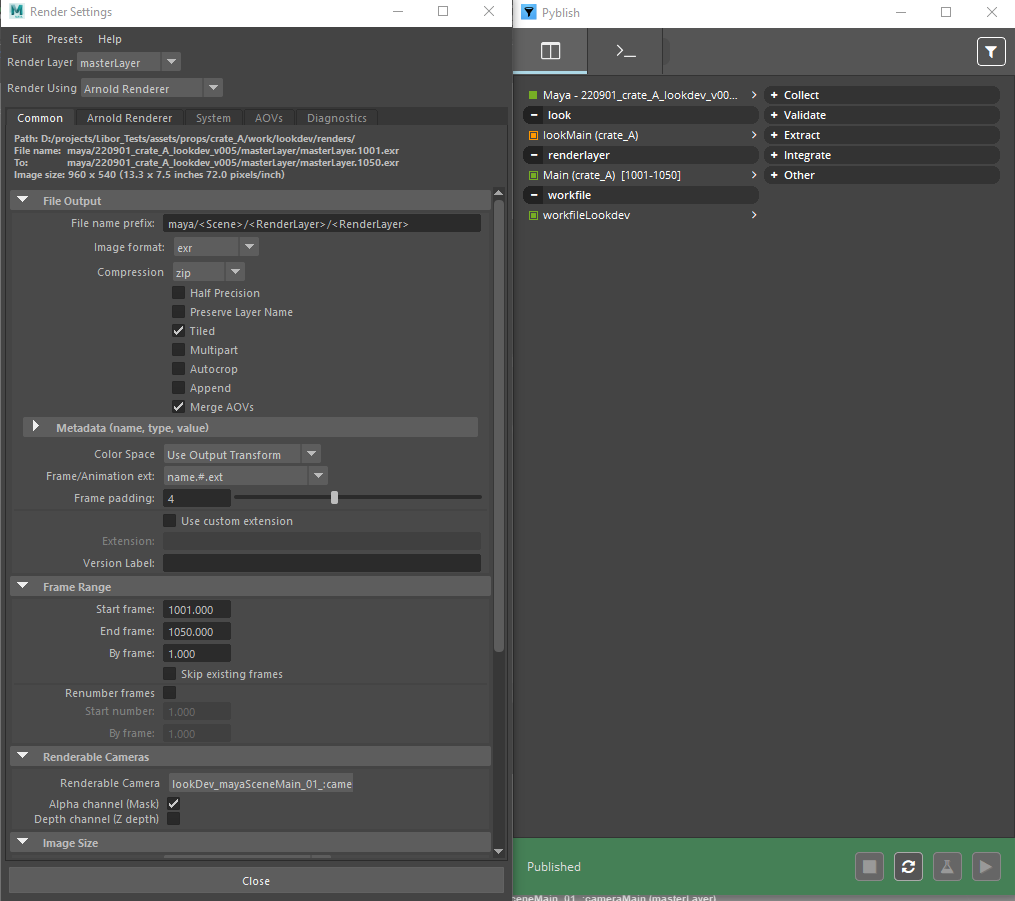
Thanks
this msg You must have: '
' token with merge AOVs turned off seems to be off because I clearly have this token in my name prefix as seen on the second scrnshot.
I'm so sorry for wasting so much of your time @LiborBatek. I accidentally changed the if not prefix_has_aov_token statement to if prefix_has_aov_token for that scenario. It's fixed with this commit.
Thanks so much for the continuous checks and following up with screenshots and details.
@BigRoy No problem at all! You do wondreful job man! We are humans after all no worries!
Thanks for your effort too!!
Cheers L.
It has been all tested and works fine now. However Im not able to give it "Review". @antirotor
Thx @BigRoy

I have tested it in maya2022 with Redshift 3.0.67 and it doesnt work besides image prefix which is ok the rest of settings is not taken into account, also any AOVs set in OP render settings are ignored (could be the RS version difference tho)
these are my OP settings for RS:
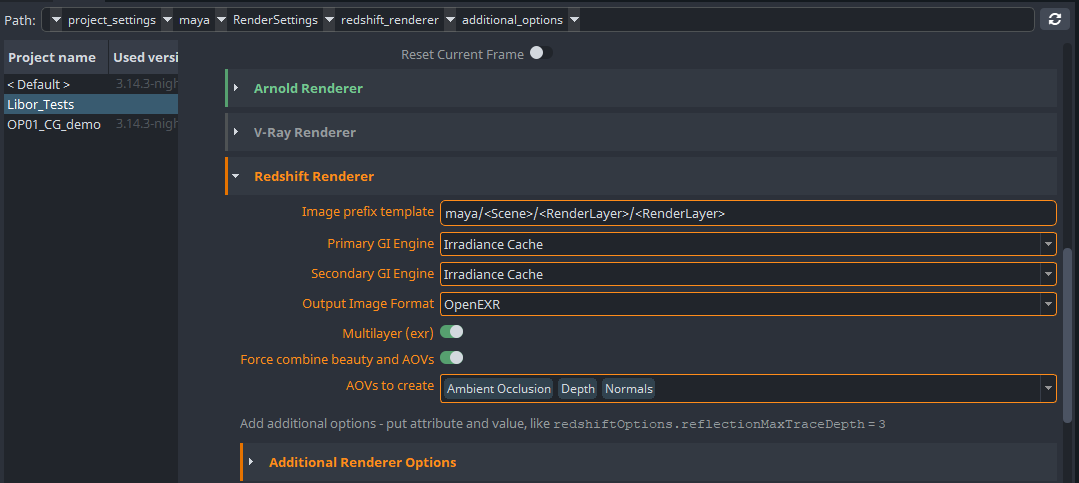
and maya render settings after applying OP render settings:
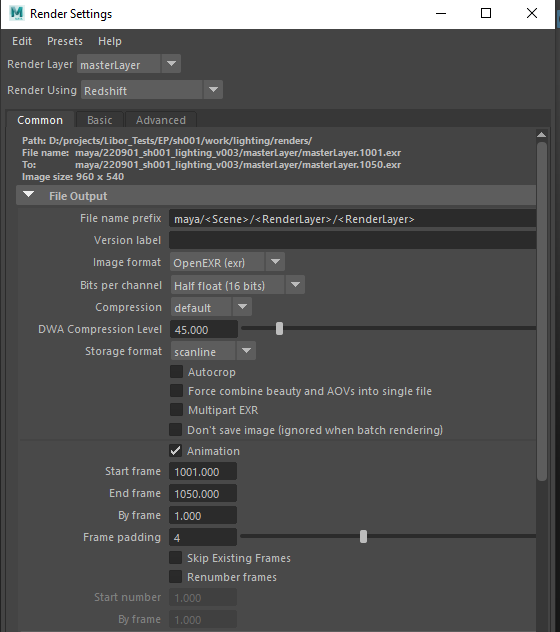
Any news about this PR guys? I have tested with latest develop but the redshift issue remains. OP settings arent working for Redshift besides image file template prefix which works ok.
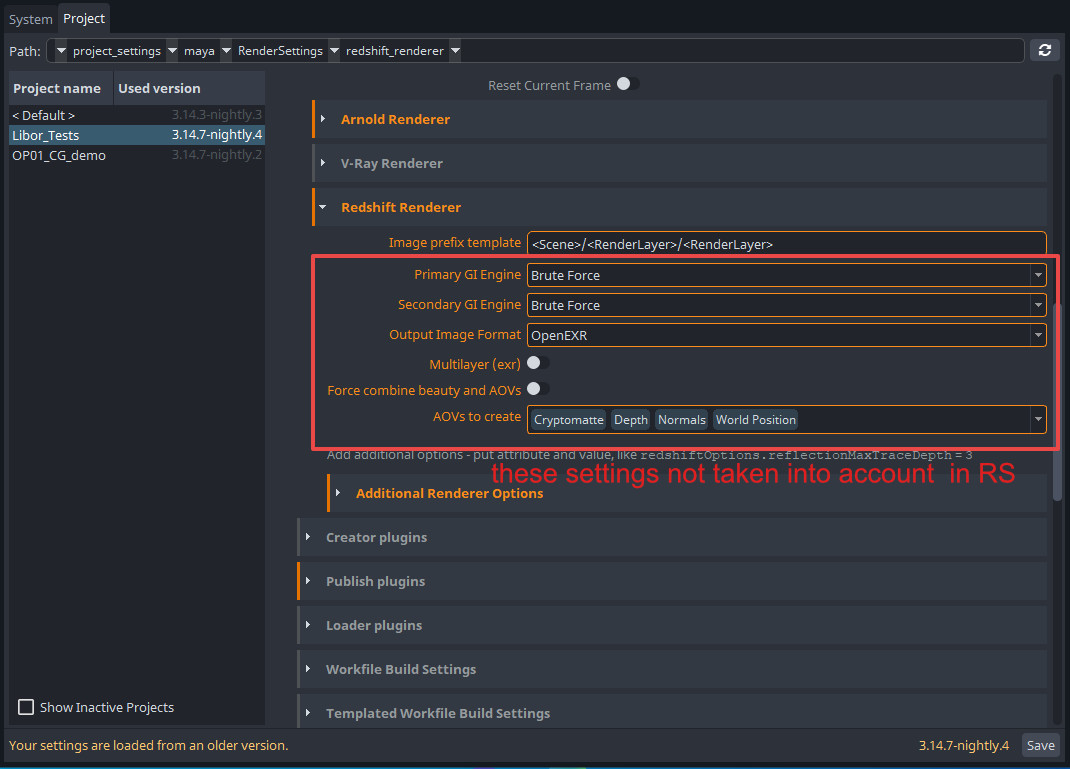
I've tried to merge with latest develop and resolve the conflicts. It was quite a beast to resolve but I think it's ok. Just wondering whether we still find this PR worth the changes.
It contains some changes to areas of code similar to the following PRs:
- #4735
- #4723 - note: this PR is targeted to
release/next-minor- specifically the cleanup of getting the 'project_settings' for the render settings.
And thus it might end up generating merge conflicts with those too. It might be worth waiting for those PRs to be merged to resolve conflicts here once more and then get to testing to avoid having to test numerous times.
If you have Merge AOV disabled and remove the token , the validate/repair never gets it back. This is for Maya and Arnold.
Could you elaborate the preferred behavior. The question is what "repair" should do or allow? If I understand correctly it should revert the merge AOV option back to what the settings dictate, correct? It's not up to the scene or artist to deviate from the merge AOV option, yes?
Currently the validation DOES allow to deviate merge AOVs settings + the image prefix as well. Which maybe makes it weird if it then forces the value on repair if it invalidates based on another setting?
The validator does require however the token to match with the merge AOV setting, so have `
Anyway, I've now made it so that it also repairs the merge AOV setting. @tokejepsen does that solve it for you?
Could you elaborate the preferred behavior. The question is what "repair" should do or allow?
I think the repair should fix the file name prefix according to what state the Merge AOVs is in.
Merge AOVs enabled > no <RenderPass> token.
Merge AOVs disabled > need <RenderPass> token.

I think the repair should fix the file name prefix according to what state the Merge AOVs is in.
Merge AOVs enabled > no <RenderPass> token. Merge AOVs disabled > need <RenderPass> token.
What should happen if the default prefix in settings does NOT have a <RenderPass> token, should we append it to the end? Should we append _<RenderPass>?
What should happen if the default prefix in settings does NOT have a token, should we append it to the end? Should we append _<RenderPass>?
Hmm, had some thoughts about optional tokens but since this setting is project based, admin should be in control of this. Lets keep as it now. Nice one!
@LiborBatek could you test again whether in the meantime your issue mentioned here has been resolved?
There have been changes in code (4 months ago) by @moonyuet here which I'm not sure whether they do what it intends to do. Since it seems off that first it's trying to set redshiftOptions.primaryGIEngine and redshiftOptions.secondaryGIEngine based on some conditions but in the end it still ALWAYS sets it to the value int(rs_p_engine) and int(rs_s_engine). Seems like a bug @moonyuet ?
Anyway, the code seems related to the issue you described @LiborBatek so I suspect your particular issue has been resolved.
@LiborBatek could you test again whether in the meantime your issue mentioned here has been resolved?
There have been changes in code (4 months ago) by @moonyuet here which I'm not sure whether they do what it intends to do. Since it seems off that first it's trying to set
redshiftOptions.primaryGIEngineandredshiftOptions.secondaryGIEnginebased on some conditions but in the end it still ALWAYS sets it to the valueint(rs_p_engine)andint(rs_s_engine). Seems like a bug @moonyuet ?Anyway, the code seems related to the issue you described @LiborBatek so I suspect your particular issue has been resolved.
maybe needs a double check on the particular setting, but it got tested and resolved in the other ticket which is merged in December 2022, while @LiborBatek found this on November 2022.The related PR is https://github.com/ynput/OpenPype/pull/4087

@BigRoy maybe silly question, how this PR adhere to the new publisher in maya? all good?!
maybe silly question, how this PR adhere to the new publisher in maya? all good?!
I don't expect it to be functional momentarily - it's a very old PR that I'm not sure how to best merge logically nowadays. I think we might have it merged in our colorbleed branch and along the way have synced that branch with new publisher - etc. but likely that's seen decent refactoring to make it work.
However, some of the cleanup is still relevant - I'll close this PR and see if I can set up a new one with some of the cleanup in here that is still relevant.