
distance-machine-locker
 distance-machine-locker copied to clipboard
 yeokm1
A system that locks your computer the moment you move away from it.
Distance Machine Locker
A system that locks your computer the moment you move away from it. An Arduino-based hardware senses how far are you away from the computer and reports it to a host app on your machine. When a set threshold has been reached, the machine is locked.
If the device is forcefully detached from the PC while the app is in operation, the app will lock your machine and reconnect back once the device is attached again.
Only Mac OS is supported at this time.
Demo media
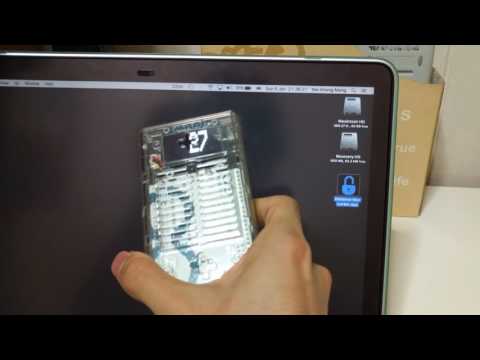
Video of everything in action.
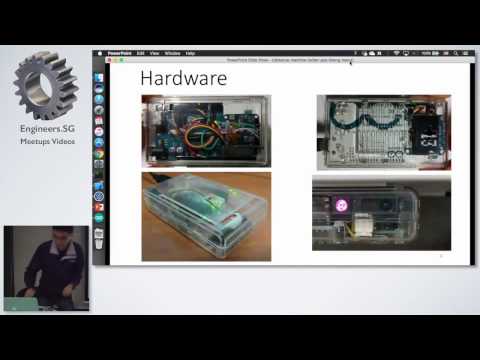
Video of the talk I gave on this setup
 My device deployed under my desk. The purple light coming from the sharp IR sensor cannot be seen with a naked eye but the camera can.
 Front view of device
 This is the "production" design that does not have the OLED screen to save costs. The sensor position is shifted to take advantage of the gap in the top cover to give the wire some allowance to bend.

Feature to customise the locking distance threshold.

Customise a delay before locking to let you have time to get back into range.

Shows the currently connected USB Serial port as well as other ports if available.
Features
- Locks Mac on threshold reached
- Shows live distance reading on menubar
- Customisable threshold from 10cm to 80cm which is the effective range of the IR sensor
- Choice to flash firmware before connection
- Choice to auto connect to device if only one sensor is found
- Locks machine if device is disconnected
- Notifications to indicate flashing/connect/disconnect status
- If locking mode is disabled for testing purposes, a red background is placed behind the distance text to alert the user of lack of security.
- Auto reconnect back to device if it was forcefully disconnected previously. Auto-reconnection does not happen if you manually disconnect using the menu.
- Adjustable delay to avoid unnecessary locking if the user can come back into range within a time window.
Rough steps to quick start
- Build the hardware, connect it to your Mac
- Download and install the Arduino app into
/Applications. The Arduino app is also used by my app to flash the firmware. - Use Arduino app to flash firmware or flash from command line. Replace path to
distance-machine-locker-arduino.hexand serial port/dev/ttyusbmodemXwith the exact ones./Applications/Arduino.app/Contents/Java/hardware/tools/avr/bin/avrdude -C /Applications/Arduino.app/Contents/Java/hardware/tools/avr/etc/avrdude.conf -p atmega328p -b 115200 -c arduino -U flash:w:distance-machine-locker-arduino.hex:i -P /dev/ttyusbmodemX - Download from releases, Unzip and copy
Distance Mac Locker.appinto/Applications - Lock the system immediately when screensaver is enabled or display sleeps. System Preferences -> Security and Privacy -> Require password "immediately"
- Start the app
- Connect to the associated USB Serial port
- Turn off locking mode and decide your threshold distance
- Set your threshold distance and turn locking mode back on
- Optionally turn on
Connect on StartandFlash before Connect. Configure locking delay if you want. - Make app start on login by. System Preferences -> Users and Groups -> Login Items -> + app into list
Documentation
Extra documentation is available in the readme files of the subdirectories.
- Hardware schematic and components
- Arduino Code
- Swift Host Code
 yeokm1