
KiKit

KiKit copied to clipboard
 yaqwsx
Feature request: Add layer coupon to panel rail
Prerequisites
- [X] I have read the documentation and the proposed feature is not implemented.
Description
Hi,
One thing I noticed was missing that would be nice to have is to generate a layer order coupon on the rails of an panel.
I made an example here on how it could look (where the numbers are on each layer):
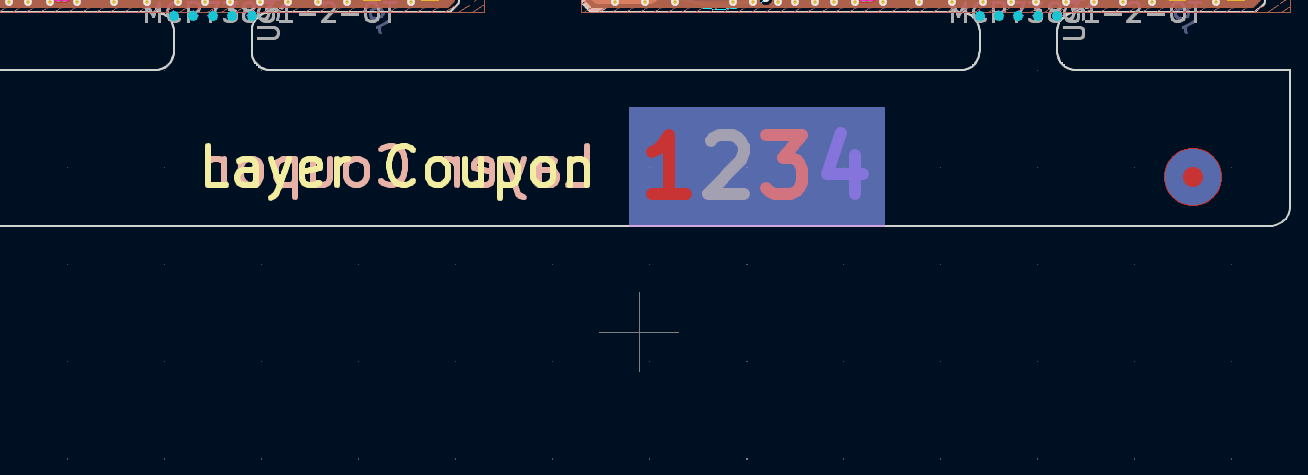
Thanks for a great tool!


This can also be done in a post-processing script.
I just hacked something together:
from kikit.common import toKiCADPoint, toMm, fromMm
from pcbnew import F_Cu, B_Cu, In1_Cu, F_Mask, B_Mask, PCB_SHAPE, S_RECT
import shapely

def add_layer_window(panel, offset, cell_dim, text_dim, bar_height=0, clearance=0, labels='123456789ABCDEFGHJKLMNPR'):
    """
    Creates a layer window to be put onto the panel rails.

    offset: (x, y): window center, distance from top/left if positive, from bottom/right if negative
    cell_dim: (width, height, cell_border_thickness): window cell dimensions
    text_dim: (width, height, text_thickness): text dimensions
    clearance: distance: extra copper clearance around window
    labels: string: layer labels, one character per layer (default: max. 24 layers, alphanum. w/o IOQSXZ)
    """
    minx, miny, maxx, maxy = panel.panelBBox()
    cu_layer_count = panel.board.GetCopperLayerCount()
    window_pos = ((minx if offset[0] > 0 else maxx) + offset[0],
                  (miny if offset[1] > 0 else maxy) + offset[1])
    start_x = window_pos[0] - cell_dim[0] * cu_layer_count / 2
    start_y = window_pos[1] - cell_dim[1] / 2
    end_x   = start_x + cell_dim[0] * cu_layer_count
    end_y   = start_y + cell_dim[1]
    panel.addKeepout(shapely.geometry.box(
        start_x - clearance, start_y - clearance,
        end_x + clearance, end_y + clearance))
    for layer in F_Mask, B_Mask:
        add_rectangle(panel, start_x - clearance, start_y - clearance, end_x + clearance, end_y + clearance, 0, layer, filled=True)
    for layer in range(cu_layer_count):
        kicad_layer = F_Cu if layer == 0 else B_Cu if layer == cu_layer_count - 1 else In1_Cu + layer - 1
        cell_start_x = start_x + layer * cell_dim[0]
        add_rectangle(panel, cell_start_x, start_y, cell_start_x + cell_dim[0], end_y, cell_dim[2], kicad_layer, filled=False)
        if bar_height > 0: add_rectangle(panel, cell_start_x, end_y - bar_height, cell_start_x + cell_dim[0], end_y, 0, kicad_layer, filled=True)
        panel.addText(labels[layer], (int(cell_start_x + (cell_dim[0]/2)), int(start_y + ((cell_dim[1] - bar_height)/2))),
            width=text_dim[0], height=text_dim[1], thickness=text_dim[2], layer=kicad_layer)

def add_rectangle(panel, sx, sy, ex, ey, thickness, layer, filled=False):
    """Adds a rectangle."""
    rect = PCB_SHAPE(panel.board)
    rect.SetShape(S_RECT)
    rect.SetStart(toKiCADPoint((sx, sy)))
    rect.SetEnd(toKiCADPoint((ex, ey)))
    rect.SetWidth(thickness)
    rect.SetLayer(layer)
    rect.SetFilled(filled)
    panel.board.Add(rect)

def kikitPostprocess(panel, arg):
    add_layer_window(panel, (fromMm(-27), fromMm(-5)),
        (fromMm(3.5), fromMm(6), fromMm(0.2)),
        (fromMm(2.5), fromMm(2.5), fromMm(0.2)),
        bar_height=fromMm(2), clearance=fromMm(0.35))
Edit 2024-03-04:
- Bugfix: Added solder mask opening over window.
- Added optional copper bars.
If you're not yet using a post-processing script, you'll need to add the script via
--post 'script: scriptname.py;'
to your kikit panelize call.
On a 6-layer board the result looks like this:
Hope it's useful.
