
font-spider-plus
 font-spider-plus copied to clipboard
 yangchuansheng
font-spider-plus(字蛛+)是一个智能 WebFont 压缩工具,它能自动分析出本地页面和线上页面使用的 WebFont 并进行按需压缩。示例站点:https://fuckcloudnative.io/
字蛛+(Font-spider-Plus)
font-spider-plus(字蛛+)是一个智能 WebFont 压缩工具,它能自动分析出本地页面和线上页面使用的 WebFont 并进行按需压缩。
特性
除了兼容font-spider(字蛛)支持的特性:
- 压缩字体:智能删除没有被使用的字形数据,大幅度减少字体体积
- 生成字体:支持 woff2、woff、eot、svg 字体格式生成
font-spider-plus(字蛛+)还具有以下特性:
- 支持线上动态渲染的页面
- 支持线上GBK编码的文件
安装
npm i font-spider-plus -g
快速使用方法
1、克隆本仓库,进入 example 目录
$ git clone https://github.com/yangchuansheng/font-spider-plus
$ cd example
2、编辑 index/index.html.base,将 <div class="test"> </div> 中的文字换成你自己的网站的文字。你可以选择将你的博客所有文章内容全选,然后粘贴到此处。
3、下载你想使用的字体到 fonts 文件夹,本仓库提供了几个示例字体:
$ ll fonts/

total 66128
-rw-rw-rw-  1 cnsgyg  staff    12M 11 21 01:08 STKaiti.ttf
-rw-r--r--  1 cnsgyg  staff   9.3M 11 21 14:51 SimHei.ttf
-rw--w--w-  1 cnsgyg  staff    11M 11 21 01:24 chinese.stfangso.ttf
选择你想使用的字体,如果你想使用的字体为 <font>.ttf,那么就执行下面的命令来生成 css:
$ bash start.sh <font>
例如,如果想使用 STKaiti.ttf,就执行下面的命令:
$ bash start.sh STKaiti

✔ 优化完成

已提取 5 个 font 字体:
 米开朗基杨
生成字体文件:
* /Users/cnsgyg/Downloads/font-spider-plus/example/fonts/STKaiti.eot,7K (已优化体积:12429K)
* /Users/cnsgyg/Downloads/font-spider-plus/example/fonts/STKaiti.woff2,3K (已优化体积:12433K)
* /Users/cnsgyg/Downloads/font-spider-plus/example/fonts/STKaiti.woff,7K (已优化体积:12430K)
* /Users/cnsgyg/Downloads/font-spider-plus/example/fonts/STKaiti.ttf,7K (已优化体积:12430K)
* /Users/cnsgyg/Downloads/font-spider-plus/example/fonts/STKaiti.svg,8K (已优化体积:12429K)
执行完上面的命令后,就会生成一个 fonts-zh.css,css 中定义好了 font-face,引用了你想要的字体,并使用 base64 进行编码,以减少字体的加载体积,所有的这一切我都在脚本中写好了,你不需要关心。接下来你只需要将 fonts-zh.css 放到你的网站中就可以了。
以 hugo 为例,先将 fonts-zh.css 复制到网站主题目录的 static/css/ 目录下,然后在 <head></head> 中引入该 css,以 beatifulhugo 主题为例,直接在 layouts/partials/head_custom.html 中加上下面一行:
<link rel="stylesheet" href="{{ "css/fonts-zh.css" | absURL }}" />
最后让网站的 body 使用该中文字体,具体的做法是修改 body 的 css,以 hugo 的 beatifulhugo 主题为例,修改 static/css/main.css 中的 body 属性:
body {
  font-family: STKaiti;
  ...
}
可以再加上备用字体,例如:
body {
  font-family: STKaiti,Cambria;
  ...
}
表示如果 STKaiti 字体不可用,将使用 Cambria 字体。到这里就大功告成了,具体的效果可以参考我的网站:https://fuckcloudnative.io/
使用范例
一、书写 CSS
/*声明 WebFont*/
@font-face {
  font-family: 'source';
  src: url('../font/source.eot');
  src:
    url('../font/source.eot?#font-spider') format('embedded-opentype'),
    url('../font/source.woff2') format('woff2'),
    url('../font/source.woff') format('woff'),
    url('../font/source.ttf') format('truetype'),
    url('../font/source.svg') format('svg');
  font-weight: normal;
  font-style: normal;
}

/*使用指定字体*/
.home h1, .demo > .test {
    font-family: 'source';
}
特别说明:
@font-face中的src定义的 .ttf 文件必须存在,其余的格式将由工具自动生成
二、压缩本地WebFont
fsp local [options] <htmlFile1 htmlFile2 ...>
特别说明:htmlFile支持通配符,例如*.htm,*.shtml
三、压缩URL中的WebFont
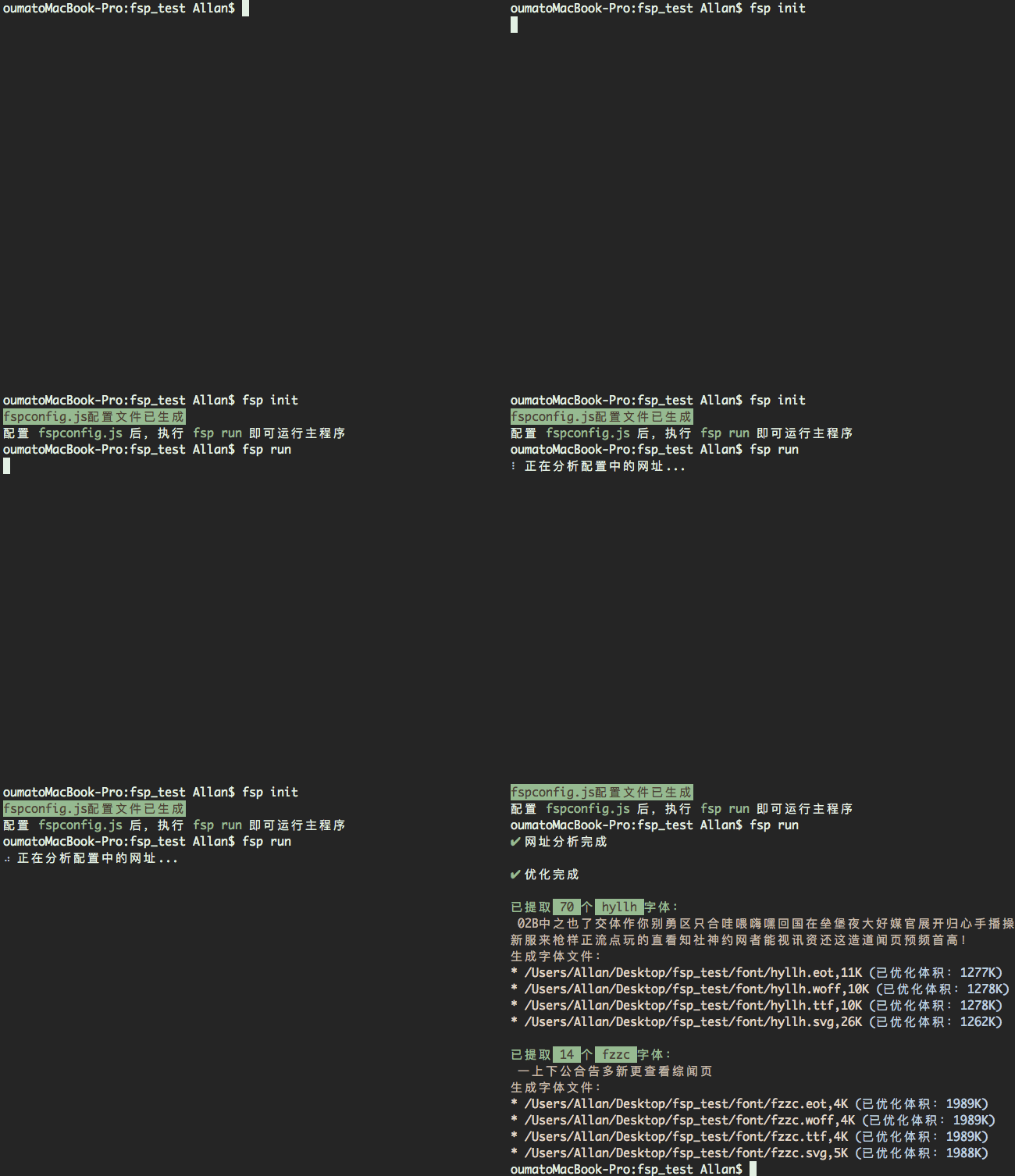
1、初始化fspconfig文件
fsp init
在根目录下生成fspconfig.js文件
2、完善fspconfig.js文件
{
    /**
     * 本地font存放路径
     * @type    {String}
     */
    "localPath" : "../font/",
    /**
     * 线上字体文件路径 (网址中样式文件内font-family的src路径)
     * @type    {String}
     */
    "onlinePath" : "../font/",
    /**
     * URL
     * @type    {Array<String>}
     */
    "url" :  [
    "http://ieg.tencent.com/",
    "http://game.qq.com/"
     ]
}
3、执行
fsp run
示例文件下载: Demo.zip
相关链接
Metadata
Owner
 yangchuansheng
Metadata
font-spider-plus(字蛛+)是一个智能 WebFont 压缩工具,它能自动分析出本地页面和线上页面使用的 WebFont 并进行按需压缩。示例站点:https://fuckcloudnative.io/