

 yandex
Splitting styles with props and makeup into two layers
Hi again! :)
I have another issue:
In an ideal way, I wanna have 2 layers of some view component: makeup and styles. Styles can use props from component: theme, state props, etc. I analyzed use cases in spec. files and create some demo component:
import styled from 'reshadow';
import * as React from 'react';
import { ThemeContext } from '../../../../theme/theme.context';

// It should be in separate file
const getStyles = ({ bgColor }) => css`
    button {
        width: 100px;
        height: 20px;
        background-color: ${bgColor};

        & > title {
            font-size: 16px;
        }

        & > icon {
            font-size: 20px;
        }
    }
`;

export class Button extends React.PureComponent {

    render() {
        return styled(getStyles({ bgColor: '#fc0' }))(
            <button as='div'>
                <title as='div'>{this.props.children}</title>
                <icon/>
            </button>
        );
    }
}
So, with importing css from reshadow/react compiler doesn't crash, but in the runtime there is no css-variable:
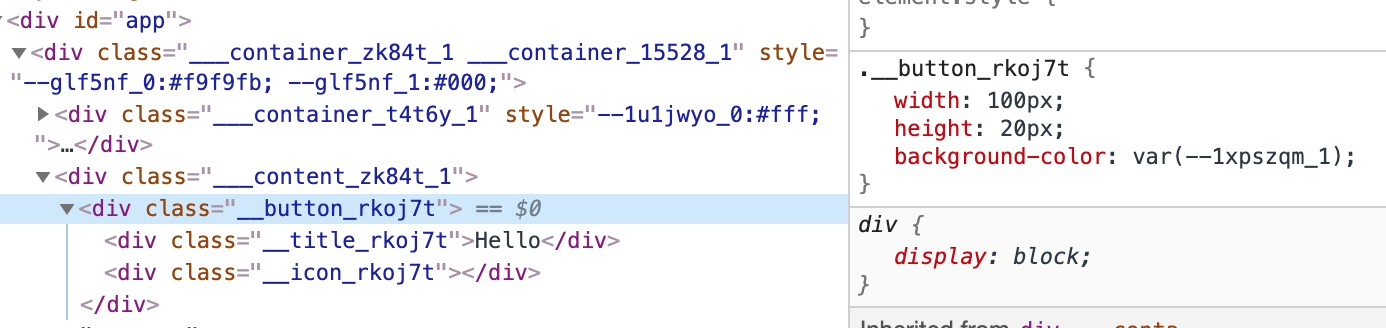
If I try with importing css from reshadow directly I get:
ERROR in ./src/sample-app/common/card/button/button.js
Module build failed (from ./node_modules/babel-loader/lib/index.js):
CssSyntaxError: /Users/dsitdikov/Projects/reshadow-research/src/sample-app/common/card/button/button.js:2:5: Unclosed block
May be an alternative way exists?

Hi @Danilqa, thank you for the issue!
At this moment, dynamic values are supported only by styled function, not css function.
I'm sorry that there is no best solution for that case, but I think that we'll ship dynamic css function support for about next 1-2 weeks with some other interesting improvements.
The ways to achieve such behaviour today:
-
compose static and dynamic styles, for example:
import styled from 'reshadow'; import * as React from 'react'; const styles = css` button { width: 100px; height: 20px; & > title { font-size: 16px; } & > icon { font-size: 20px; } } ` class Button extends React.PureComponent { render() { return styled(styles)` button { background-color: ${this.props.bgColor}; } `( <button as='div'> <title as='div'>{this.props.children}</title> <icon/> </button> ); } } -
use explicit css custom properties:
import styled from 'reshadow';
import * as React from 'react';

const styles = css`
    button {
        width: 100px;
        height: 20px;
        background-color: var(--bgColor);

        & > title {
            font-size: 16px;
        }

        & > icon {
            font-size: 20px;
        }
    }
`

class Button extends React.PureComponent {
    render() {
        return styled(styles)`
            button {
              --bgColor: ${this.props.bgColor}
            }
        `(
            <button as='div'>
                <title as='div'>{this.props.children}</title>
                <icon/>
            </button>
        );
    }
}
And you can also apply css custom properties to the root node:
class Button extends React.PureComponent { render() { return styled(styles)( <button as='div' style={{'--bgColor': this.props.bgColor}}> <title as='div'>{this.props.children}</title> <icon/> </button> ); } } -
reshadow/reactwithout babel processing and styles extracting (the default option ifreshadow/babelis not used). It parses styles on the clientside and allows to apply runtime transformations, even mixins.But it's also an experimental package and I don't think that it should be really used today.
The relevant things that we're going to support in near future:
-
dynamic
cssfunction (including the case that you've mentioned) with static styles extracting support -
root nodestyles, like:class Button extends React.PureComponent { render() { return styled(styles)` --bgColor: ${this.props.bgColor}; padding: 10px; `( <button as='div'> <title as='div'>{this.props.children}</title> <icon/> </button> ); } }
