

 yairEO
How to add a `tag` on click (React) ?
Prerequisites
- [x] I am running the latest version
- [ ] I checked the documentation and found no answer
- [ ] I checked to make sure that this issue has not already been filed
How to add a tag on click ? Is it possible, in React, to add a tag into content editable input on tag click ? I did not find it in examples. Could you please help ?

add a tag on tag click? I don't understand. how can you add something by clicking on it before it exists?

@yairEO Sorry, I was not clear enough. See this example:
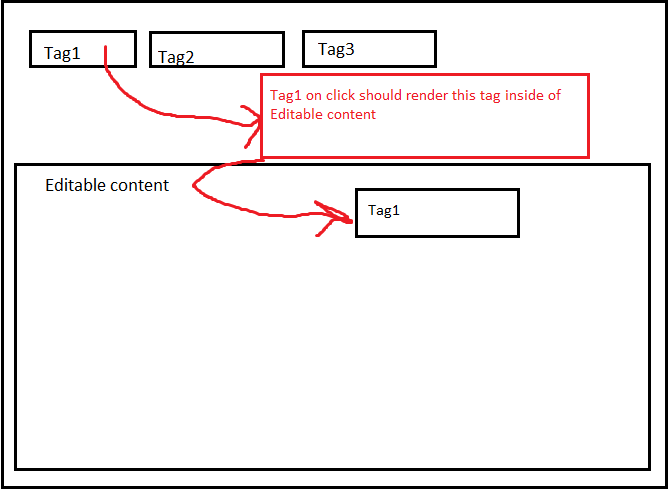
Imagine you have several tags on the top. When you click on some tag, this tag should also appear inside of Editable content When I add a new tag, tag object is rendered instead of tag UI representation. See what is rendered:
{{{"prop1":"{\"prop1\":\"{\\\"prop4\\\":\\\"prop2\\\",\\\"prop1\\\":\\\"prop3\\\",\\\"editable\\\":false,\\\"style\\\":\\\"--tag-bg:#FF9B7A\\\",\\\"class\\\":\\\"tag\\\"\",\"prop4\":\"{\\\"prop4\\\":\\\"prop2\\\",\\\"prop1\\\":\\\"prop3\\\",\\\"editable\\\":false,\\\"style\\\":\\\"--tag-bg:#FF9B7A\\\",\\\"class\\\":\\\"tag\\\"\"","prop4":"{\"prop1\":\"{\\\"prop4\\\":\\\"prop2\\\",\\\"prop1\\\":\\\"prop3\\\",\\\"editable\\\":false,\\\"style\\\":\\\"--tag-bg:#FF9B7A\\\",\\\"class\\\":\\\"tag\\\"\",\"prop4\":\"{\\\"prop4\\\":\\\"prop2\\\",\\\"prop1\\\":\\\"prop3\\\",\\\"editable\\\":false,\\\"style\\\":\\\"--tag-bg:#FF9B7A\\\",\\\"class\\\":\\\"tag\\\"\""}}}}
Do you know what may cause such weird behaviour. It is most likely that I am doing something wrong. To add a tag I use this code in React app:
const tagElm = tagifyRef?.current?.createTagElem(tag.detail.data)
    if (tagElm) {
      console.log({ tagElm })
      tagifyRef?.current?.injectAtCaret(tagElm)

      tagifyRef.current?.DOM.input.focus()
    }
I have found it in onside one of the issues. Is this approach is correct ?
Apart from that, I have tried this approach:
tagifyBodyRef.current?.addMixTags('hello')
It almost works. It adds a clickable tag to Editable content, but when you click again on this tag, it does not add another tag, instead it adds raw representation of tag object:
... [[{"value":"hello"}]] [[{"value":"hello"}]] ...
P.S. Treat rectangle with red border as a message and not as a part of expected UI
Sorry I am currently overly flooded with tasks and I hope to answer you this weekend
@yairEO I'm using tagify.addTags() to add tags to a mixed textarea when clicking several buttons.
Is there any way to keep the textarea focused and with the cursor after the added tag?

Is there any way to keep the textarea focused and with the cursor after the added tag?
Yes, the FAQ section in the README explains how: https://github.com/yairEO/tagify/issues/524#issuecomment-699140465