
orbiton
 orbiton copied to clipboard
 xyproto
Configuration-free text editor and IDE limited to VT100. Suitable for writing git commit messages, editing Markdown, config files, source code, viewing man pages and for quick edit-compile cycles when...




o is a text editor and a minimalistic IDE.
It might be a good fit for:
- Editing git commit messages (using
EDITOR=o git commit). - Editing
README.mdandTODO.mdfiles. - Write Markdown files and then export to PDF.
- Learning programming languages, like Rust or Zig.
- Editing files deep within larger Go or C++ projects.
- Solving Advent of Code tasks.
- Writing and maintaining to-do lists and project documentation in Markdown.
- Testing if your favorite package manager can handle single-letter package names.
- Being on a live image for a Linux distro or BSD, since it supports VT100, is small and self-contained, has a built-in man page viewer, can be used for editing
/etc/fstaband for viewing logs.
For a more feature complete editor that is also written in Go, check out micro.
Screenshots
Screenshot of the VTE GUI application that can be found in the ko directory, running the o editor:

Stepping through the assembly instructions of a Rust program by entering debug mode with the ctrl-o menu and then stepping with ctrl-n:

Packaging status


Quick start
With Go 1.18 or later, o can be installed like this:
go install github.com/xyproto/o/v2@latest
Alternatively, download and install a release version. For example, for Raspberry Pi 2, 3 or 4 running Linux:
curl -sL 'https://github.com/xyproto/o/releases/download/2.55.1/o-2.55.1-linux_armv7_static.tar.xz' | tar JxC /tmp && sudo install -Dm755 /tmp/o-2.55.1-linux_armv7_static/o /usr/bin/o && sudo install -Dm644 /tmp/o-2.55.1-linux_armv7_static/o.1.gz /usr/share/man/man1/o.1.gz
- Remember to use
tar zxCif the release file for your platform ends with.tar.gz. - The
sudo installcommands may be slightly different for FreeBSD and NetBSD.
Setting o as the default editor for git
To set:
git config --global core.editor o
To unset:
git config --global --unset core.editor
Viewing man pages
By setting the MANPAGER environment variable, it's possible to use o for viewing man pages:
export MANPAGER=o
An alternative to viewing man pages in o is to use less:
export MANPAGER='less -s -M +Gg'
Unique features
These features are unique to o, as far as I am aware:
- If the loaded file is read-only, all text will be red by default.
- Smart cursor movement, trying to maintain the X position when moving up and down, across short and long lines.
- Press
ctrl-vonce to paste one line, pressctrl-vagain to paste the rest. - Press
ctrl-conce to copy one line, pressctrl-cagain to copy the rest (until a blank line). - Open or close a portal with
ctrl-r. When a portal is open, copy lines across files (or within the same file) withctrl-v. - Build code with
ctrl-spaceand format code withctrl-w, for a wide range of programming languages. - Cycle git rebase keywords with
ctrl-rorctrl-w, when an interactive git rebase session is in progress. - Jump to a line with
ctrl-l. Either enter a number to jump to a line or just pressreturnto jump to the top. Pressctrl-landreturnagain to jump to the bottom. - If tab completion in the terminal went wrong and you are trying to open a
main.file that does not exist, butmain.cppandmain.odoes exists, thenmain.cppwill be opened. - For C-like languages, missing parentheses are added to statements like
if,forandwhilewhen return is pressed. - Search and replace by entering a search term (or unicode rune on the form
u+0000), pressingtabentering the replacement string or rune, and then pressingreturn. - When jumping to a specific line or percentage (ie.
50%) of a file withctrl-l, jumping to a fraction (ie.0.5) is also supported. - Press
right, down, leftorleft, down, rightin a rapid succession followed bydownto save,upto save and quit or type in a command. This shortcut is handy to avoid the emacs pinky. - Type
iferron a single line in a Go program and pressreturnto insert a suitableif err != nil { return ... }block, based on koron/iferr.
Other features and limitations
- The syntax highlighting is instant.
- Can compile
"Hello, World"in many popular programming languages simply by pressingctrl-space. - Configuration-free, for better and for worse.
ctrl-tcan jump between a C++ header and source file.- Can only edit one file at the time, by design.
- Provides syntax highlighting for Go, C++, Markdown, Bash and several other languages. There is generic syntax highlighting built-in.
- Will jump to the last visited line when opening a recent file.
- Is provided as a single self-contained executable.
- Loads faster than both
vimandemacs, for small files. - Can render text to PDF either by itself or by using
pandoc. - Tested with
alacritty,st,urxvt,konsole,zuttyandxfce4-terminal. - Tested on Arch Linux, Debian and FreeBSD.
- Never asks before saving or quitting. Be careful!
- The
NO_COLORenvironment variable can be set to disable all colors. - Rainbow parentheses makes lines with many parentheses easier to read.
- Limited to VT100, so hotkeys like
ctrl-aandctrl-emust be used instead ofHomeandEnd. - Compiles with either
goorgccgo. - Will strip trailing whitespace whenever it can.
- Must be given a filename at start.
- May provide smart indentation.
- Requires that
/dev/ttyis available. xclip(for X) orwl-clipboard(for Wayland) must be installed if the system clipboard should be used.- May take a line number as the second argument, with an optional
+or:prefix. - If the filename is
COMMIT_EDITMSG, the look and feel will be adjusted for git commit messages. - Supports
UTF-8, but some runes may be displayed incorrectly. - Only UNIX-style line endings are supported (
\n). - Will convert DOS/Windows line endings (
\r\n) to UNIX line endings (just\n), whenever possible. - Will replace non-breaking space (
0xc2 0xa0) with a regular space (0x20) whenever possible. - If interactive rebase is launched with
git rebase -i, then eitherctrl-worctrl-rwill cycle the keywords for the current line (fixup,drop,editetc). - If the editor executable is renamed to a word starting with
r(or have a symlink with that name), the default theme will be red/black. - If the editor executable is renamed to a word starting with
l(or have a symlink with that name), the default theme will be suitable for light backgrounds. - Want to quickly convert Markdown to PDF and have pandoc installed? Try
o filename.md, pressctrl-spaceand quit withctrl-q. - Press
ctrl-wto toggle the check mark in- [ ] TODO itemboxes in Markdown. ois written mostly ino, with some use of NeoVim for the initial development.- The default syntax highlighting theme aims to be as pretty as possible with less than 16 colors, but it mainly aims for clarity. It should be easy to spot a keyword, number, string or a stray parenthesis.
Known issues
- Using
tmuxand resizing the terminal emulator window may trigger text rendering issues. Try pressingescto redraw the text. - For some terminal emulators, if
ois busy performing an operation, pressingctrl-smay lock the terminal. Some terminal emulators, likekonsole, can be configured to turn off this behavior. Pressctrl-qto unlock the terminal again (together with the unfortunate risk of quittingo). You can also use thectrl-omenu for saving and quitting. - Some unicode runes may disrupt the text flow. This is generally not a problem for editing code and configuration files, but may be an issue when editing files that contains text in many languages.
omay have issues with large files (of several MB+). For normal text files or source code files, this is a non-issue.- Using backspace near the end of lines that are longer than the terminal width may cause the cursor to jump.
- Middle-click pasting (instead of pasting with
ctrl-v) may only paste the first character. - The smart indentation is not always smart.
Hotkeys
ctrl-s- Save.ctrl-q- Quit.ctrl-r- Open or close a portal. Text can be pasted from the portal into another file withctrl-v. For "git interactive rebase" mode (git rebase -i), this will cycle the rebase keywords.ctrl-w- Format the current file (see the table below).ctrl-a- Go to start of text, then start of line and then to the previous line.ctrl-e- Go to end of line and then to the next line.ctrl-p- Scroll up 10 lines, or go to the previous match if a search is active.ctrl-n- Scroll down 10 lines, or go to the next match if a search is active.ctrl-k- Delete characters to the end of the line, then delete the line.ctrl-g- Toggle a status line at the bottom for displaying: filename, line, column, Unicode number and word count.ctrl-d- Delete a single character.ctrl-t- For C and C++: jump between the current header and source file. For Agda and Ivy, insert a symbol. For the rest, record and play back keypresses. Press escape to clear the current macro.ctrl-o- Open a command menu with actions that can be performed.ctrl-x- Cut the current line. Press twice to cut a block of text (to the next blank line).ctrl-c- Copy one line. Press twice to copy a block of text.ctrl-v- Paste one trimmed line. Press twice to paste multiple untrimmed lines.ctrl-space- Build program, render to PDF or export to man page (see table below).ctrl-j- Join lines (or jump to the bookmark, if set).ctrl-u- Undo (ctrl-zis also possible, but may background the application).ctrl-l- Jump to a specific line number. Pressreturnto jump to the top. If at the top, pressreturnto jump to the bottom.ctrl-f- Search for a string. The search wraps around and is case sensitive. Press tab instead of return to search and replace.ctrl-b- Toggle a bookmark for the current line, or if set: jump to a bookmark on a different line.ctrl-\- Comment in or out a block of code.ctrl-~- Jump to a matching parenthesis.esc- Redraw everything and clear the last search.right, down, leftin quick succession followed byupto just quit ordownto save and quit. This is handy to avoid pinky finger pain (theemacs pinky).
Build and format
- At the press of
ctrl-space,owill try to build or export the current file. - At the press of
ctrl-w,owill try to format the current file, in an opinionated way. If the current file is empty, template text may be inserted.
| Programming language | File extensions | Jump to error | Build command | Format command ($filename is a temporary file) |
|---|---|---|---|---|
| Ada | .ada |
WIP | WIP | WIP |
| Agda | .agda |
yes | agda -c $filename |
N/A |
| C and C++ | .cpp, .cc, .cxx, .h, .hpp, .c++, .h++, .c |
yes | cxx |
clang-format -fallback-style=WebKit -style=file -i -- $filename |
| C# | .cs |
yes | csc -nologo -unsafe $filename |
astyle -mode=cs main.cs |
| Clojure | .clj, .cljs, .clojure |
WIP | lein uberjar |
WIP |
| Crystal | .cr |
yes | crystal build --no-color $filename |
crystal tool format $filename |
| D | .d |
yes | gdc |
WIP |
| Garnet | .gt |
WIP | garnetc -o $executable $filename |
N/A |
| Go | .go |
yes | go build |
goimports -w -- $filename |
| Hare | .ha |
yes | hare build |
N/A |
| Haskell | .hs |
yes | ghc -dynamic $filename |
brittany --write-mode=inplace $filename |
| Ivy | .ivy |
WIP | WIP | N/A |
| Jakt | .jakt |
WIP | WIP | WIP |
| Java | .java |
yes | javac + jar, see details below |
google-java-format -i $filename |
| JavaScript | .js |
WIP | WIP | prettier --tab-width 4 -w $filename |
Kotlin, if kotlinc-native is installed |
.kt |
yes | kotlinc-native -nowarn -opt -Xallocator=mimalloc -produce program -linker-option '--as-needed' $filename |
ktlint |
| Kotlin | .kt |
yes | kotlinc $filename -include-runtime -d |
ktlint |
| Lua | .lua |
yes | luac |
lua-format -i --no-keep-simple-function-one-line --column-limit=120 --indent-width=2 --no-use-tab $filename |
| Nim | .nim |
WIP | nim c |
WIP |
| Object Pascal | .pas, .pp, .lpr |
yes | fpc |
WIP |
| OCaml | .ml |
WIP | ocamlopt -o $executable $filename |
WIP |
| Odin | .odin |
yes | odin build |
N/A |
| Python | .py |
yes | python -m py_compile $filename |
autopep8 -i --maxline-length 120 $filename |
Rust, if Cargo.toml or ../Cargo.toml exists |
.rs |
yes | cargo build |
rustfmt $filename |
| Rust | .rs |
yes | rustc $filename |
rustfmt $filename |
| Scala | .scala |
yes | scalac + jar, see details below |
WIP |
| Standard ML | .sml |
yes | mlton |
WIP |
| TypeScript | .ts |
WIP | WIP | WIP |
| V | .v |
yes | v build |
v fmt $filename |
| Zig | .zig |
yes | zig build-exe -lc $filename |
zig fmt $filename |
/etc/fstab files are also supported, and can be formatted with ctrl-w if fstabfmt is installed.
| Markup language | File extensions | Jump to error | Format command ($filename is a temporary file) |
|---|---|---|---|
| HTML | .htm, .html |
no | tidy -w 120 -q -i -utf8 --show-errors 0 --show-warnings no --tidy-mark no --force-output yes -ashtml -omit no -xml no -m -c |
owill try to jump to the location where the error is and otherwise displaySuccess.- For regular text files,
ctrl-wwill word wrap the lines to a length of 99. - If
kotlinc-nativeis not available, this build command will be used instead:kotlinc $filename -include-runtime -d $name.jar
CXX can be downloaded here: GitHub project page for CXX.
| File type | File extensions | Build or export command |
|---|---|---|
| AsciiDoc | .adoc |
asciidoctor -b manpage (writes to out.1) |
| scdoc | .scd, .scdoc |
scdoc (writes to out.1) |
| Markdown | .md |
pandoc -N --toc -V geometry:a4paper (writes to $filename.pdf) |
Debug support for C and C++
This is a brand new feature and needs more testing.
- If
gdbis installed, it's possible to select "Debug mode" from thectrl-omenu and then build and step through a program withctrl-space, or set a breakpoint withctrl-band continue withctrl-space. - Messages printed to stdout are displayed as a status message when that line is reached.
- An indication of which line the program is at has not yet been added, and is a work in progress.
- There are status messages indicating when the debug session is started and ended.
- Therefore
ois not only an editor, but also an integrated development environment (IDE).
Manual installation on Linux
git clone https://github.com/xyproto/o
cd o
make
sudo install -Dm755 o /usr/bin/o
gzip o.1
sudo install -Dm644 o.1.gz /usr/share/man/man1/o.1.gz
OpenBSD installation instructions
Install dependencies (use doas if needed):
add_pkg git gmake go vte3
Build both the editor o and the GUI frontend ko:
gmake CXX="clang++ -w" o ko
*Install both executables, a man page, an icon and a desktop shortcut file (use doas if needed`):
PREFIX=/usr/local gmake install ko-install
Dependencies
C++
- For building code with
ctrl-space,cxxmust be installed. - For formatting code with
ctrl-w,clang-formatmust be installed.
Go
- For building code with
ctrl-space, Thegocompiler must be installed. - For formatting code with
ctrl-w,goimportsmust be installed.
Zig
- For building and formatting Zig code, only the
zigcommand is needed.
V
- For building and formatting V code, only the
vcommand is needed.
Rust
- For building code with
ctrl-space,Cargo.tomlmust exist andcargomust be installed. - For formatting code with
ctrl-w,rustfmtmust be installed.
Haskell
- For building the current file with
ctrl-space, theghccompiler must be installed. - For formatting code with
ctrl-w,brittanymust be installed.
Python
ctrl-spaceonly checks the syntax, without executing. This only requirespythonto be available.- For formatting the code with
ctrl-w,autopep8must be installed.
Crystal
- For building and formatting Crystal code, only the
crystalcommand is needed.
Kotlin
- For building code with
ctrl-space,kotlincmust be installed. A.jarfile is created if the compilation succeeded. - For formatting code with
ctrl-w,ktlintmust be installed.
Java
- For building code with
ctrl-space,javacandjarmust be installed. A.jarfile is created if the compilation succeeded. - For formatting code with
ctrl-w,google-java-formatmust be installed.
Scala
- For building code with
ctrl-space,scalacandjarmust be installed. A.jarfile is created if the compilation succeeded. - The jar file can be executed with
java -jar main.jar. Usescalac -d main.jar MyFile.scalaif you want to produce a jar that can be executed withscala main.jar. - For formatting code with
ctrl-w,scalafmtmust be installed.
D
- For building code with
ctrl-space,gdcmust be available.
JSON
- The JSON formatter is built-in. Note that for some files it may reorganize items in an undesirable order, so don't save the file if the result is unexpected.
fstab
- For formatting
fstabfiles (usually/etc/fstab) withctrl-w,fstabfmtmust be installed.
JavaScript
- For formatting JavaScript code with ,
prettiermust be installed.
A note on Java and Scala
Since kotlinc $filename -include-runtime -d builds to a .jar, I though I should do the same for Java. The idea is to easily compile a single or a small collection of .java files, where one of the file has a main function.
If you know about an easier way to build a .jar file from *.java, without using something like gradle, please let me know by submitting a pull request. This is pretty verbose...
javaFiles=$(find . -type f -name '*.java')
for f in $javaFiles; do
  grep -q 'static void main' "$f" && mainJavaFile="$f"
done
className=$(grep -oP '(?<=class )[A-Z]+[a-z,A-Z,0-9]*' "$mainJavaFile" | head -1)
packageName=$(grep -oP '(?<=package )[a-z,A-Z,0-9,.]*' "$mainJavaFile" | head -1)
if [[ $packageName != "" ]]; then
  packageName="$packageName."
fi
mkdir -p _o_build/META-INF
javac -d _o_build $javaFiles
cd _o_build
echo "Main-Class: $packageName$className" > META-INF/MANIFEST.MF
classFiles=$(find . -type f -name '*.class')
jar cmf META-INF/MANIFEST.MF ../main.jar $classFiles
cd ..
rm -rf _o_build
For Scala, I'm using this code, to produce a main.jar file that can be run directly with java -jar main.jar:
#!/bin/sh
scalaFiles=$(find . -type f -name '*.scala')
for f in $scalaFiles; do
  grep -q 'def main' "$f" && mainScalaFile="$f"
  grep -q ' extends App ' "$f" && mainScalaFile="$f"
done
objectName=$(grep -oP '(?<=object )[A-Z]+[a-z,A-Z,0-9]*' "$mainScalaFile" | head -1);
packageName=$(grep -oP '(?<=package )[a-z,A-Z,0-9,.]*' "$mainScalaFile" | head -1);
if [[ $packageName != "" ]]; then
  packageName="$packageName."
fi
mkdir -p _o_build/META-INF
scalac -d _o_build $scalaFiles
cd _o_build
echo -e "Main-Class: $packageName$objectName\nClass-Path: /usr/share/scala/lib/scala-library.jar" > META-INF/MANIFEST.MF
classFiles=$(find . -type f -name '*.class')
jar cmf META-INF/MANIFEST.MF ../main.jar $classFiles
cd ..
rm -rf _o_build
- If
/usr/share/scala/lib/scala-library.jaris not foundscalac -d run_with_scala.jaris used instead. - If
scala-library.jarwas not found, then the resultingjarfile willscalato run.
Agda
ctrl-t brings up a menu with a selection of special symbols.
There are also these shortcuts:
- Insert
⊤by pressingctrl-tand thent. - Insert
ℕby pressingctrl-tand thenn.
Updating PKGBUILD files
When editing PKGBUILD files, it is possible to press ctrl-o and select Call Guessica to update the pkgver= and source= fields, by a combination of guesswork and online searching. This functionality depends on the Guessica package update utility.
List of optional runtime dependencies
agda- for compiling Agda codeasciidoctor- for writing man pagesastyle- for formatting C# codeautopep8- for formatting Python codebrittany- for formatting Haskell codecargo- for compiling Rustclang- for formatting C++ code withclang-formatclojure- for compiling Clojurecrystal- for compiling Crystalcxx- for compiling C++fpc- for compiling Object Pascalfstabfmt- for formatting/etc/fstabg++- for compiling C++ codegdc- for compiling D codeghc- for compiling Haskell codego- for compiling Go codego-tools- for formatting Go code and handling imports withgoimportsgoogle-java-format- for formatting Java codejad- decompile.classfiles on the fly when opening them withojava-environment- for compiling Java code and creating.jarfiles withjavacandjarkotlin- for compiling Kotlinktlint- for formatting Kotlin codelua- for compiling Lua to bytecodelua-format- for formatting Lua codemlton- for compiling Standard MLmono- for compiling C# codeocaml- for compiling and formatting OCaml codeodin- for compiling Odinpandoc- for exporting Markdown to PDFprettier- for formatting JavaScript, TypeScript and CSSpython- for compiling Python to bytecoderustc- for compiling Rustrustfmt- for formatting Rustscala- for compiling Scalasdoc- for writing man pagestidy- for formatting HTMLv- for compiling and formatting V codezig- for compiling and formatting Zig code
Size
- The
oexecutable is only 989k when built with GCC 11.1.0 (for 64-bit Linux) and compressed withupx. - This isn't as small as e3, an editor written in assembly (which is 234k), but it's reasonably lean.
One way of building with gccgo and upx:
go build -mod=vendor -gccgoflags '-Os -s' && upx o
It's 11M when built with Go 1.19 and no particular build flags are given.
Jumping to a specific line when opening a file
These four ways of opening file.txt at line 7 are supported:
o file.txt 7o file.txt +7o file.txt:7o file.txt+7
This also means that filenames containing + or :, and then followed by a number, are not supported.
Spinner
When loading files that are large or from a slow disk, an animated spinner will appear. The loading operation can be interrupted by pressing esc, q or ctrl-q.

Find and open
This shell function works in zsh and bash and may be useful for both searching for and opening a file at the given line number (works best if there is only one matching file, if not it will open several files in succession):
fo() { find . -type f -wholename "*$1" -exec /usr/bin/o {} $2 \;; }
If too many files are found, it is possible to stop opening them by selecting Kill find from the ctrl-o menu in o, which will execute the equivalent of pkill find.
Example use:
fo somefile.cpp 123
Pandoc
When using pandoc to export from Markdown to PDF:
- If the
PAPERSIZEenvironment variable is set to ie.a4orletter, it will be respected when exporting from Markdown to PDF using pandoc, at the press ofctrl-space. - The
--pdf-engine=xelatexand--listingsflags are used, soxelatexand thelistingspackage needs to be available. A standard installation of LaTeX and Pandoc should provide both. Render to PDF with pandocwill only appear on thectrl-omenu when editing a Markdown file andpandocis installed.
Easter egg
Try the Konami code while in the ctrl-o menu to start a silly little game about feeding creatures with pellets before they are eaten.
Recommended symlinks
- For starting
owith the Light VS theme:ln -sf /usr/bin/o /usr/bin/vs. - For starting
owith the Blue Edit theme:ln -sf /usr/bin/o /usr/bin/edit. - For starting
owith the Red & black theme:ln -sf /usr/bin/o /usr/bin/redblack.
The GUI frontend ko
Build:
make ko
Install (use sudo, if needed):
make ko-install
Installing a symlink for launching ko with a light theme:
ln -sf /usr/bin/ko /usr/bin/lo
Terminal settings
Konsole
- Untick the
Flow controloption in the profile settings, to ensure thatctrl-swill never freeze the terminal.
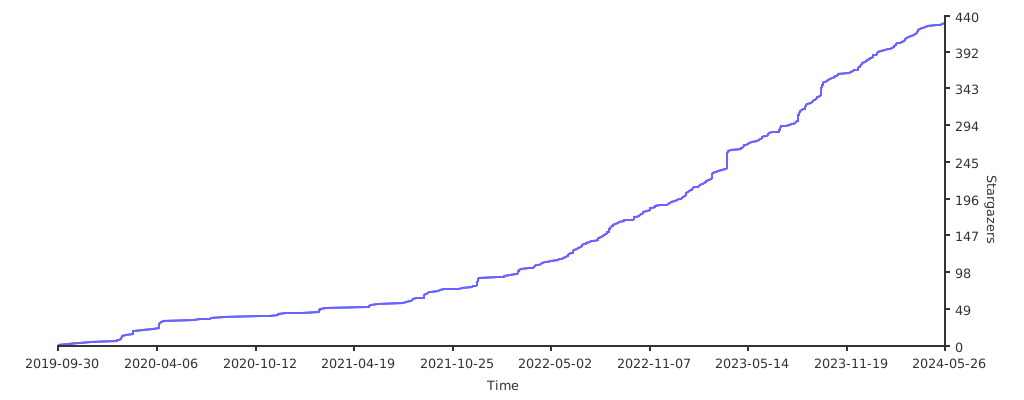
Stars
General info
- Version: 2.55.1
- License: 3-clause BSD
- Author: Alexander F. Rødseth <[email protected]>
 xyproto