

 xxoo
xxoo
New functions
I wanted to ask, have you ever considered expanding this module by adding more functions for working with file system and drives?
For example:
-
getLogicalDriveList -
watchDriveList(to detect when drive list changes) -
getDriveInfo(memory type, name, file system, etc.) -
getUsbDevices -
ejectDrive -
setDriveLabel -
copyToMtpDevice -
readMtpDevice
Maybe some functions from this systeminformation module? It's a good module but it's really slow since it's using Powershell calls instead of C++:
- It takes 100ms to get the drive list
- And it doesn't encode strings in UTF-8, which means you cannot use it if drives have non-ASCII characters in their name
This module could become really popular if it had a lot more functions.

sure. i made this module to fit my own needs before. but patches and prs are always welcome. these functions seems useful but i still need sometime to see if i can do the job.

Hi @xxoo I noticed that find() doesn't return link type property (symlink, hardlink).
Does fswin module let you determine whether a file is a hardlink?
Powershell
mklink "./test sym link.txt" "./test.txt"
mklink /h "./test hard link.txt" "./test.txt"
Get-ChildItem | select name, linktype
Output:
Name:                  LinkType:
-----                  ---------
test sym link.txt      SymbolicLink
test hard link.txt     HardLink
test.txt               HardLink
you may detect symlinks by checking REPARSE_POINT_TAG for SYMLINK. but hardlinks are quite different. cause every regular file is a hardlink. multiple files may point the same position in filesystem. there is a win32 api can get the link count of a file. and it's possible to include that field in getAttributes, however not in find
LINK_COUNT is added to getAttributes now. please note that a symlink can also have multiple hardlinks
@xxoo that's great, thank you very much! The code changes look good to me. I will update the module in my app, test it and implement the hardlink info getter today
@aleksey-hoffman added 4 new functions getLogicalDriveList, getVolumeInformation, setVolumeLabel and ejectDrive. docs are also add to wiki
@xxoo that's great, good job brother! I will check the commits and add some of those functions into my app later.
I found one issue with ejectDriveSync functon:
// Test config: removable USB drive, letter D

// ❌ Nothing happens, returns true
fswin.ejectDriveSync('d', 2)

// ✅ Works as expected, drive gets ejected, similarly to Windows built-in eject function
fswin.ejectDrive('d', 2, console.log)
Is there any situation where you would choose sync function over async? Maybe it would be easier to just remove support for the ejectDriveSync function completely, so you don't have to spend time on it?
Thanks for your hard work on this module. I just mentioned xxoo/node-fswin on the readme page of my app, hopefully it will help increase the popularity of fswin a little bit, when the app gets more popular:
https://github.com/aleksey-hoffman/sigma-file-manager#special-thanks
Can I support your work financially somehow? Do you have a Patreon / Buymeacoffee page or Paypal link? Maybe you should consider adding support links to the readme page similarly to my app's readme page, so people could support your work?: https://github.com/aleksey-hoffman/sigma-file-manager#supporters
thanks bro you are so kind😄 i will consider about adding some donation link. now i think i should look into this issue. sync functions are easier to use, it would be better to keep them unless i can't find a way to fix that.
@aleksey-hoffman i can not reproduce it... could u make more tests with different methods and let me know the result?
@xxoo I discovered something weird while re-testing it. I noticed that the function was not working when I was measuring execution time of other functions using console.time above the fswin.ejectDriveSync function line.
Test code 1
Result: ❌ Nothing happens, returns true
console.time('time:')
// Any code here
console.timeEnd('time:')

console.log(fswin.ejectDriveSync('D', 0))
Test code 2
Move console.time below the fswin.ejectDriveSync function
Result: ✅ Works as expected, returns true
console.log(fswin.ejectDriveSync('D', 0))

console.time('time:')
// Any code here
console.timeEnd('time:')
Test code 3
Result: ✅ Works as expected, returns true
console.log(fswin.ejectDriveSync('D', 0))
I never saw anything like this, I have no idea why console.time breaks the fswin.ejectDriveSync function, even though it returns true anyway.
Sorry for reporting this as a problem with fswin.ejectDriveSync function, I didn't realize that console.time was causing the issue.
Other functions:
-
getLogicalDriveListreturnsFIXEDfor external HDD drive that connects via USB. When this drive is connected Windows displays "safely eject" icon in Tray , however in the drive properties, it says "local disk", not "USB drive". That's probably why Windows returnsFIXEDto C++ API -
setVolumeLabelis not working forFIXEDdrives (however it works with external HDD USB drive that I mentioned in the line above, even though it is reported asFIXED).
I think it's because FIXED drives require administrator rights. When I run a similar command via powershell I get "Access is denied" error:
powershell
function ChangeDriveLabel([string]$driveletter,[string]$newlabel )
{
     $disk = Get-WmiObject -Class win32_volume -Filter "DriveLetter = '$driveletter'"
     Set-WmiInstance -input $disk -Arguments @{ Label=$newlabel}
}
ChangeDriveLabel -driveletter 'C:' -newlabel 'test'
Set-WmiInstance : Access is denied.
powershell
But If I run this function below, I get a system prompt, allowing me to execute the command:
(New-Object -ComObject shell.application).NameSpace("C:\").self.name = "test"
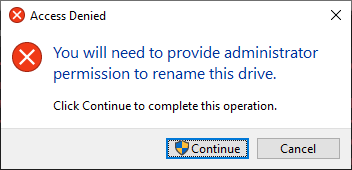
@xxoo also, I wanted to ask, would it be easy to add drive media type property to the getVolumeInformation function?
[
  {
    MEDIA_TYPE: 'SSD'
  },
  {
    MEDIA_TYPE: 'HDD'
  }
]
I'm getting this info using powershell with this code:
(Get-CimInstance Win32_Diskdrive -Filter "Partitions>0" | ForEach-Object {
$disk = Get-CimInstance -ClassName MSFT_PhysicalDisk -Namespace root\Microsoft\Windows\Storage -Filter "SerialNumber='$($_.SerialNumber.trim())'";
foreach ($partition in $_ | Get-CimAssociatedInstance -ResultClassName Win32_DiskPartition) {
    foreach ($logicaldisk in $partition | Get-CimAssociatedInstance -ResultClassName Win32_LogicalDisk) {
        [PSCustomObject]@{
            Disk          = $_.DeviceID;
            DiskModel     = $_.Model;
            DiskSize      = $_.Size;
            HealthStatus  = $disk.HealthStatus;
            BusType       = $disk.BusType;
            DiskType      = $_.MediaType;
            MediaType     = $disk.MediaType;
            Partition     = $partition.Name;
            PartitionSize = $partition.Size;
            VolumeName    = $logicaldisk.VolumeName;
            DriveLetter   = $logicaldisk.DeviceID;
            VolumeSize    = $logicaldisk.Size;
            FreeSpace     = $logicaldisk.FreeSpace;
        }
    }
  }
}) | convertTo-csv | convertFrom-csv | convertTo-json
Which returns a mediaType value corresponding to one of these values:
https://docs.microsoft.com/en-us/previous-versions/windows/desktop/stormgmt/msft-physicaldisk
{
    '1': '',
    '3': 'HDD',
    '4': 'SSD',
    '5': 'SCM'
}
@aleksey-hoffman i found a bug in ejectDriveSync. it makes the function always use method 2 regardless the value of method param. but console.time did not change anything in my computer...
USBHDDs are removable device but the media type is still fixed. i think we need another function to get the device type.
administrator permission can only be provided in a new process. u can do it with the runas command.
i don't think it is hard but WMI class is not a good choice. it's too heavy for this kind of demands. perhaps there's another way.
@aleksey-hoffman the bug i mentioned above is fixed now.
and added 2 functions getDriveDevice and getDeviceCapabilities. u can use them to detect removable devices.
wiki pages are also added.
@xxoo thank you. Yeah, WMI is quite slow, that Powershell code takes 1 - 2 seconds to run. Perhaps you can get drive media (memory) type by checking TRIM status?
@xxoo do you think it's possible to create a function that would force the app to run on the high-performance (discrete) GPU?
I found this thread, but I don't know if it's possible to implement it in fswin:
// Enable dedicated graphics for NVIDIA:
extern "C"
{
  __declspec(dllexport) unsigned long NvOptimusEnablement = 0x00000001;
}

// Enable dedicated graphics for AMD Radeon:
extern "C"
{
  __declspec(dllexport) int AmdPowerXpressRequestHighPerformance = 1;
}
@aleksey-hoffman added new function getStorageProperties.
this function may query many kinds of information including trim status. but some of them may be unsupported on specific drive.
i guess these symbols must be exported in exe file to take effect. fswin.node is a dll which has nothing to do with that unfortunately.
@xxoo I tested the new version, here's the results:
getStorageProperties function returns null:
// var path = '\\\\?\\scsi#disk&ven_nvme&prod_wdc_wds100t2b0c-#4&1442bac9&0&010000#{23f53302-a6bf-21d0-56f1-01b0c71efb5a}';
// var path = '\\\\.\\PhysicalDrive0';
var path = '\\\\.\\PHYSICALDRIVE0';
var properties = {
  deviceProperty: true,
  adapterProperty: true,
  deviceWriteCacheProperty: true,
  accessAlignmentProperty: true,
  deviceSeekPenalty: true,
  deviceTrim: true,
  deviceLBProvisioningProperty: true,
  devicePowerProperty: true,
  deviceCopyOffloadProperty: true,
  deviceMediumProductType: true,
  adapterRpmbProperty: true,
  deviceIoCapabilityProperty: true,
  adapterTemperatureProperty: true,
  deviceTemperatureProperty: true,
  adapterSerialNumber: true
};

console.log(fswin.getStoragePropertiesSync(path, properties));
// null

fswin.getStorageProperties(path, properties, console.log);
// null
I tried the device path returned by Powershell:
> Get-WmiObject Win32_DiskDrive


Partitions : 3
DeviceID   : \\.\PHYSICALDRIVE0
Model      : TOSHIBA MQ02ABD100H
Size       : 1000202273280
Caption    : TOSHIBA MQ02ABD100H

Partitions : 1
DeviceID   : \\.\PHYSICALDRIVE1
Model      : NVMe WDC WDS100T2B0C-
Size       : 1000202273280
Caption    : NVMe WDC WDS100T2B0C-
And device path returned by fswin.getDriveDeviceSync('c'):
devicePath: '\\\\?\\scsi#disk&ven_nvme&prod_wdc_wds100t2b0c-#4&1442bac9&0&010000#{23f53302-a6bf-21d0-56f1-01b0c71efb5a}'
this method requires administrator permission to run... i should add this information in the wiki page.
@aleksey-hoffman i just learned admin permission is not necessary for this operation... please check for update, it's not required now.
@xxoo yeah, it works without admin permissions now, thanks.
It looks like you can get the type of a fixed drive by checking fswin.getStoragePropertiesSync().deviceSeekPenalty property.
It returns false for SSD and true for HDD.
Thank you