

 xulihang
Tibetan characters not stacking
ImageTrans v1.4.8 on Windows 11 here.
The text field doesn't allow Tibetan letters to stack properly. The letter a is used to stack other letters and isn't expected to be displayed. See the expected stack in the pasted string:

I'm using the Monlam Tibetan keyboard which works fine everywhere else. Is there a way to fix that?
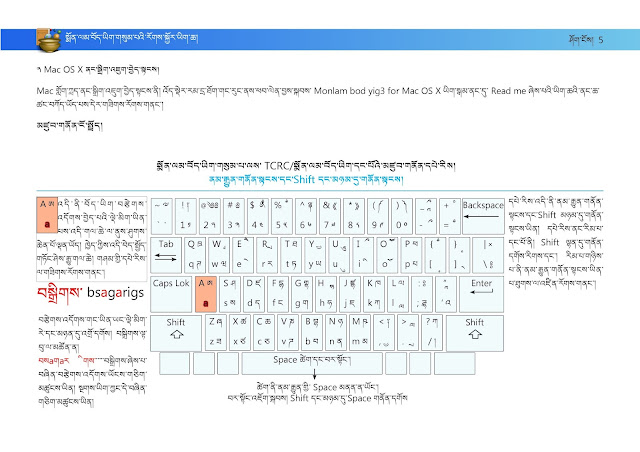

JavaFX may not support Tibetan input methods. If there is a way to input without this input method, it may work.

I found that it is possible to stack "a" with SHIFT key pressed using the Himalaya input method.
http://www.yalasoo.com/English/docs/yalasoo_en_MStbKb.html

It's the same problem with Himalaya. In order to get སྨ you need to type smh because it's in the "M keyboard". I actually use other programs with JavaFX and don't have this issue. I'm pretty sure it's something that you can change on your side.
Your tool is really great and I'm waiting for that to be fixed to create tutorials in Tibetan and share it along. I really hope this issue can be fixed.
Which JavaFX program are you using? You can replace ImageTrans's jre with its jre to have a try.
I just tried liberica jre17 and it is the same. I think this is a problem of JavaFX and there is not much I can do about this.
I found that JTextPane control in Swing supports this. I may add a compatibility mode which uses JTextPane instead of TextArea to support Tibetan inputing.
I have added a compatibility input helper which uses JTextArea. This helper can work as a bridge between JavaFX's TextArea and Swing's JTextArea. Check out the video to see how it works:
https://user-images.githubusercontent.com/5462205/141647286-e6816091-a762-4084-bf2d-c5e219afd948.mp4
Meanwhile, I've reported the bug to oracle. Hope they can fix this in JavaFX.
Thanks! I didn't manage to display Tibetan though. I saw that you get the tofu boxes for Chinese characters in your demo. Is it something you could fix?

You should specify the font to Microsoft Himalaya in the project settings.
The bug is reported, but they don't have plans to implement this now:
https://bugs.openjdk.java.net/browse/JDK-8277198?jql=project%20%3D%20JDK%20AND%20component%20%3D%20javafx
So I think we still have to use the compatibility input helper.
Oh I see, that's a pity. Thanks for reaching out! I'll let you know if I have other issues.