

 xournalpp
Issue #4732 url link tool
Hi, I added a new tool to embed links into the document as requested in issue #4732. This is just an early draft of that feature with basic functionality.
I'm sharing the current status to get feedback and see if there is a chance to merge this in the future, as this will cause compatibility issues with older versions of Xournal++.
Here is a short demo:
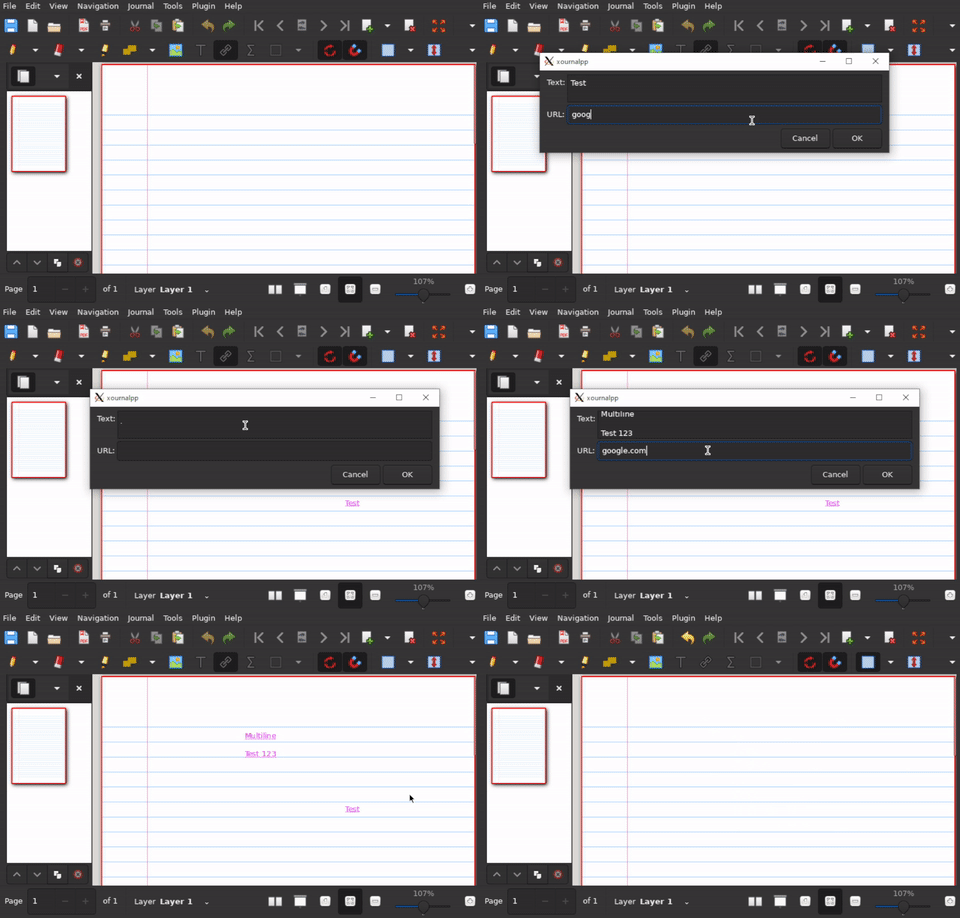
What still needs to be done:
- [x] Integrate with PDF export
- [x] Open URL by clicking in Browser

After having work on this feature for the last couple of weeks, here is a small status update on what has changed since.
- Open the embedded link (normal click opens the editor dialog, and a ctrl + click will open the link in the default program)
- Improved the link dialog editor
- Automatically resizes the text field until a certain height
- Changed text font and alignment options
- link prefix combo box
- "Hover" effect for the link element
Here are some images showing the current status:
| Improved dialog | Hover effects |
|---|---|
Any feedback is greatly appreciated 😎!
- Open the embedded link (normal click opens the editor dialog, and a ctrl + click will open the link in the default program)
- Improved the link dialog editor
Hello!
Thanks for all the effort! This looks amazing hope it can get merged. It would be a valueable contribution to the project!
I am no maintainer so I have no say in it.
In the past it has been noted in the forums though, that people with "touch devices only" need to be included as well (convertibles), so the programm gets more barrier free. They won't have a Ctrl-Key available when they transform their decive into a touch only one.
Hence they won't be able to click the link, only edit the link. There have been similiar discussions on the implementation of the PDF Tools.
#4673 back then "alt" was used, and later neglected.
Regards N.
Edit: the topic also arose here #4010.
"Copy paste selection anchors".

Hi, thank you for the feedback. That is a very good point I haven't thought about. I will have to find a solution for that.
Regarding how to open a link:
I'm personally not in favor of opening a link by simply clicking on it. Especially on touch devices, it is quite common to accidentally click somewhere (e.g. while scrolling). This would not only be annoying, but could potentially also be a security issue when somebody has embedded a malicious link. Therefore, I think it is very important that the user can see the full URL before opening it (hence the popover in the current version) and that there needs to be a mechanism to verify the user intentionally wants to open the link (hence the CTRL+click). But that's just my personal opinion on that topic.
My initial thought on how to improve the controls was:
- Double click for editing & creating -> In the link dialog, I would add a button to open the link
- Single click will highlight the link (see hover effects) -> I would restyle the URL label as a link -> Clicking on the URL in the popover will open the link (as with pdf links)
- Single click + CTRL opens the link (as is)
That was just some first idea, and I'm open for discussion and other suggestions.
Regarding internal linking:
I would prefer to do this in a second PR, just to not further inflate the complexity of this PR.
Regarding backwards compatibility:
Does Xournal++ have a warning if users open a newer file with an older xournal++ version? If not something like this might be useful. (But out of scope for this PR)
Regarding how to open a link:
I'm personally not in favor of opening a link by simply clicking on it. Especially on touch devices, it is quite common to accidentally click somewhere (e.g. while scrolling). This would not only be annoying, but could potentially also be a security issue when somebody has embedded a malicious link. Therefore, I think it is very important that the user can see the full URL before opening it (hence the popover in the current version) and that there needs to be a mechanism to verify the user intentionally wants to open the link (hence the CTRL+click). But that's just my personal opinion on that topic.
Maybe doing it the same way like for PDF links (clicking on the PDF link opens the popover displaying the URL, then clicking on the URL opens the link) would be the way to go then.
Does Xournal++ have a warning if users open a newer file with an older xournal++ version? If not something like this might be useful. (But out of scope for this PR)
Yes, it does:
https://github.com/xournalpp/xournalpp/blob/7d3c6ec13a4174cc24fae3e7832c695d7398e27f/src/core/control/Control.cpp#L2372-L2384

I have now implemented the new controls as mentioned in the previous post.
Here a small demo showing the enhanced popover (I added some control hints for the user):
I currently don't own any touch device on which I can run Xournal++. Therefore, it would be great if somebody else could help me out and test if everything works as intended with touch devices.
I have now finalized the implementation, and therefore I will make this a pull request.
I have tried out the PR once more and I really like how you solved the way of choosing between editing and following the link. Could you please rebase on master? I want to look at the code in detail. Also please take into account #4763 for making dialogs GTK4 compatible.
One minor thing I found that could possibly be improved: The default value for the text field for the URL is the same regardless of the URI scheme. It doesn't make sense though to write an email to xournalpp.github.io for example. So maybe a different default could be used for different schemes.
Is there any news here yet? I find this almost indispensable for teaching purposes.


