

 xou816
Provide a reason to gnome for running in background
Describe the bug Gnome 40 complains that Spot is running in the background but it doesnt know the reason why it needs to run in the background
To Reproduce Steps to reproduce the behavior:
- Install Spot via Flatpak
- Close the application while playing audio
- See error
Expected behavior No banners from Gnome. Play graciously in the background
Screenshots
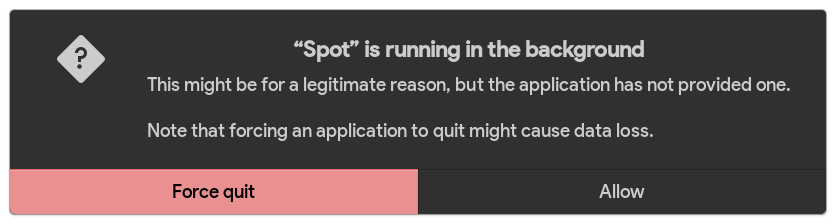
General information:
- Distribution: Pop OS 21.20
- Installation method Flathub
- Version : 0.2.2
- Device used [e. g. desktop, phone...]: Desktop

Can't replicate :\
Not surprised that's happening though - what you're supposed to do is call the org.freedesktop.portal.Background portal to ask for the permission to run in background.

Hi, thanks for the report!
I think you have to clear the granted permissions to reproduce this.
But you're right absolutely, I think there's an issue for that actually.
It's definitely not a major issue (in my opinion of course) as the fact that music is playing when you get this warning makes the purpose of running in the background obvious.

I think there's an issue for that actually.
There was https://github.com/xou816/spot/issues/132, but it was closed when the behavior was changed so that Spot only runs in the background if music is playing.
I think you have to clear the granted permissions to reproduce this.
On Ubuntu, this permission can be changed in Settings > Applications > Spot > Integration > Run in background. However, turning it off didn't work for me on Ubuntu 20.04.3. No popup appeared and Spot continued to play music in the background. That's weird. I guess further research is needed.

This is not an error. Just as GNOME is designed to be used without a tray, that is, without background/minimized applications, it warns that there is an application in the background. This SHOULD show up once the first time you close after you choose one of these options. Also, you can go to the settings on the apps tab and check/uncheck the option to run in the background.

@CleoMenezesJr Hi just curious, is this a GNOME/Flatpak thing? Because this seems like terrible UX. A new Linux user could see this pop-up and freak out. Imagine a grandpa with Spot seeing this popup. Lol. Do you think there's an issue open on Flatpak for getting rid of this popup?
