

 xou816
App crash after leaving song paused for a few minutes
Describe the bug After leaving the player open for a few minutes (with a song paused), it'll crash either trying to play the song or switch to the next song
To Reproduce Steps to reproduce the behavior:
- Play an album
- Pause in any song
- Wait a few minutes
- Wait for it to trash (trying to resume or play the next song)
Expected behavior Should not crash
Screenshots If applicable, add screenshots to help explain your problem.
General information:
- Distribution: Fedora 34
- Installation method [e. g. built from source, installed from Flathub...]: flatpak
- Version [e.g. 0.1.0]: 0.2.0
- Device used [e. g. desktop, phone...]: desktop
Stack trace:
[rafaelurrea@localhost ~]$ flatpak run --env='RUST_BACKTRACE=full' dev.alextren.Spot
bitrate: Bitrate320
using pulseaudio
[src/player/player.rs:230] e = MercuryError
thread '
The translation of the messages is "resource temporarly unavailable" and "was not posible to allocate memory"
If it matters, I'm using pipewire too

Hi! Thanks for the report. Do you notice significant memory usage using spot, or do you have a memory limited system perhaps? I'll have a look on the librespot repo to see if they have similar reports, looks like the allocation issue happens there

I didnt notice high memory numbers, tbh I didnt even look at them near the time, I'll reproduce later and will get back to you.
Regarding the memory, I have 32gb of ram and nothing else happens on the system, just the spot crash. It's fairly easy to reproduce it
Thanks
I just installed in another hd (I was using another installation though flatpak) and got the same error. About memory usage, I noticed it kept going up while changing tracks, it'ld go up some 15-20mbs, when I paused it was at 250mbs, while idle, it got to 300mb and crashed
I waited a good 30mins the other day, no similar issue on my end :/
It's weird that you would have memory allocation issue under these conditions! I suppose you would have mentioned it if it were the case, but does this happen with a specific track?
It's weird that you would have memory allocation issue under these conditions! I suppose you would have mentioned it if it were the case, but does this happen with a specific track?
Not specific to a track, but it happens with tracks of varying lengths (from 2 - 20 minutes long). Sadly this happens everytime I try to use the app. Even if I can listen to a whole album, if I leave it idle and then change to another album, it'll crash. Tbh I didnt record the error msg again, but since it's the same issue and I can reproduce with the same steps, the only thing that changes is the amount of time it takes to crash.
I think I now have a better understanding of this issue. After reading some issues with that error message (like this) I went to look the process spot on htop (although I'm not sure what I'm reading) and spot has a TON of PIDs under that filter. I dont know whats causing it, but I can see the thread count rising while playing a song and then after switching songs
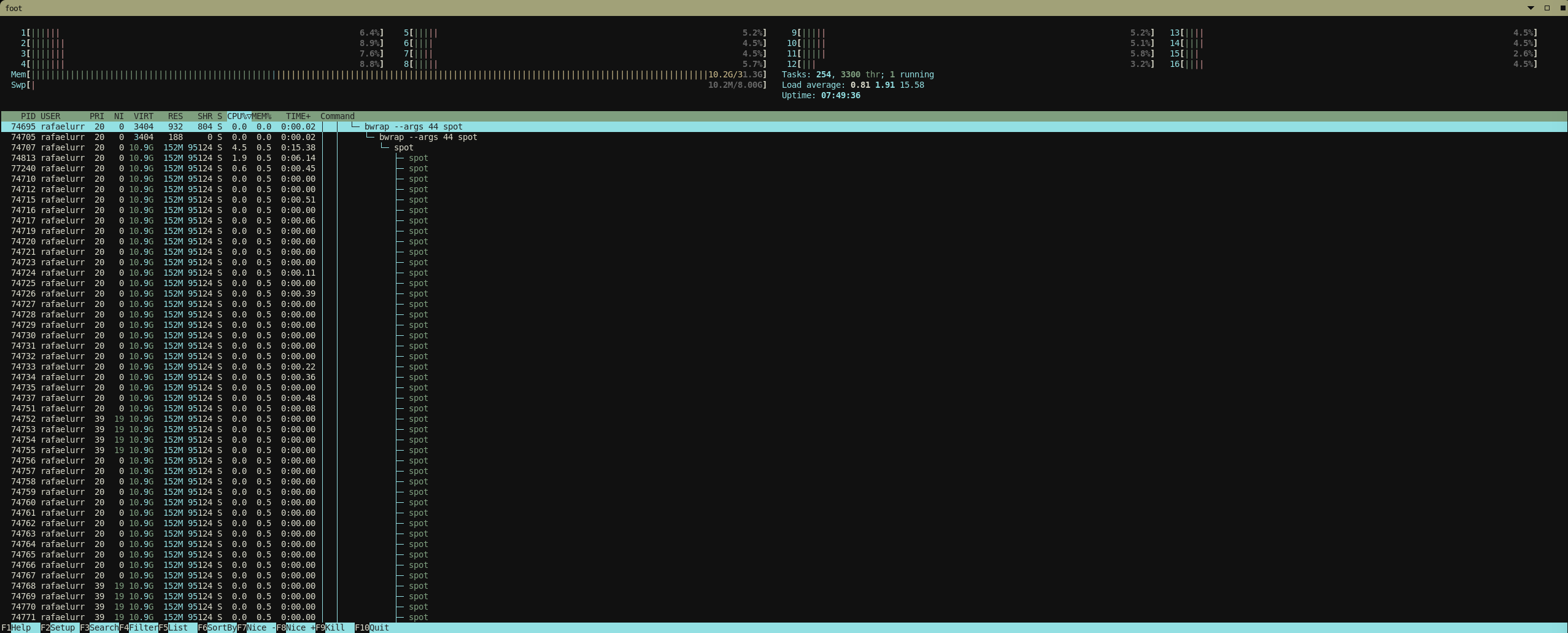
Here is the top (in tree mode) and I have to scroll down a lot to find the end of the spot processes
Hope this helps
Edit: After playing 2 songs (5 minutes each) and then killing the spot process, it freed more than 2k threads
Sorry for the long answer time. Can you reproduce this using librespot on its own (like this: https://github.com/librespot-org/librespot/#usage )? If so, might be worth reporting to them directly. I don't think the issue is with spot for this one but I might be wrong :/
Hello there, no worries. I'll try to build librespot in the weekend then and report back when I get the chance and results, thanks for the help
First of all, I love spot and how easy it is (compared to spotifyd + spotify-qt)
but just to check, I compiled librespot (with cargo build --release) and ran it like so: target/release/librespot -n "Librespot" -b 320 -c ./cache --enable-volume-normalisation --initial-volume 100 -u <redacted>-p <redacted> --device-type avr --normalisation-pregain 0. I'm controlling this through spotify-qt.
using ps (specifically, ps -o thcount $(pgrep librespot)), I consistently get THCNT as 3, as opposed to spot going to 2k+ threads.

Hi! Thank you for chiming in! It is really helpful if we can find other persons affected by this -- just need to figure out why this affects both of you.
One thing I could see happening is spot recreating the librespot session over and over and somehow leaking the previous one, so maybe there is an issue with authentication. Are you both using the gnome keyring integration? Is there something special about your accounts maybe?
I just spawned up my bog-standard Ubuntu 20.04 VM and install spot through flatpak (curiously, it didn't connect to gnome-keyring, I might have gotten something wrong with my setup) and it stays pretty constant at 19-20 threads in it, so I doubt it's something related to my account. If it helps, I have a premium family account.
I have an Arch host, and I installed spot through the AUR (spot-client). I also use pipewire. I have experienced this on KDE (with gnome-keyring running) and dwm (without gnome-keyring)
First of all, thank you @hegdenischay for testing it and even being able to reproduce the problem. I ran out of time last weekend and couldnt provide new info, thats why I didnt come back earlier.
I use Fedora 34 (default gnome) and installed it through flatpak. I use a premium family account too. I dont know where it started, but I stopped using for a while because of the way I had to use a VPN for work, it'ld disconnect from the internet, then connect again and that was making spot crash too much, I noticed this thread problem just recently with the 0.2.0, dont know if it affected me before, but the pattern is somewhat similar
While I had some free time today I did a bit of testing. Checking the source code nothing seemed obvious to me, but I checked my spotify dashboard (the app permissions) and spot was there, I dont think spot "asks for permission", just for the login, right ? I get why that is and indeed it makes more fluid to the user than having to accept another popup.
I decided to remove the permission and check what would be the results and spot gained permission again, automagically and the session worked with no problems, showing 67 threads all the time. I decided to close and try again, but then the thread count went back to increasing until crash. I tried to remove the spot permission, but now I cant use spot, I'm getting
[rafaelurrea@localhost ~]$ flatpak run --env='RUST_BACKTRACE=full' dev.alextren.Spot [src/player/player.rs:241] e = AuthenticationError( LoginFailed( BadCredentials, ), )
And I dont have an options to logout and login again, even after reinstalling the app. Sadly I wasnt running spot on the terminal with debug to check the logs, but I think it would be interesting to put some debug messages where you think it would happen (some obivous ones just to start and not take too much time from you) and then I watch it.
But first, I dont know how to login again in Spot
But first, I dont know how to login again in Spot
secret-tool clear spot_credentials yes

Yeah, after fiddling a bit with the permissions, I dont think it made a difference, nothing new in the logs
I managed to get spot running on my machine (from the builder IDE), where should I put the messages to see whats being triggered from the source ? Because it happens when I'm running from builder with debug on, but no new messages
I'm not sure I totally understand your question, but this is great step forward if you can reproduce the issue while attaching a debugger 😮 you can try adding a breakpoint in player.rs where the crash occurred, or a bit before that. Thank you so much for investigating this! I wish I could help more and reproduce the issue as well!
I found a weird workaround to get it working on my system: Using Wayland. I'll try to debug in GNOME Builder soon, but I thought it would be a good idea to see if the others with this issue can also confirm that this problem disappears on Sway and GNOME Wayland, and it exists on GNOME on Xorg.
Uh, weird! I'll try to switch back to xorg tomorrow and see how it goes ;)
So it would it be the DE killing spot for some reason? Maybe we can confirm with the exit code?
I'll start saying that I'm sorry for not getting back to this, time has been tight these last weeks.
Regarding the session type, all the times I was running spot was under the gnome wayland session, never tried the xorg one. I'm curious what made you think of that, because when the threads are being created by spot I dont notice any graphical glitches
I dont know if the new release could help with this issue, but I just started the app (I havent used in months) and this problem still exist. Such a shame, cause now it looks terrific
I wish I had more time to look into this
Edit: as of 0.3.0, this thread bug happens 100% the time I try to use the app
Hello there, just wanted to say that apparently the issue is gone after a clean installation of Fedora 35 (new ssd), to this date I dont know what caused, but I've been using for two days already with the thread count being constant (64-62), thanks for all your help.
I'll close this issue for now, I dont think our friend is having it anymore too, cheers
Just installed spot (0.3.1-1 on chaotic-aur, on xorg now), and it doesn't seem to be a problem for me either.
Never mind, it's back, sadly. I left my computer idle for a long while, when I tried to resume, just crash, then I started again with the terminal and watching the thread count, same as before