

 xnotepp
Notes created in Thunderbird v78 not appearing in Thunrderbird v91
Created notes in v78 of Thunderbird are not appearing after upgrading to Thunderbird v91 and xnote v3.2.4. The box appears where the note was created but I get the following error in place of my notes:
XML Parsing Error: no root element found Location: chrome://xnote/content/xnote-window.xhtml Line Number 1, Column 1:
^


Same problem, independent if notes are old or new.
note is shown in column, but the popup shows a parse error:
XML-Verarbeitungsfehler: Kein Wurzel-Element gefunden Adresse: chrome://xnote/content/xnote-window.xhtml Zeile Nr. 1, Spalte 1:
TB 91.2.1 32 bit / Windows 10 64 bit / XNote++ 3.2.4

oh, so it is a 32 bit TB. I will check whether that makes a difference. How about trying 3.2.5
https://github.com/xnotepp/xnote/releases/tag/v3.2.5
Klaus
The update didn't fix my issue. The note still shows at the top of the window, but it's not appearing in the xnote box.
oh, so it is a 32 bit TB. I will check whether that makes a difference. How about trying 3.2.5
https://github.com/xnotepp/xnote/releases/tag/v3.2.5
Klaus
maybe try this: it has the newest TB glue code. Also, it connects to the bookmarks addon and can bookmark xnotes. They appear in a toolbar and main menu, and you can go to the note, no matter which folder you are in
Still didn't seem to fix the issue unfortunately. Still the same problem. Also, the version number isn't showing correctly on that one. See the screenshot.
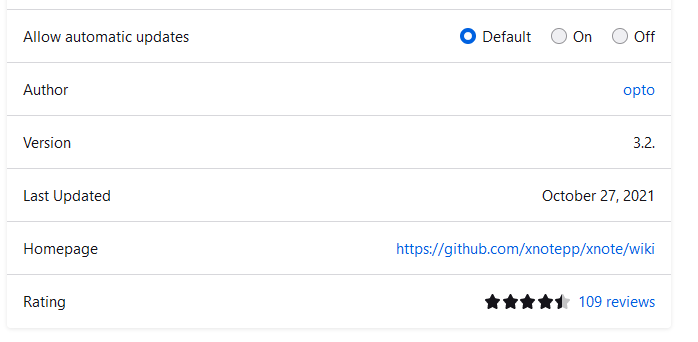
yes, I know about the version number.
I asked some TB people what this might be. Any other addons installed? What happens if you disable them and then restart?
Only two others installed. "FileLink Provider for Dropbox" and the second one is "Forward" which is disabled.
While I restarted TB itself it did not fix the problem; however, disabling the remaining add-ons (including xnote), restarting TB and then reenabling xnote, it did indeed fix the issue.
Thank you for the help fixing this problem.
I just installed 3.2.8, this seems to fix the problem for me. Popup was now shown correct, I could see old notes and create new ones. Thanks for your fast support !!!
Quick FYI... the same issue randomly started again today. Oddly, went to look and it's showing v3.2.4 is installed instead of v3.2.8 that I installed previously. Any idea why this would happen?
Quick FYI... the same issue randomly started again today. Oddly, went to look and it's showing v3.2.4 is installed instead of v3.2.8 that I installed previously. Any idea why this would happen?
I have observed the same behavior, the automatic update probably installs not the newest version 3.2.8 from the repo, but the "official" version 3.2.4 from the TB Add-Ons store. Disabling automatic updating for XNote++ stops that.
Regards, Bernhard

Quick FYI... the same issue randomly started again today. Oddly, went to look and it's showing v3.2.4 is installed instead of v3.2.8 that I installed previously. Any idea why this would happen?
I have observed the same behavior, the automatic update probably installs not the newest version 3.2.8 from the repo, but the "official" version 3.2.4 from the TB Add-Ons store. Disabling automatic updating for XNote++ stops that.
Regards, Bernhard
Thanks for the tip!
Although I am now running v3.2.10 in Thunderbird v91.5.0 I am still having the same issue. Any ideas on a permanent fix?
Same here, running v3.2.10 in Thunderbird v91.5.0 64bit on Ubuntu 18.04.6 LTS. After some time, the XML error shows up. Restarting Thunderbird only helps for an undetermined time.
