xmrig-cuda
 xmrig-cuda copied to clipboard
 xmrig
xmrig
Cuda disabled (impossible to find the specified procedure. )
As the title says, i have this issue, and when launching the program i get an error saying "impossible to find entry point" and indicates the xmrig-cuda.dll No anti-virus problem, and everything is installed properly (i think). Maybe the GTX 275 is not compatible?

is your Cuda install working otherwise? what's your --cuda-loader= path look like?

After a deep search it seems that the Gtx 275 runs Cuda 1.3, so maybe this is the problem.
is your Cuda install working otherwise? what's your --cuda-loader= path look like?
I've primarly focused on solving the window bug talking about the entry point, but on win10 there is no solution. What do you mean with --cuda-loader= ? I've placed the plugin in the same path of XMRig, so i suppose this should not be the problem.
I'm just another user, I'm not xmrig-cuda contributor so someone else might be able to more specifically reply to the error.... I've never seen the specific error you refer to - I use xmrig on Linux, I would try ensuring your path is set to the dll specifically just to be sure, also ensure your Gtx 275 device drivers are loaded correctly in Windows, and that (I'm not sure if you have nvidia-smi on Windows) either nvidia-smi or nvidia-settings reports the card and that you have the Cuda libraries installed (in my case I had to compile xmrig-cuda "against" an older version of the Cuda api library to get I think it was a gtx760 working - your card may be too old a compute version or something as newer Cudas drop support I think 10.2 still supported compute 3 cards and so I had to use it instead of 11+... if you can test your installation with another compatible nvidia card you may be able to determine if it's the xmrig configuration or an issue elsewhere, with the specific device or it's driver installation etc... likely I won't be much help, personally I gave up on Windows entry points decades ago
Unfortunately everything is installed correctly, and the dll file is placed in the correct place.
Probably is just too old the gpu 😩.
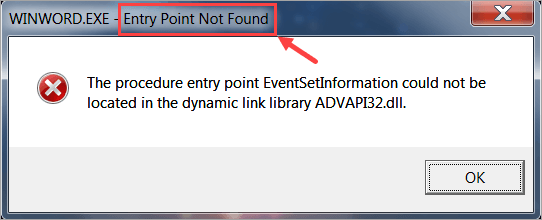
That’s the window error that appears when I launch the program with cuda enabled (that’s a picture taken from the net, the .dll and the path are different from mine):
Confirming GPU too old, it is Arch 1.3 (Tesla2.0 base family) and you must have minimal 2.0 (Fermi base family) for any sort of mining. It just doesn't have the functions (mostly FP64?) in the silicon at all.