
xiaoiver


xiaoiver
从 Fruchterman 的例子中也能看出,设计一个对于 GPU 内存友好的数据结构对于前端开发者来说并不是一件容易的事。 另外,在实现可并行算法时,很多数据结构也很难实现。例如 G6 的力导布局算法中就使用了 quadtree。

很多特性都与底层渲染 API (WebGPU/WebGL) 无关,例如: * frustum culling #3 * framegraph * scenegraph 因此如果能自动检测如果不支持 WebGPU 就 fallback 到 WebGL 就好了。 事实上 Babylon.js 也是这么做的,WebGPURenderer 兼容了全部 Renderer 接口。 但在实现中也存在以下难点: 1. Shader 语法难以兼容。WebGPU Chrome...
## 问题背景 算法本身很简单,G6 已有的[实现](https://github.com/antvis/G6/blob/master/src/layout/fruchterman.ts):  目前已有WebGL 版本:https://nblintao.github.io/ParaGraphL/ 在该实现中,由于 WebGL 不支持 ComputeShader,因此只能将节点位置计算放在 FragmentShader 中进行(常见的 WebGL GPGPU 实现),值得一提的是依然采用 sigma(SVG)渲染节点。 另有 Unity 版本:https://github.com/l-l/UnityNetworkGraph/blob/master/Assets/Shaders/GraphCS.compute。 我们希望在 WebGPU 版本中,渲染和计算都在 GPU 侧完成。为了达到最佳的渲染和计算效率: * 节点位置计算在 ComputeShader 中进行。 *...
# 问题背景 Deferred Shading 延迟渲染分成两个阶段: 1. 几何处理阶段:渲染所有的几何/颜色数据到 G-buffer 2. 光照处理阶段:使用 G-buffer 计算场景的光照,类似后处理 用伪代码表示: ``` // g-buffer pass foreach visible mesh { write material properties to g-buffer; } // light accumulation...
相比 Occlusion Culling,在 3D 引擎中更广泛使用的剔除技术其实是 Frustum Culling 和 Face Culling 面剔除,后者实现比较简单。 # 算法 1. 基础相交测试 the basic intersection test 2. 平面一致性测试 the plane-coherency test 3. 八分测试 the octant test 4....
# Frostbite 来自「[GDC17] FrameGraph Extensible Rendering Architecture in Frostbite」[🔗](https://www.gdcvault.com/play/1024612/FrameGraph-Extensible-Rendering-Architecture-in)[解读](https://zhuanlan.zhihu.com/p/36522188) - WorldRenderer 需要硬编码管线、负责分配资源(RenderTarget、Buffers)。 - Shading System,根据美术在 ShaderGraphs 中的连线构造的 Data-Driven Architecture。 - GFX API 即底层绘图 API,Render Context 为上层的统一抽象。 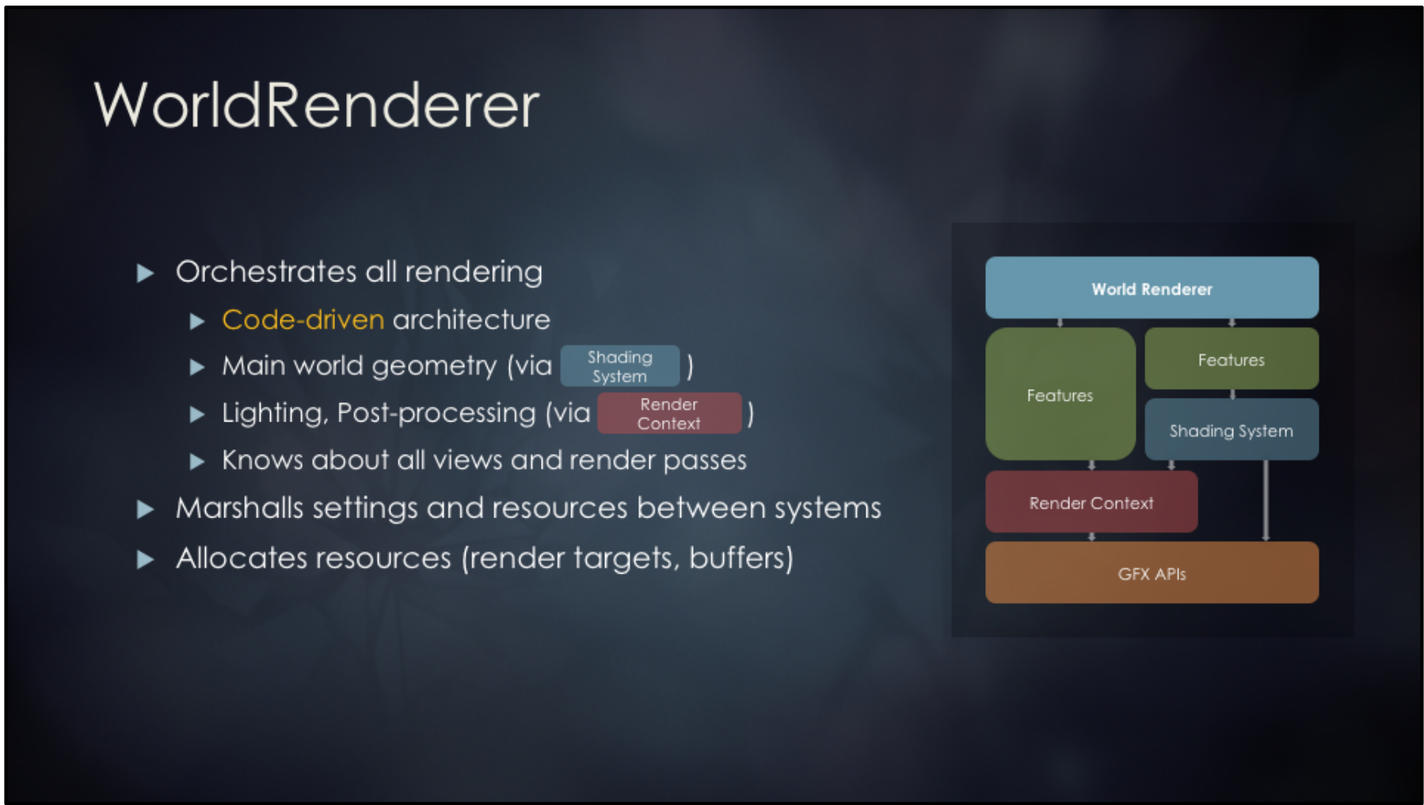 > World Render的挑战:...
Now this plugin precaches the recent N posts and some other static pages like `index.html` and `tags.html` so that they are offline available. But when a visitor opens the No.N+1...
Path 部分有两点需要优化: * 计算 Arc 的包围盒与长度时,目前会分成 100 段,导致耗时很大。合理的做法是提供 `sampleSize` 参数,这样当需要高精度时就增加分段,反之可以减少 * 目前 `getPathBBoxTotalLength()` 是一个二合一的方法,但有时仅需要计算包围盒或者长度。例如初始化 Path 时仅需要包围盒,此时计算长度就会造成浪费。可以通过参数控制,例如: ```js // 仅计算包围盒 const { x, y, width, height } = getPathBBoxTotalLength(absolutePath, { bbox:...
如果使用 `@antv/g-canvaskit` 渲染器就可以直接使用 CanvasKit 内置的 Skottie 播放器: https://g-next.antv.vision/zh/docs/api/renderer/canvaskit#lottie-%E5%8A%A8%E7%94%BB%E6%92%AD%E6%94%BE%E5%99%A8 但其他渲染器就无法使用了。此时就需要解析 Lottie 文件,将其中的元素转换成 G 的基础图形,再执行动画。 Lottie 文件说明:https://lottiefiles.github.io/lottie-docs/concepts/ Lottie 特性支持度查询:https://canilottie.com/shape-path ## 实现原理 Lottie 文件中包含了元素层次结构和 Keyframe 动画描述。因此我们需要将它转换成 G 的场景图,并在合适的时机调用图形的动画方法。 ### 场景描述 Lottie 描述了场景树,但比较特殊的是列表靠前的元素后被渲染: https://lottiefiles.github.io/lottie-docs/concepts/#lists-of-layers-and-shapes...
例如画布的尺寸为 `300 * 250`,可视范围之外的 HTML 元素应该被隐藏。`g-svg` 展示正常是因为使用了 ``,但其他渲染器的 HTML 为画布节点的兄弟元素,并不会被自动裁剪。 `g-svg` 效果: