
game-compatibility
 game-compatibility copied to clipboard
 xenia-project
555308CA - Far Cry 4
Tested on https://github.com/xenia-project/xenia/commit/d124e1761897e681d0cd530fa979167dc0a5c910
Issues:
Game can't install and guest crash
Log:
Screenshot(s):


Labels:
state-load

Does xenia actually support games that require you to install data first yet? I don't have any to try

When i start the game, a folder was created for the game but no file in. i think the emulator can but is not totaly stable.

Tested on https://github.com/xenia-project/xenia/commit/f748e5af49062fd78d098acdaf045183f29faf36
When I ran the game, it prompted me to install about 3.5 gigabytes of stuff before I could play the game. I accepted and let the emulator do its thing, just like the poster above me. When that was done, the game went to a black screen and wouldn't do anything. Running the game a second time shows that screen for a fraction of a second before it goes to a black screen again.
There is now a folder at My Documents/Xenia/content/555308CA/00000001/installation1 that has these files inside it:
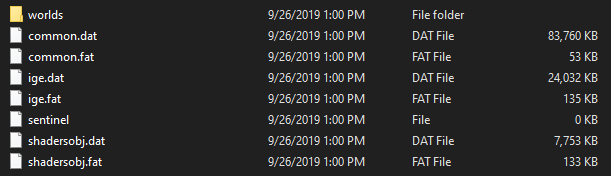
The "worlds" folder has two folders called "fcc_main" and "multicommon" with four .dat and .fat files in each of them.
The total size of the installation1 folder is 3.54 GB.
Here is a log file of me installing the data: FC4.zip and another one where I run the game a 2nd time after it went to a black screen the first time: FC4 part2.zip

With the method that Serenity figured out, Far Cry 4 is now able to go ingame. To get the game running you need to copy over all of the files from the installation1 folder into the game's main folder (the one with the default.xex). After that you need to run game.xex (Note: If you tried to run the game with default.xex and let the game install the content, delete the installed content as it will cause issues with the game). After this is done, you will be able to run the game and get into gameplay. The game does have graphical glitches, lots of vertex explosions and sound cutting off and the performance is not that great but I'm happy it runs at all.


Where is the default.xex and game.xex files? I installed the game on a flash drive via the Xbox 360 disc and moved it to my pc, but the 555308CA file only has the two 9E2C4FA.... files.
