

 xcp-ng
local fallback to xolite.html fails because file is missing from /opt/xensource/www
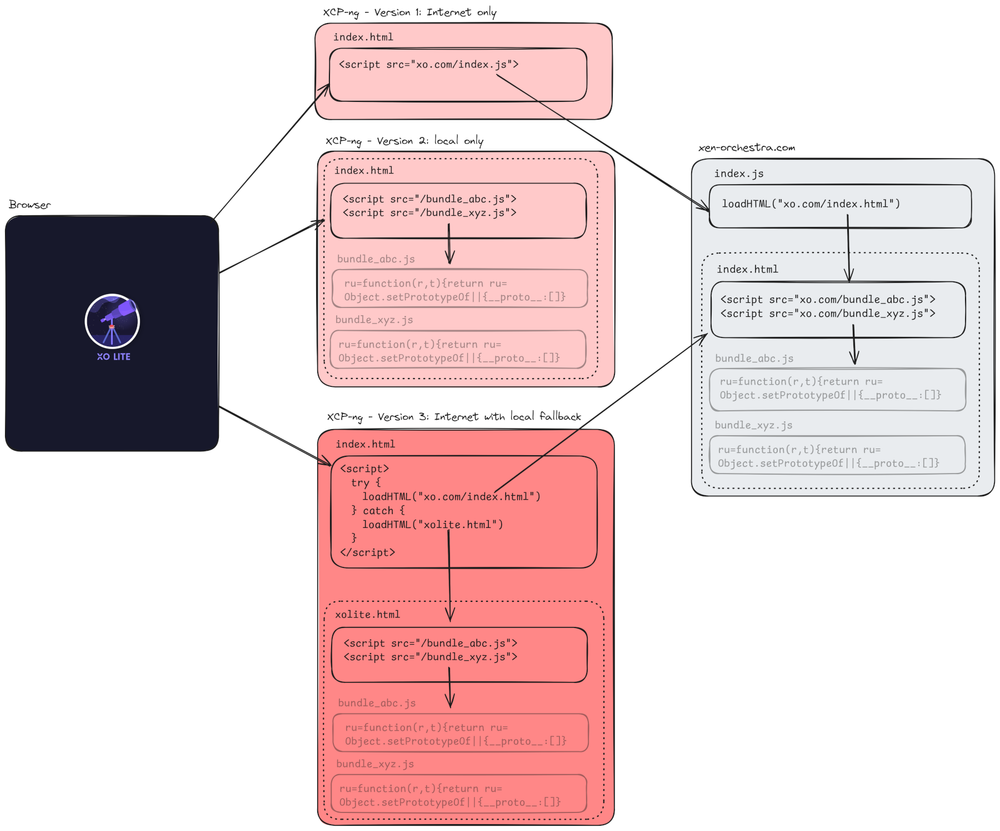
A recent change to xolite tries to "fetch the latest version" from the internet if it exists.
/opt/xensource/www/index.html tries to fall back "./xolite.html", but that file is not present?
So if your internet is down/firewalled etc. xolite is not going to work.
On a side note...making the local web admin reliant on any internet site is a terrible idea.
Please consider making xolite 100% local only again.

I noticed this when I upgraded to 8.3. For some reason, however, XO lite started eventually working without Internet access. Regardless, it was not a great first impression and is the sort of thing that will keep people asking for updated versions of XCP-NG Center.

Hello @jebsolutions
We'll investigate and fix that ASAP. Thanks for your report.


Ah yes I missed the end of the first post: we meant to have XO Lite in local, and the online mode is only when it's possible, allowing to get a most recent update without waiting for a new package in XCP-ng. Basically, best of both worlds.
We already made the effort to communicate about this, I strongly suggest to follow our XO/XO Lite release blog post: https://xen-orchestra.com/blog/xen-orchestra-5-97/#%F0%9F%94%AD-xo-lite
Is there any update on a fix for this please? Recently installed XCP-ng 8.3 (https://mirrors.xcp-ng.org/isos/8.3/xcp-ng-8.3.0.iso?https=1) and unable to access XO Lite whilst offline. Followed the blog and also verified that xolite.html is missing from /opt/xensource/www. Thanks.

Thank you for the prompt reply! I downloaded 8.3 from the link provided earlier today and still missing xolite.html and any associated bundles.
Just type the URL of the host, no need to add xolite.html. Also, after install of 8.3, don't forget to update it: we already released many updates since the ISO is available.
Only the URL of the host was used in my scenario. The index.html file included with my installation includes the following -
<script> ;(async () => { try { // Try to load XO Lite from lite.xen-orchestra.com const response = await fetch(https://lite.xen-orchestra.com/dist/index.html) if (!response.ok) { throw new Error(Cannot download XO Lite from lite.xen-orchestra.com (${response.status})) } document.open() document.write(await response.text()) document.close() } catch (err) { console.log(err?.message ?? err) // Fallback to local version of XO Lite document.open() document.write(await (await fetch('./xolite.html')).text()) document.close() } })() </script>
As xolite.html is not included within the /opt/xensource/www directory, the web page cannot load.
This install is offline and, therefore, cannot be updated through yum update. Is it possible to compile an ISO with the latest updates? Apologies if this is a fairly simple question, I am relatively new to XCP.
We will rebuild another ISO that will have recent updates and obviously the XO Lite fix. I can't tell when, it depends on many other things.
Until then, you can probably download just a more recent XO Lite package and install it locally.
Download https://updates.xcp-ng.org/8/8.3/updates/x86_64/Packages/xo-lite-0.5.0-1.xcpng8.3.noarch.rpm and then yum install it.