
xcp
 xcp copied to clipboard
 xcp-ng
XCP-NG Install Fails on a Mac Pro
Install fails at "Completing installation..." 50%:
An unrecoverable error has occurred. The error was:

Failed to run efibootmgr: Could not prepare Boot variable: No such file or directory


Did it happen only once? Reproducible on which hardware? (Vendor, model...)

Two questions: Is the firmware in UEFI mode? Does the target disk contain an EFI system partition?
efibootmgr reporting no "file" means it can't find the boot variable in /sys/firmware/efi/efivarfs/* which only exists if the firmware is in UEFI mode.
This might happen if there is an EFI system partition on disk but the firmware is not in UEFI mode. The partition makes the installer think its an EFI platform, but then dies when it can't find the efivarfs file.

Happens over and over again. Even tried going in with Ubuntu/Gparted and clearing the install drive and creating a clean GPT partition table. Same result.
Device is a 2010 Mac Pro.

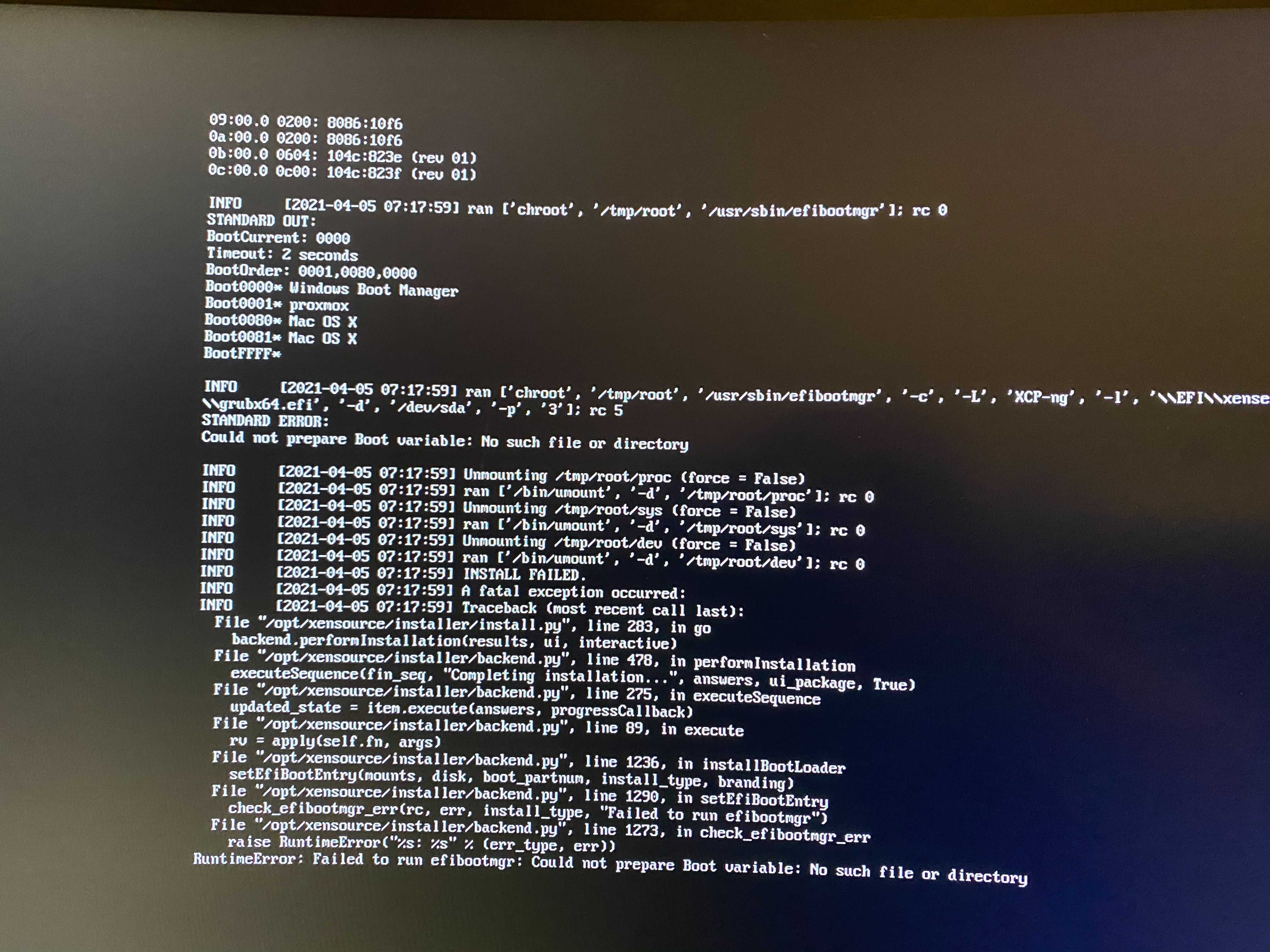
Happens over and over again. Even tried going in with Ubuntu/Gparted and clearing the install drive and creating a clean GPT partition table. Same result.
Device is a 2010 Mac Pro.
Thank you for the screens and hw info. This shows that efivarfs is indeed mounting correctly.
This is very likely an Apple UEFI implementation bug that has been worked around in recent Linux kernels... the Apple UEFI implementation was notoriously problematic until Linux worked around its "quirks"... and this efibootmgr call is almost as dead simple as creating a file and placing it in /sys/firmware/efi/efivars/.
Could you provide the output from dmesg?
Thanks again for the info and issue.
An empty BootFFFF entry is extremely bizarre, but seems unrelated.
Are these Macs able to boot any non-Apple OS out of the box? For Windows e.g. you need bootcamp to get it working.
Are these Macs able to boot any non-Apple OS out of the box? For Windows e.g. you need bootcamp to get it working.
Yes; I had proxmox and esxi installed previously without issue.
Could you provide the output from dmesg?
as requested dmesg.txt
Thanks. efivarfs subsystem doesn't seem to be complaining at all.
Could you invoke the same efibootmgr command with -v for verbose output?
efibootmgr -c -L XCP-ng -l \\EFI\\xenserver\\grubx64.efi -d /dev/sda -p 3 -v
Does this command succeed?
This error can also occur if "-d /dev/sda" is pointing to a non-existent device, is /dev/sda displayed via lsblk?
Does the command succeed with a /dev/sdX device that does exist? (ls /dev/sd*)
**note: it may require the chroot part, but I'm not 100% sure.
Not chrooted:
/dev/sda exists vs lsblk
Unable to prepare boot variable: invalid argument.
Chrooted to /tmp/root
no devs show up
running command results in Efivars is not supported on this system
Thanks for the info Casey.
efibootmgr -c -L XCP-ng -l \\EFI\\xenserver\\grubx64.efi -d /dev/sda -p 3 -v should work on any device with /dev/sda, even if partition 3 doesn't exist, which strongly implicates some incompatibility with the firmware and the version of the efi driver in the installer's kernel.
We can rule out efibootmgr being the culprit by manually creating an EFI variable from the Linux console.
Using efivarfs:
echo BwAAAAIA | base64 -d > /sys/firmware/efi/efivars/TestVar-8be4df61-93ca-11d2-aa0d-000000000000
Then echo $? should return 0 and the file should exist across a reboot, i.e:
cat /sys/firmware/efi/efivars/TestVar-8be4df61-93ca-11d2-aa0d-000000000000 | base64
... echoes BwAAAAIA after rebooting the kernel.
If that succeeds, then it might be as easy as updating efibootmgr. If that doesn't succeed, then it might require patching the kernel.
Hi. Running the echo command gives Operation not permitted.
The file /sys/firmware/efi/efivars/TestVar-8be4df61-93ca-11d2-aa0d-000000000000 do exists. Running the cat command gives no result, not surprising since the echo throws an error.
I've got the same error as casey-hillman on a macbook pro A1502 (2013 model) running xcp-ng 8.2. Was planning to install xcp-ng on a macmini that currently runs proxmox (havn't tested on that one yet, but expect to see same error), the macmini has previously been running esxi as well. This seems to be a showstopper for apple hardware and xcp-ng
update: If one on the mac disable System Integrity Protection(csrutil disable form internet recovery -> terminal) the installation won't stop with a fail and do succeed, but the mac still doesn't boot xcp-ng, starts up with no boot devices available.

Having identical issues with a 2011 IMac 27".
(No clue how he got ESXi to run, I was unable to even get a partition showing up, But Proxmox does work.

Hi. Running the echo command gives Operation not permitted.
The file /sys/firmware/efi/efivars/TestVar-8be4df61-93ca-11d2-aa0d-000000000000 do exists. Running the cat command gives no result, not surprising since the echo throws an error.
I've got the same error as casey-hillman on a macbook pro A1502 (2013 model) running xcp-ng 8.2. Was planning to install xcp-ng on a macmini that currently runs proxmox (havn't tested on that one yet, but expect to see same error), the macmini has previously been running esxi as well. This seems to be a showstopper for apple hardware and xcp-ng
update: If one on the mac disable System Integrity Protection(csrutil disable form internet recovery -> terminal) the installation won't stop with a fail and do succeed, but the mac still doesn't boot xcp-ng, starts up with no boot devices available.
Sounds like you made progress. Have you managed to get it to boot yet ?

Can confirm that this is still an issue with the latest installation xcp-ng.8.2.1.iso. Just tried installing it on a Late 2013 Macbook Pro 11,1 (4core/16GB) over a working existing esxi-7u3 installation. Bugs out at the same place as previously mentioned. Restarting will show a grub menu and you can continue starting. In my case It will boot up into the configuration menu eventually but gives ACPI and EFI errors during this process.
But it seems that the root password / timezone etc is not saved during setup. (5th re-install, double checked keyboard layouts and tried password 123456), leaving an non accessible system.
Any advice to track this down?


*** ignore ***Are they on the USB installer drive? Since the root pass does not work I can not access the filesystem. Note: It seems to be an issue on multiple apple hardware platforms. Mac Mini, Mac Pro, Macbook Pro edit: I just found the Root Reset URL I'll try that and ***
Edit 2"I'll redo all the steps and copy the files manually from /tmp/install-log. Will update this probably later today.
Ok tried a clean install just now. Uploaded the dmesg and install logfiles. Also tried to reset the root pw but in emergency prompt the keyboards are non responsive (embedded keyboard and external logitech).....
I got the same weird EFI bootconfig (BootFFFF). Should I blow away the full /dev/sda with fdisk and try again?
INFO     [2022-06-06 09:01:21] ran ['chroot', '/tmp/root', '/usr/sbin/efibootmgr']; rc 0
STANDARD OUT:
BootCurrent: 0000
Timeout: 5 seconds
BootOrder: 0001,0080
Boot0001* VMware ESXi
Boot0080* Mac OS X
BootFFFF*

INFO     [2022-06-06 09:01:21] ran ['chroot', '/tmp/root', '/usr/sbin/efibootmgr', '-c', '-L', 'XCP-ng', '-l', '\\EFI\\xenserver\\grubx64.efi', '-d', '/dev/sda', '-p', '4']; rc 5
STANDARD ERROR:
Could not prepare Boot variable: No such file or directory

INFO     [2022-06-06 09:01:21] Unmounting /tmp/root/proc (force = False)
INFO     [2022-06-06 09:01:21] ran ['/bin/umount', '-d', '/tmp/root/proc']; rc 0
INFO     [2022-06-06 09:01:21] Unmounting /tmp/root/sys (force = False)
INFO     [2022-06-06 09:01:21] ran ['/bin/umount', '-d', '/tmp/root/sys']; rc 0
INFO     [2022-06-06 09:01:21] Unmounting /tmp/root/dev (force = False)
INFO     [2022-06-06 09:01:21] ran ['/bin/umount', '-d', '/tmp/root/dev']; rc 0
INFO     [2022-06-06 09:01:21] INSTALL FAILED.
INFO     [2022-06-06 09:01:21] A fatal exception occurred:
INFO     [2022-06-06 09:01:21] Traceback (most recent call last):
  File "/opt/xensource/installer/install.py", line 283, in go
    backend.performInstallation(results, ui, interactive)
  File "/opt/xensource/installer/backend.py", line 478, in performInstallation
    executeSequence(fin_seq, "Completing installation...", answers, ui_package, True)
  File "/opt/xensource/installer/backend.py", line 275, in executeSequence
    updated_state = item.execute(answers, progressCallback)
  File "/opt/xensource/installer/backend.py", line 89, in execute
    rv = apply(self.fn, args)
  File "/opt/xensource/installer/backend.py", line 1236, in installBootLoader
    setEfiBootEntry(mounts, disk, boot_partnum, install_type, branding)
  File "/opt/xensource/installer/backend.py", line 1290, in setEfiBootEntry
    check_efibootmgr_err(rc, err, install_type, "Failed to run efibootmgr")
  File "/opt/xensource/installer/backend.py", line 1273, in check_efibootmgr_err
    raise RuntimeError("%s: %s" % (err_type, err))
RuntimeError: Failed to run efibootmgr: Could not prepare Boot variable: No such file or directory
edit 3: Disabling System Integrity Protection did not help, nor deleting all efi partitions with fdisk. I tried efibootmgr manually and got the same errors as casey-hillman Unable to prepare boot variable: invalid argument.
Perhaps an issue with writing to NVRAM?
I ran into exact the same issues today trying to install on 2 mac mini 2012. Any Idea how to continue troubleshooting?

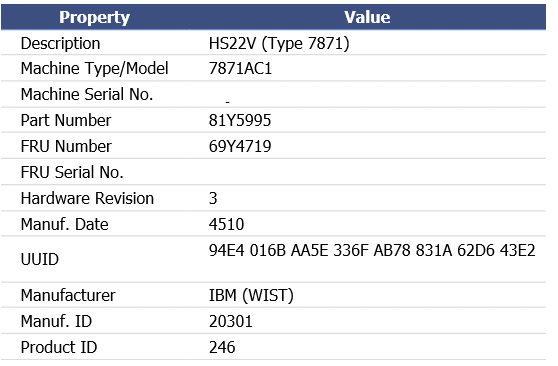
I've got the same issue with an IBM Blade server,

Tried resetting the blade bios to default, it is EFI and other blades work fine, just this particular one

I've got the same issue with an IBM Blade server,
Tried resetting the blade bios to default, it is EFI and other blades work fine, just this particular one
tried 4 times same result
OK issue is fixed for us, enter BIOS setup on IBM F1, go to boot options and i had many old xenserver installations and xcp older in there not sure why, i deleted them and presto - working now.
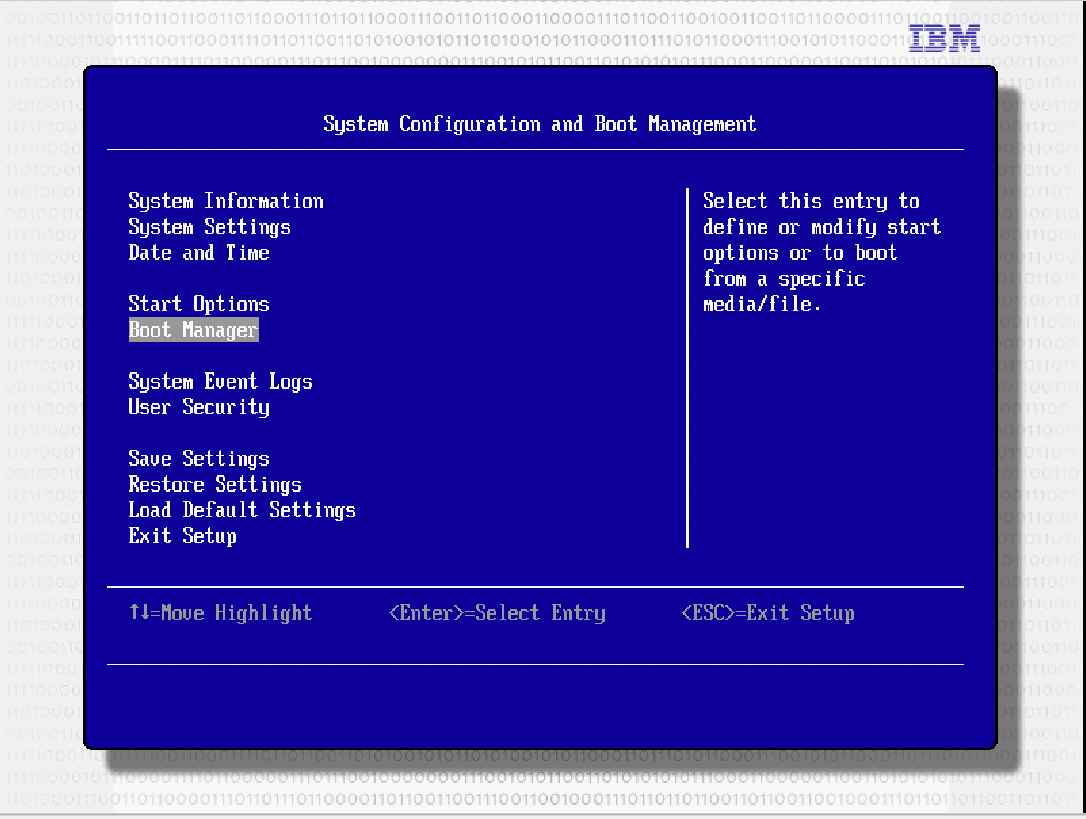
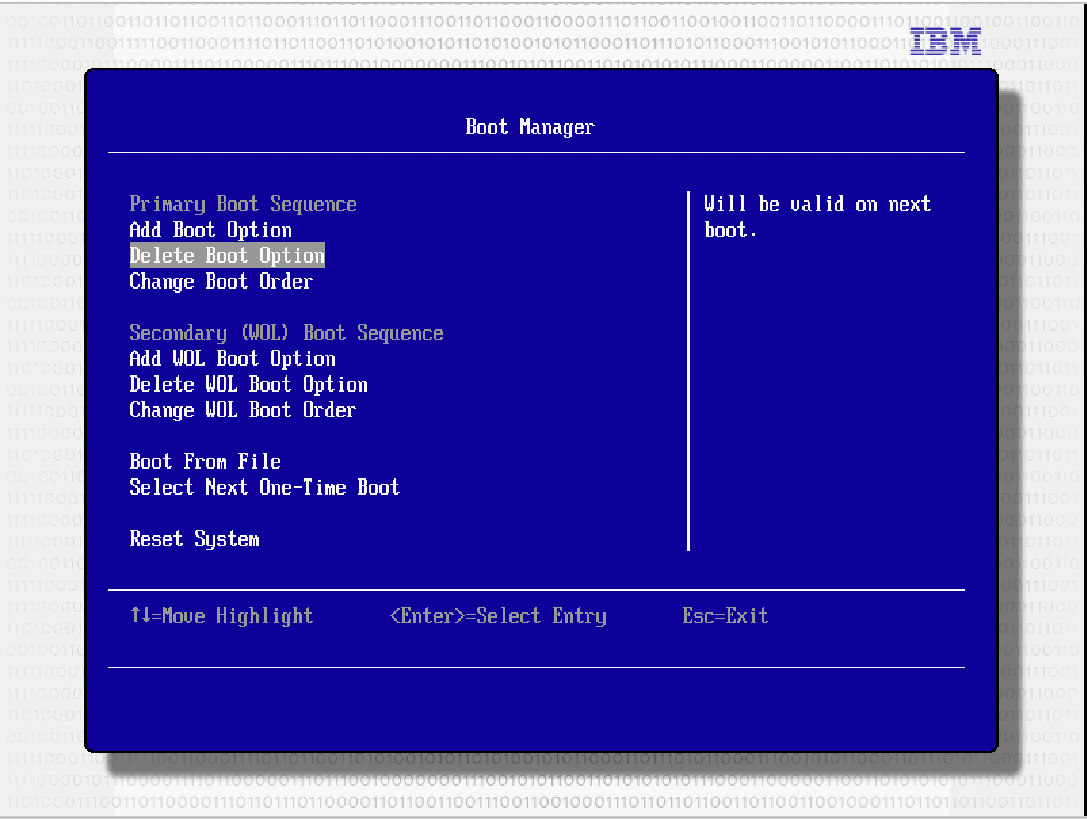
OK issue is fixed for us, enter BIOS setup on IBM F1, go to boot options and i had many old xenserver installations and xcp older in there not sure why, i deleted them and presto - working now.
UPDATE: I'm doing the next blade and i followed these steps and actually now it doesn't work, so trying to solve this riddle again
So, for anyone needing an answer installing latest at the time of writing XCP-ng 8.2.1 - and receiving the error about efiboot at end of installation,
A combination of reseting bios to defaults, deleting existing boot options of previous versions of xenserver or xcp, and rebooting, shutting off and trying again worked for us eventually
I also see the problem on a MacPro5,1 while installing XCP-ng v8.2.1. XCP-ng is installed over top of — replacing — what was a working TrueNAS SCALE test installation.
The same computer was previously able to install and use ESXi 6.7.x, although getting a bootable flash drive was tricky for that.
It was also able to install and boot with Proxmox sometime in the last year, as I’ve slowly been trying out options for running VMs/containers in a homelab.
Like others mentioned, I’m unable to get a working root password. When I got to the Customize screen after rebooting, I was not able to successfully authenticate to restart, shut down, or do anything else. I couldn’t get out of the Customize screen.
It seems that this is a showstopper for XCP-ng on Intel Mac hardware.

Same Problem on Topton AMD5800U + i226-V 4 port
XCP-ng version 8.3.0 alpha2 XCP-ng version 8.2.1-nuc-Test3
Mainboard CW56-58 Bios ver: 0.22
Network UEFI Stack must be enable in bios for XCP-ng installation to see the network device. Network device is working because can do network-install when select Media.
Preparing Installation Phase: Cmplete OK Installation Phase: Complete OK Completing Installation Phase: Stop at 53% with error message exactly as above.
Follow the instruction and the TestVar file survives reboot.

Chiming in because I ran into this too. Device=Mac Mini (quad core i7, probably 2013/2014 vintage) Install works, but ultimately fails on last step as described by others. On reboot, it appears okay and I can access the Web UI from my network. But, I'm unable to authenticate with the root password configured during installation. (Re-installed to verify it wasn't a typo, same result second time.) Did the password reset via single user boot in xcp-ng docs/kb. In that mode, my keyboard input failed. Need to try with non-Apple keyboard to see if that matters.

I have the same issue on a "Late 2012" Mac mini using the xcp-ng-8.2.1-20231130.iso installer. Macs are probably not the most popular host, but I have a few minis laying around and would love to be able to run XCP-ng on them. They're nice for home and small office use since they are small and near-silent. :)

For what it's worth I had literally zero issues installing XCP-ng 8.2.1, even onto an external USB drive (I know this is discouraged) onto a MacBook Pro (model MacBookPro8,1 — "Early 2011").
I did have to use Rufus to turn the ISO into a GPT/EFI-bootable USB drive, though.
P.S. hi @davidmnelson :)
edit: spoke too soon! After booting into the newly installed XCP-ng, I cannot auth with root. However, followed the reset root instructions to get access, and that worked.
edit 2: also has no timezone configured (solved with timedatectl), and seem to have missing EXT storage configured (addressed by making a new one via xe).
edit 3: I think this is the same issue folks are seeing, above. the post-install/configuration never got a chance to run, probably because of the same efi issue. I was able to run the post-install things manually (In my previous edits), but my claim of literally zero issues was clearly premature.
