

 xbmc
xbmc
Error creating demuxer when playing .ism stream
Hi,
I maintain the Eurosport addon for Kodi.
The addon has been able to play .ism streams using inputstream.ffmpegdirect for a while now, but recently it has started to raise an error.
I suspect Eurosport have changed something and I need to provide additional settings to allow the stream to play.
In the addon I set the following:
item.setProperty('inputstreamclass','inputstream.ffmpegdirect')
item.setProperty('inputstream.ffmpegdirect.manifest_type','ism')
item.setProperty('inputstream.ffmpegdirect.is_realtime_stream','true')
item.setMimeType('text/xml')
The log is now displaying the following error:
2021-03-15 12:09:00.292 T:281471503795376   DEBUG: CFileCache::Open - opening <secondary/3/4ee27fdf05844bd5a09677a77e6e75a5/start/1615807783/index.ism/Manifest> using cache
2021-03-15 12:09:00.293 T:281471503795376   DEBUG: CurlFile::Open(0xffff104ab3a0) https://eurosport-dlvr-ott.akamaized.net/secondary/3/4ee27fdf05844bd5a09677a77e6e75a5/start/1615807783/index.ism/Manifest?aws.manifestfilter=video_bitrate:900000-5500000&hdnts=ip=92.22.35.160~exp=1615864139~acl=/secondary/3/4ee27fdf05844bd5a09677a77e6e75a5/start/1615807783/index.ism/Manifest%3Faws.manifestfilter%3Dvideo_bitrate%3A900000-5500000*~hmac=420d16f7fd8f2fe07043dd1f7fd1647db4204c01033f3aa9814be076181f5e1d
2021-03-15 12:09:00.322 T:281471394755760   DEBUG: Thread FileCache start, auto delete: false
2021-03-15 12:09:00.322 T:281471503795376  NOTICE: Creating Demuxer
2021-03-15 12:09:00.323 T:281471394755760    INFO: CFileCache::Process - Source read didn't return any data! Hit eof(?)
2021-03-15 12:09:00.358 T:281471503795376   ERROR: Open - error probing input format, https://eurosport-dlvr-ott.akamaized.net/secondary/3/4ee27fdf05844bd5a09677a77e6e75a5/start/1615807783/index.ism/Manifest?aws.manifestfilter=video_bitrate:900000-5500000&hdnts=ip=92.22.35.160~exp=1615864139~acl=/secondary/3/4ee27fdf05844bd5a09677a77e6e75a5/start/1615807783/index.ism/Manifest%3Faws.manifestfilter%3Dvideo_bitrate%3A900000-5500000*~hmac=420d16f7fd8f2fe07043dd1f7fd1647db4204c01033f3aa9814be076181f5e1d
2021-03-15 12:09:00.359 T:281471503795376   ERROR: OpenDemuxStream - Error creating demuxer
2021-03-15 12:09:00.359 T:281471503795376  NOTICE: CVideoPlayer::OnExit()
I've copied and pasted the URL into VLC, and it plays correctly in there.
I've tested and can re-create the error on Kodi 18.8.
Any thoughts?


Hi,
Yeah, I've tried using ffplay. I've attached a screenshot of the debug messages. I've set the request headers that are required but just get "invalid data".
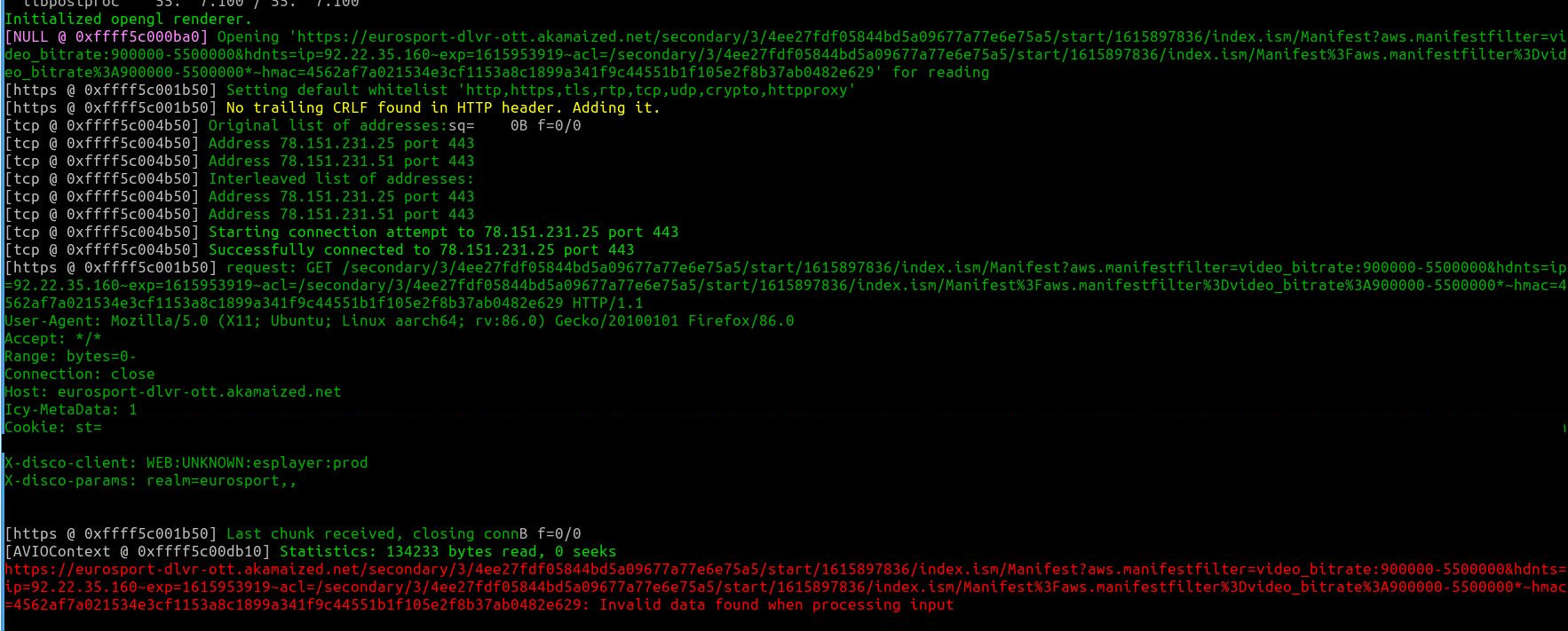
Hmmm, if ffplay does not work I’m not sure we would make any progress.
what about inputstream.adaptive?
inputstream.adaptive gives me the same errors:
2021-03-24 09:18:28.420 T:281472000640176   ERROR: Open - error probing input format, https://europe-fastly-mediashield-live-prod.cdn.h264.io/primary/1/3675c8d931514834935146006f1334e8/start/1616576406/index.ism/Manifest?aws.manifestfilter=video_bitrate:900000-5500000&hdnts=ip=92.22.35.160~exp=1616631507~acl=/primary/1/3675c8d931514834935146006f1334e8/start/1616576406/index.ism/Manifest%3Faws.manifestfilter%3Dvideo_bitrate%3A900000-5500000*~hmac=c10e44c2f9b2f01bc0a22175389aa09841bd7be2aab1d3a3ad13b889e48405c3
2021-03-24 09:18:28.420 T:281472000640176   ERROR: OpenDemuxStream - Error creating demuxer
In the addon I set the values for inputstream.adaptive like this: item.setProperty('inputstreamaddon','inputstream.adaptive') item.setProperty('inputstream.adaptive.manifest_type','ism') item.setMimeType('text/xml')
no, the authentication has already been resolved and is set in a cookie on the request to get the stream. The HLS stream plays fine with inputstream.adaptive, it's just the ISM streams that have stopped working.
If it’s doesn’t play with either ffmpegdirect or adaptive I’m at a loss as to what to try next.
Ok, well thanks for helping anyway. I'll think I'll remove the support for .ism streams from the addon and just default to hls.