

 xbmc
xbmc
Allow to directly play downloaded files
Feature suggestion
Currently, I can press the download button to download media files. After the download is completed, a second press on the download button asks if I want to download the file again, with a different name (not sure why I would want to do that). It took me quite a while to find the location of the downloaded file. I looked for a "Kore" folder. Then I looked inside the "Downloads" folder. Then I looked at "/sdcard/Android/data/org.xbmc.kore/". Finally, I found the folder "Movies".
I suggest to display a play button directly in Kore that opens the downloaded file with the device's default video player. This (maybe even combined with a "delete" button) would be easier to understand and also feel more "integrated" in one app than having to open gallery/file manager for watching the downloaded video.
Alternatively, the download button could provide a button to play the media file. This is probably the easiest to implement and does not require to add additional buttons to the screen. The dialog could even display a little file management screen (see mock-up below).
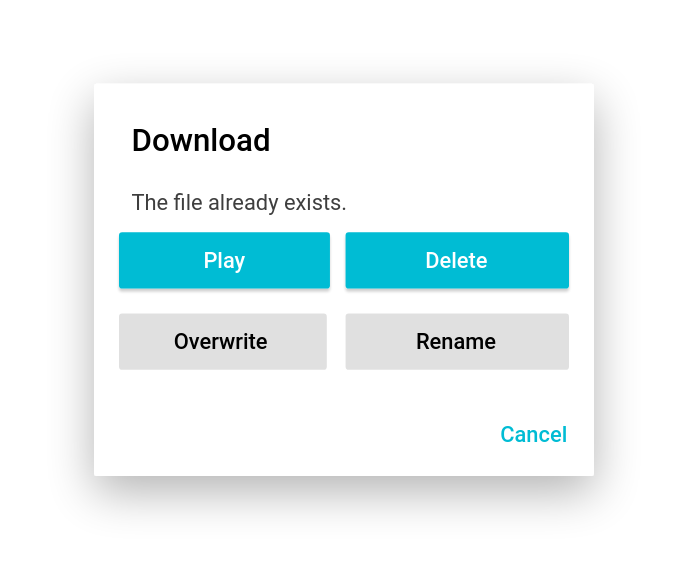

This has already been implemented for video files. If you go to the movie page the FAB icon should show a + indicating it's a menu and when pressed allows you to either play the movie on Kodi or on the device. The same can be implemented for music as well but as Music items are usually played by genre, artist, or album it is a bit harder to implement. Although we could, as a quick fix, add the option to the context menu for each song.

when pressed allows you to either play the movie on Kodi or on the device.
This streams the file, doesn't it? I wanted to play the downloaded media file. Streaming does not work on my device (logs show that the http request VLC does returns 404) but downloading does. After playing around with the code for 2 hours, I gave up and download instead, which lead me to his feature request ;).
Some more explanation: The "Movies", "Music", etc folders are the Android standard folders for media.
A regular user won't have a file explorer installed and won't use one, so he won't go looking for the downloaded files. Given that they were downloaded to the "correct" folders Android's media framework will pick them up, and automagically they will be available on the video/music player app.
Kore's role in this is just making the file available on the device. Note that Android is much more focused on apps than on data, so that interaction should be "normal" for a user.

I agree that looking at the file system should not be the way to go. I should have looked at my Gallery app instead (but I think I did that and the file did not appear. Probably a bug in the 3rd party gallery app).
Kore's role in this is just making the file available on the device. Note that Android is much more focused on apps than on data, so that interaction should be "normal" for a user.
This does not conflict with a button to play the file, I think. I mean, Firefox also allows to open downloaded files instead of expecting that you manually choose the corresponding app after downloading.
Closing this, as i believe that downloading the files is the most that Kore should do. Furthermore there are technical issues, as Kore delegates the download to Android and isn't notified of its ending