

 xanderfrangos
Windows Smart App Control (Windows 11 Insider Build) - False Flag
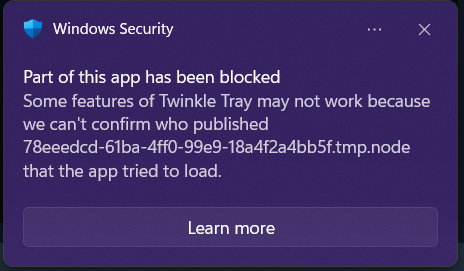
It seems like the new Windows Smart App Control thing blocks Twinkle Tray because it can't verify the developer's signature. Let me know if any other information is required. I have attached a screenshot of the error message in addition to the link Microsoft takes me to when I click on the notification.
Smart App Control: https://support.microsoft.com/en-us/topic/what-is-smart-app-control-285ea03d-fa88-4d56-882e-6698afdb7003

As an update, it seems like the app has multiple blocks with a recurring notification. I think one of them was wmic.exe and some other stuff. Will respond with screenshots of further notifications.
Hi @alexeidrekker,
Are you using Twinkle Tray from the Windows Store or the EXE installer? Also, which version are you on? If you're using v1.14.0 or newer, try disabling "WMIC" from the General tab in the Settings window. Let me know if that does anything.
The actual solution is for me to get a code signing certificate, but those are much more expensive than I can justify.

I installed the app using the Windows Store. Version: 1.14.3
Wasn't aware that it would cost a lot. I guess I can just turn off Smart App Control if it causes any issues. Oddly, the app seems to work fine. As far as I can tell, none of its features seem broken. Will let you know if that changes
Regarding the troubleshooting options, I disabled everything and then re-enabled everything. Everything worked fine both ways. Decided to just leave the toggles off since it caused no issue with its functionality.
Apologies for the less than technical responses. I haven't the foggiest idea what goes on under-the-hood and I am only familiar with what is apparent from the UI and functions.
Oh wow, if you're getting that with the Windows Store version then there actually isn't a ton I can do. It's supposed to be signed via Microsoft already. I hope Microsoft isn't planning to roll that out to more than Insiders... It will probably break a lot of apps. I expect more people will eventually report this as well. I'll just have to tell people that they can't use Smart App Control.
Thanks for sharing this. 👍
Sounds good.
For what it is worth, I have submitted a Windows Feedback request about this issue and I have mentioned this app and the Windows Store. Hopefully, someone gets ahold of it at Microsoft. Have a good day.