
twinkle-tray
 twinkle-tray copied to clipboard
 xanderfrangos
[BUG] Stable Build of Twinkle Tray no Longer Works on Latest Beta Channel (22593.1)
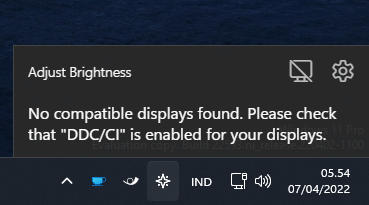
No compatible displays found. Please check that "DDC/CI" is enabled for your displays.

Settings
These are your raw user settings.
{
  "isDev": false,
  "userClosedIntro": true,
  "theme": "default",
  "icon": "icon",
  "updateInterval": 500,
  "openAtLogin": true,
  "brightnessAtStartup": true,
  "killWhenIdle": false,
  "remaps": {},
  "hotkeys": {},
  "hotkeyPercent": 10,
  "adjustmentTimes": [],
  "adjustmentTimeIndividualDisplays": false,
  "checkTimeAtStartup": true,
  "order": [],
  "features": {
    "luminance": true,
    "brightness": true,
    "gain": false,
    "contrast": false,
    "powerState": false,
    "volume": false
  },
  "checkForUpdates": true,
  "dismissedUpdate": "",
  "language": "system",
  "settingsVer": "v1.13.11",
  "names": {},
  "analytics": true,
  "scrollShortcut": true,
  "useAcrylic": false,
  "useNativeAnimation": false,
  "sleepAction": "ps",
  "hotkeysBreakLinkedLevels": true,
  "enableSunValley": true,
  "uuid": "57368ab1-8076-4b25-9a8f-c9ecbc035ffb",
  "branch": "master"
}
1.14 is working but keep my system not sleep
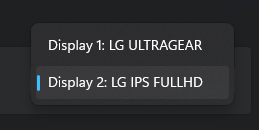
My displays both support DDC/CI LG 27GP850 and 22MP68V-Q


Hi guys,
I'm not going to directly support Insider builds, as they're still in development and I could easily be wasting my time chasing "bugs" that will be fixed prior to public release. That said, I'll try to get an updated version of the beta out sometime soon that fixes some of the major bugs (like preventing sleep).

Hi guys,
I'm not going to directly support Insider builds, as they're still in development and I could easily be wasting my time chasing "bugs" that will be fixed prior to public release. That said, I'll try to get an updated version of the beta out sometime soon that fixes some of the major bugs (like preventing sleep).
yea, I am using twinkle tray 1.14 beta actually because of this 😁
Hi guys, I'm not going to directly support Insider builds, as they're still in development and I could easily be wasting my time chasing "bugs" that will be fixed prior to public release. That said, I'll try to get an updated version of the beta out sometime soon that fixes some of the major bugs (like preventing sleep).
yea, I am using twinkle tray 1.14 beta actually because of this 😁
Has this been released somewhere, or do we need to compile it ourselves?

Hi guys, I'm not going to directly support Insider builds, as they're still in development and I could easily be wasting my time chasing "bugs" that will be fixed prior to public release. That said, I'll try to get an updated version of the beta out sometime soon that fixes some of the major bugs (like preventing sleep).
yea, I am using twinkle tray 1.14 beta actually because of this 😁
Has this been released somewhere, or do we need to compile it ourselves?
in #296
Hi guys, I'm not going to directly support Insider builds, as they're still in development and I could easily be wasting my time chasing "bugs" that will be fixed prior to public release. That said, I'll try to get an updated version of the beta out sometime soon that fixes some of the major bugs (like preventing sleep).
yea, I am using twinkle tray 1.14 beta actually because of this 😁
Has this been released somewhere, or do we need to compile it ourselves?
in #296
Thanks!

The 1.14.0 beta seems to work fine on the newer insider builds. There are some other projects that have issues with these insider builds too, looks like they are changing a lot internaly.

I found that this problem can be opened by using the administrator to achieve normal operation. Maybe the permissions have been modified in the latest windows

Closing this issue, as Windows 11 22H2 compatibility has been resolved as of v1.14.0.