

 xamarin
Android crashes on startup when linker links SDK Assemblies with a SplashActivity
Description
When there is a splash activity and the Linker settings are set to link SDK Assemblies only or SDK and User Assemblies, Xamarin Android crashes on startup.
Splash screen docs to create splash screen - https://docs.microsoft.com/en-us/xamarin/android/user-interface/splash-screen
Steps to Reproduce
- Create a new project, upgrade nugets
- Add a splashactivity.cs to the android package, set MainLauncher to true, change MainActivity MainLauncher to false
- Add the splash screen xml file to drawable folder
- Add the splash screen to the styles.xml in the values folder
- Change Debug settings (to mimic release settings): bundle package, Dex: d8, Code Shrinker: Proguard, Linking: SDK Assemblies only, uncheck Use Shared Runtime
- Debug to an actual device

Expected Behavior
Show the startup splash screen and start the project
Actual Behavior
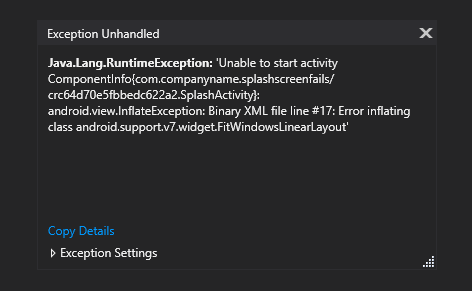
Crash on startup with the following error message:
Java.Lang.RuntimeException: 'Unable to start activity ComponentInfo{com.companyname.splashscreenfails/crc64d70e5fbbedc622a2.SplashActivity}: android.view.InflateException: Binary XML file line #17: Error inflating class android.support.v7.widget.FitWindowsLinearLayout'
Basic Information
- Version with issue: Visual Studio 2019 16.5.4 Xamarin Forms 4.5.0.617, also tested with 4.6.0.616-pre4 Debugging to a device: Motorola XT1029 (Android 5.1 - API 22)
Screenshots
Crash message:
Reproduction Link
Attaching project SplashScreenFails.zip
Workaround
Tried the workarounds mentioned here but nothing has worked
faking the linker
    class LinkerPleaseLink
    {

        static bool falseflag = false;
        static LinkerPleaseLink()
        {
            if (falseflag)
            {
                var ignore = new FitWindowsFrameLayout(Application.Context);
            }
        }
    }
as well as adding a proguard.cfg file with the following statements
-keep class android.support.v7.widget.** { *; }
-dontwarn android.support.v7.widget.**

Update to workaround I was able to get it to work - it was something related to ProGuard. I created a proguard.cfg file, set it as a proguard config file in the properties, and added the following line:
-keep class android.support.v7.** { *; }
I don't understand why something as simple as SplashAcitivity would not work out of the box tho, this workaround took me almost a day to find/figure out.
it's a bit odd that you have to add anything. We have a proguard file setup that takes this stuff into account
https://github.com/xamarin/Xamarin.Forms/blob/master/.nuspec/proguard.cfg#L1
if you use r8 instead of proguard do you still need your proguard file?

yes, with r8 I am seeing the same crash. if you notice in my op I had mentioned I had also tried adding
-keep class android.support.v7.widget.** { *; }
the only difference was this time around I went one namespace shallower and it worked:
-keep class android.support.v7.** { *; }
There was a post from 2018 on this https://forums.xamarin.com/discussion/comment/346206/#Comment_346206
I have encountered the same problem. My app started crashing when I have added a splash screen. The problem was with Proguard. The splash activity was shown for some time, but the crash happened when the app tried to switch to the main activity.
I have added the file with Proguard rules from https://github.com/xamarin/Xamarin.Forms/blob/master/.nuspec/proguard.cfg#L1. But I had to add one more rule to this file so that the app would not crash:
-keep class android.support.v7.widget.FitWindowsLinearLayout { *; }
-dontwarn android.support.v7.widget.FitWindowsLinearLayout
Note that in the file, there is rule for "FitWindowsFrameLayout", but "FitWindowsLinearLayout" was also required to prevent the crash.
