

 xamarin
GoogleTagManager working eratically in Android after initial load
Xamarin.Android Version (eg: 6.0): 10.1.4.0
Operating System & Version (eg: Mac OSX 10.11): Windows 10 I'm using VIsual studio 2019
Describe your Issue Followed every step right:
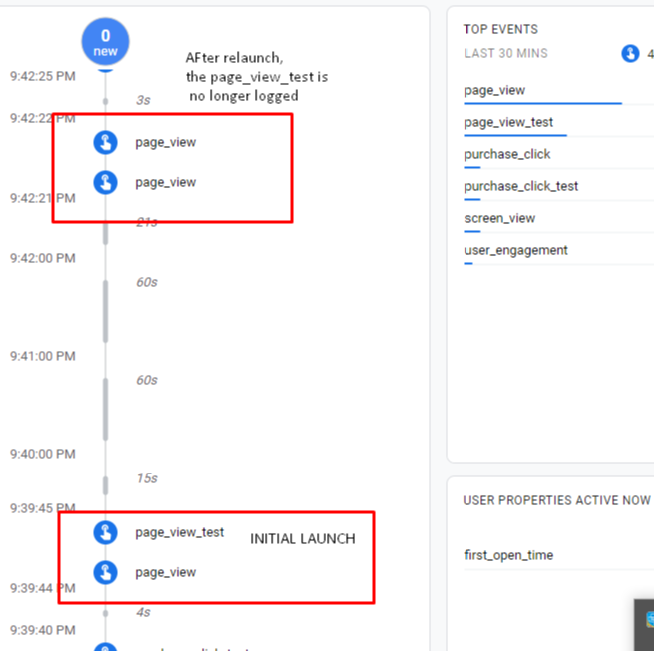
FB, GA and TM properly set up Install necessary nugets as stated below. Put the JSON of the tag manager container inside assets/containers When I tested in iOS, it went smoothly. In Android, everything works on intial load. However if you close the app and launch it again, tag manager doesn't work anymore and the tags are not affecting events logged in FB and GA.
See screenshot for reference:
Relevant information Add relevant project settings from *.csproj file:
Packages used:
<PackageReference Include="Xamarin.GooglePlayServices.Analytics" Version="60.x" />
<PackageReference Include="Xamarin.GooglePlayServices.Base" Version="60.x />
<PackageReference Include="Xamarin.GooglePlayServices.TagManager" Version="60.x /> <PackageReference Include="Xamarin.Firebase.Analytics" Version="60.x /> <PackageReference Include="Xamarin.Firebase.Messaging" Version="60.x/>
Minimal Repro Code Sample
Create a Xamarin Forms app.
In the Android project, install the necessary nuget packages.
Enable firebase and call _firebaseAnalytics.SetAnalyticsCollectionEnabled(true);.
Log some events
Create a GA and google tag manager account. Create a container (Android), then download the JSON file. Put the JSON file inside Assets/containers folder.
Close the app and relaunch again.
Run the application while Device logcat is running (you can check error here).


I need more info:
- what is "inital load"?
- what does "FB, GA and TM properly set up" mean? FB is firebase, GA (Google Ads, Google Analytics)? TM (TagManager)?

@moljac - initial load means when you initially install the application and launch it, GTM works as expected and the tags that I set up do what they suppose to. However, if you close the app and launch it again, the tags no longer log the expected events.
That's right, FB is firebase and GTM is google tag manager. GA is google analytics. FB and GA is always working fine as whenever I log something in FB(data layer), it gets logged in GA. It's only the GTM that has the problem.
For proper setup, I just installed these packages:
PackageReference Include="Xamarin.GooglePlayServices.Analytics" Version="60.x" /> PackageReference Include="Xamarin.GooglePlayServices.Base" Version="60.x /> PackageReference Include="Xamarin.GooglePlayServices.TagManager" Version="60.x /> PackageReference Include="Xamarin.Firebase.Analytics" Version="60.x /> PackageReference Include="Xamarin.Firebase.Messaging" Version="60.x/>
@moljac , to add, I'm seeing this error in the device logcat:
container not loaded yet: deferring event interceptor
@aian23 Those are very old versions. Why are you using those? Can't you try newer versions? 71.x at least, though that is old too.
@moljac , I wanted to use the 71.x versions and actually have tried those higher versions initially, but unfortunately those higher versions are more unstable. I'm encountering these issues which hasn't been fixed yet:
https://github.com/xamarin/GooglePlayServicesComponents/issues/349 https://github.com/xamarin/GooglePlayServicesComponents/issues/260
Any recommendations that might help? Have you recreated the issue?
@aian23 I tried several fixes few months ago, but they did not work. Then I had to switch to other tasks (AndroidX and GPS-FB with AndroidX dependencies 1xx version). I hope that I will find some time for more attempts soon.
Any recommendations that might help?
Manifest merger was one from top of my head, but users said that it solved other issues, but not this one.
Have you recreated the issue?
I have one repro sample from one of the issues you mentioned. I wish I could find some time to go through google tutorials and recreate those samples. That would help me and you.
@moljac - If it helps, I think what's happening is that there's a problem in loading the containers. As I was checking the issue, I saw these in the device log cat when the tag manager event triggers WORK:
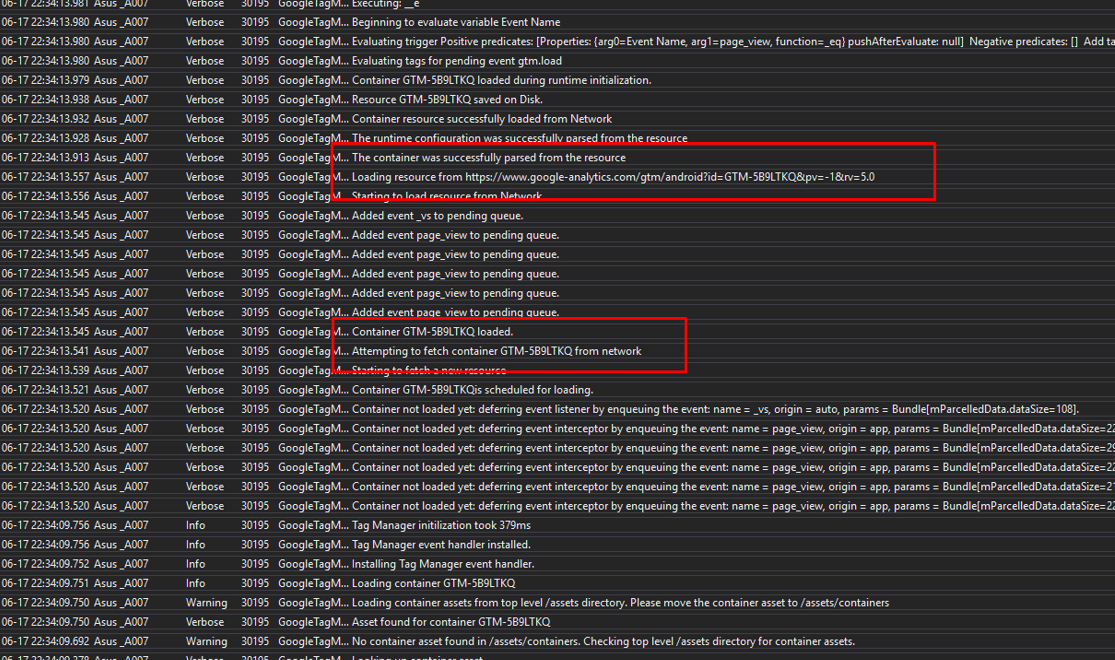
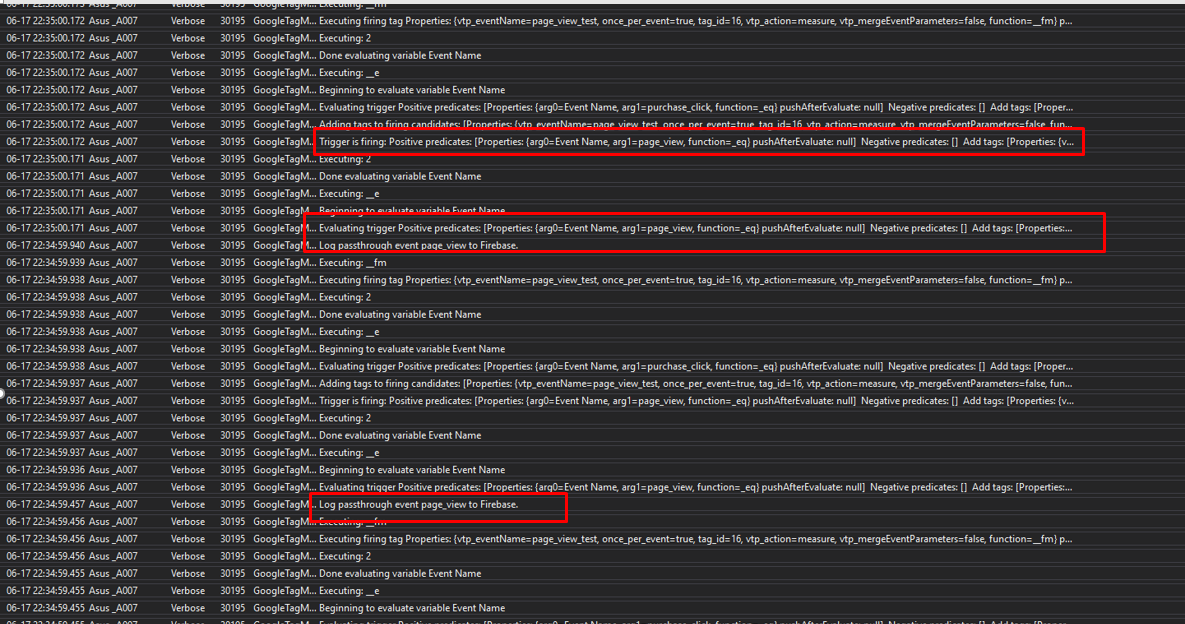
as seen in the screenshots above, what happened was that the container was loaded from the network. I also saw an item that says: "Trigger is firing: Positive predicates...."
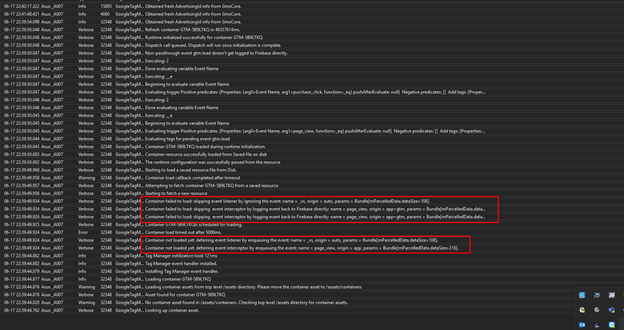
However, for the logs that I saw for the times that the event wasnt firing, I saw that the container is only being fetched from a saved resource in the disk. Moreover, I don't see the "Trigger is firing" log. See screenshot below:
@moljac , just wanted to ask if you ever get a chance to look at these logs or recreate the issue. Thanks!
@aian23 yes. I'm currently trying to find workaround for that issue (and few other similar issues).
@moljac awesome. Excited with this update! What was the cause of this issue? Hoping you would be able to find a workaround for this. Thanks!!
@aian23
What was the cause of this issue?
Not sure yet. Either bug in tooling or limitations in tooling (differences between java and c# idioms which are difficult to map 1:1)
Hoping you would be able to find a workaround for this.
If I cannot there are guys who will able to help. For sure.
@moljac I see, so it's actually mapping. I'll just be monitoring this one here and hope it gets fixed soon.. I'm sure a lot of devs will be happy also. :)
@moljac - Good day! Just wanted to ask if you were able to find some fixes or workaround for this. THanks!
@moljac , any updates on this issue? A lot of our work has been affected by this issue so we are very keen to check if there are any potential fixes or updates for this. Thanks!
@aian23 I need to fix few smaller AndroidX issues and some of those affect GPS-FB. I hope this week.
@moljac thanks for the update. Looking forward for the fix for this issue this week. We're really keen on getting it. Cheers!
@aian23 Doing my best, but keep on hitting obstacles. I had to update cake scripts and request update from few tool authors, because CI builds were failing due to older dependencies and new dotnet core installed. Good news is that it is solved (IMO)
@moljac really appreciate the updates and I'm real glad that it is now fixed. Hope you get over the CI hump so those builds get through. Really appreciate it!
OK. Seems I managed to cleanup + update + upgrade everything for CI, so now local builds and CI are green.
I am starting to tag branches. i wil not release stable versions yet, but most likely next week.
Thanks for the update @moljac ! So is there an available pre-release version already? Keen to test it while I await the stable versions but this is absolutely great news!
Published all 4 branches.
I hope that remove-node will work. That was brute force solution/workaround in the past. Otherwise I need to dig in deeper and see what is going on. One of the biggest problems is that google is shifting namespaces and code from artifact to artifact.
@moljac thanks for the update! Just wanted to clarify, did you fix it in a new version of 71 or v60? Also, would the new versions be available next week? If it can be available tomorrow though that would be fantastic!
@aian23 Trying to fix 71.xyz, but problems on CI and outdated sample projects. Can you try those published and provide feedback, so I can see if i did hit the sweet spot. Namely I removed node (the whole internal namespace/package). This usually works, but I hate to say it is solved. And I simply have no time to work on samples.
60.xyz will not be fixed for sure. 71.xyz only because I said so (I'm the man - decision man in this case, cos I'm the only one)
@moljac no worries, I understand if it gets fixed in 71.xyz. I checked the Xamarin.GooglePlayServices.TagManager nuget package versions just earlier but I can't see a new version for 71.xyz:
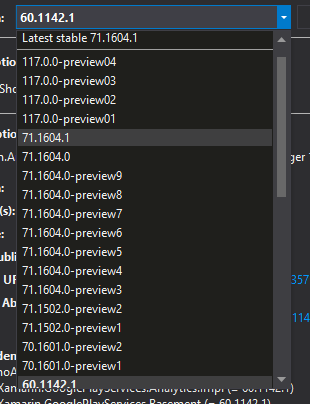
The latest version for 71.xyz that I'm seeing was updated last 5/12/2020 so I'm a bit confused. Can you guide me with the steps so I can try the changes you made? Or maybe I just got confused and there are no new versions published to nuget.org yet?
@aian23 I have problems with lane (build for 71.xyz - curently on master). Could you try other newer packages please, 1xx (I pushed 2 version then i wanted to do 71 and got stuck on CI)
@moljac I see.. I thought the CI issues were already resolved. I tried using the 1xxx versions in the past but our app doesn't have support for Android X yet and so it's not compatible. Perhaps in the future we can upgrade to it (Im assuming it also has the fix right?) but not right now. I hope the builds for 71.xyz can push through so I can test those ones since those are compatible with our app. Hope you understand and hoping for luck in the builds
@aian23 I fixed 3 100.xyz branches (bindings and tooling versions) with GPS-FB with AndroidX dependencies, but not 71.x. That branch (curently master soon 71-android-support) was "neglected" and it is quite different from 100.xyz with respect of tooling.
All 4 (3+1) branches have the same fix and I just published 71 nugets with TagManager and several other fixes.
Please try them out and provide me/us feedback if the problem was solved.
@moljac thanks for the feedback. I tried testing it right now using the new 71.1630.4. I used the ff nuget:
Xamarin.Firebase.Analytics <Version>71.1630.4</Version> Xamarin.Firebase.Core <Version>71.1601.4</Version> Xamarin.Firebase.Messaging <Version>71.1740.4</Version> Xamarin.GooglePlayServices.Base <Version>71.1610.4</Version> Xamarin.GoogePlayService.TagManager <Version>71.1604.0</Version>
After doing so, the google tag manager still is not working. Here's some info that I got from device log cat:
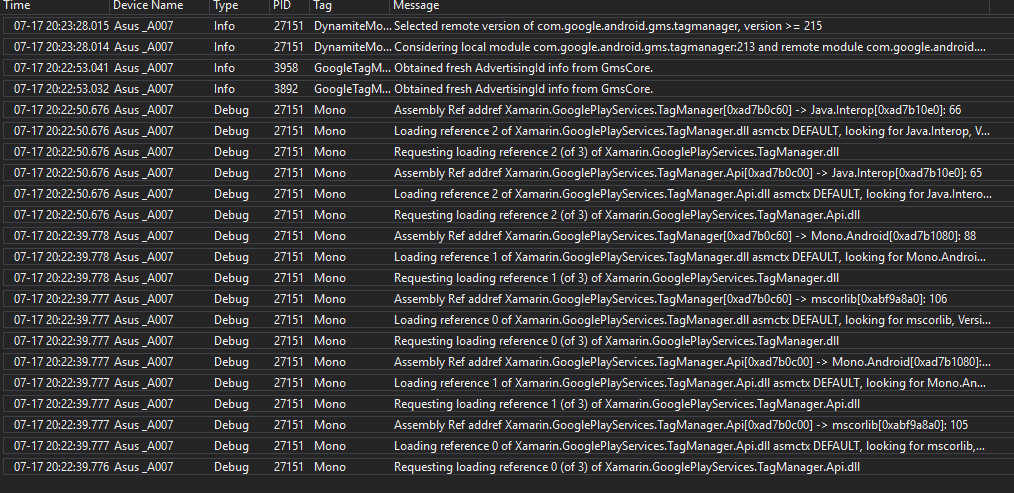
I noticed that this time, the containers aren't even being loaded. In V60.x the containers are still being loaded but erratically they fail.
@moljac were you able to check last Friday why the changes didn't fix the issue? Let me know if I can help out by providing more logs and information.