xBimTeam
Failed to load Xbim.Geometry.Engine64.dll
Some of my colleagues can't run my xBim Application with this log:
Failed to load Xbim.Geometry.Engine64.dll в Xbim.Geometry.Engine.Interop.XbimGeometryEngine..ctor(ILogger`1 logger) в Xbim.ModelGeometry.Scene.Xbim3DModelContext.get_Engine() в Xbim.ModelGeometry.Scene.Xbim3DModelContext.CreateContext(ReportProgressDelegate progDelegate, Boolean adjustWcs)
But some of them have no problem and everything works well. What's the reason of this truble?
I put these files to application folder:


And what deployment routines do I need? I just give them this files. There's no any installer or deployment process for my xBim application. Do I need to register xBim dll's on computers of my colleagues?
They probably don't have the right version of Microsoft Visual C++ Redistributable package in their system. This usually comes with updates, but you are better to check.
This is usually one of a several issues, all of which have solutions in the Issues in this repo:
- Missing VC runtime that the Geometry Engine depends on. Installing the latest Windows 10 SDK should do the trick, or else see https://support.microsoft.com/en-us/topic/the-latest-supported-visual-c-downloads-2647da03-1eea-4433-9aff-95f26a218cc0
- Using incompatible dependencies. e.g. a v5 Geometry with a v4 Essentials, or vice versa - we broke some interfaces between versions
- Bringing in an incompatible version of Microsoft.Extensions.Logging transitively from some 3rd party dependency. i.e. we use M.E.L 2.1.1 but that's not compatible with 1.x versions (e.g. older Revit has this issue)
- The native geometry engine is not being copied into bin, or it's the wrong platform. E.g. 32 bit apps should have Xbim.Geometry.Engine32.dll while 64bit apps should have Xbim.Geometry.Engine64.dll. If you build for MSIL what you deploy depends on if your OS is 32 bit or 64bit...
- ASP.NET (Core) Web apps have issues when both 64bit and 32 bit Geometry Engines are present in the bin folder resulting in a BadImageFormatException
In your case it looks like one of 1-4 might be the issue. Hard to tell without the exception.

Hi i encountered the same error my versions are: Essentials 5.1.323 Geometry 5.1.403 through analyzing the debug output I found that the Engine64.dll file was taken from the GAC deleted the GAC everything works correctly
hope it helps

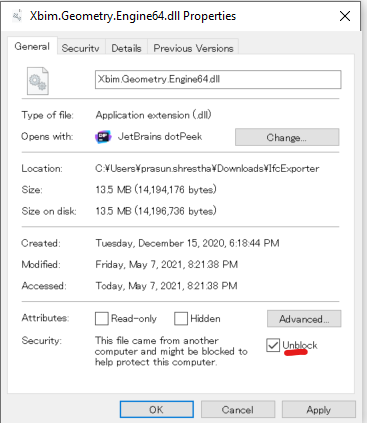
I found that this issue was caused by windows feature- auto blocking the dlls and exes downloaded from network. I ticked the unblock checkbox in properties of Xbim.Geometry.Engine64.dll and it worked. This unblock feature or bug seems to block only references of references as this dll is referenced by Xbim.Geometry.Engine.Interop.dll .