

 xBimTeam
Applicability of the GeometryEngine
Hi there,
I'm wondering if every building element can be parsed by the GeometryEngine. I was testing to read a building file in ifc format by using GeometryEngine, but some of the walls can not be found in the output geometry. I have no idea if it is my fault or some limities in GeometryEngine.
Looking forward to your reply.
Sincerely Maggie

Hi Maggie,
I don't think the building element type will be a factor, but there are always some edge cases on the handling of different Geometry primitives used in their representation, especially if using some of the newer IFC4 geometries. Typically this is as a result of invalid output from authoring tools that we need to handle.
To investigate we'd have to get hold of an IFC containing the element at fault. If you can't share the whole file there are ways to extract a single element from a model.

Hi Maggie,
I don't think the building element type will be a factor, but there are always some edge cases on the handling of different Geometry primitives used in their representation, especially if using some of the newer IFC4 geometries. Typically this is as a result of invalid output from authoring tools that we need to handle.
To investigate we'd have to get hold of an IFC containing the element at fault. If you can't share the whole file there are ways to extract a single element from a model.
Hi Andy,
Thank you for your reply! Yes I could share the file. And I used the geometry engine to read this, which is created as below. var _sourceModel = IfcStore.Open(filePath); var context = new Xbim3DModelContext( _sourceModel ); context.CreateContext(); GeometryEngine = new XbimGeometryEngine();
The element: #53097= IFCWALL('3Q72w3wjAoGutj5LQFQy4r',#30,'Wand 1-002',$,$,#53007,#53086,'DA1C2E83-EAD2-B243-8DED-15568F6BC135'); returns a null IXbimSolid.
I would be nice if you could take a look to this.
Looking forward to your reply!
ARCHICAD Demoprojekt Büro 24-IFC2x3-BREP.zip
What version of Geometry Engine are you using? I had a quick look in Xplorer using the very latest GeometryEngine (5.1.338) and it reads & renders fine & no errors:
Wall 'Wand 1-002' renders fine (as far as I can tell).
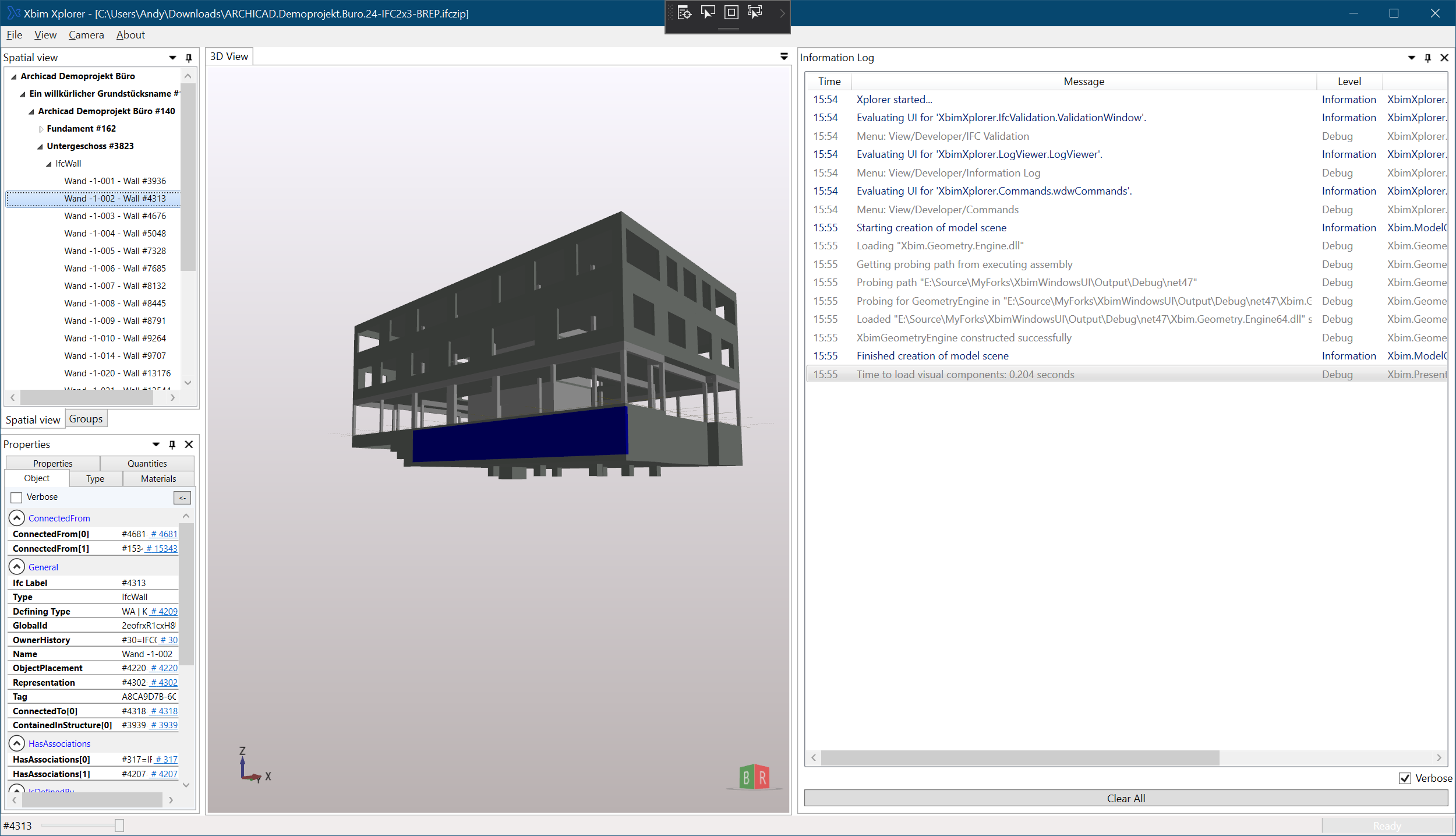
What version of Geometry Engine are you using? I had a quick look in Xplorer using the very latest GeometryEngine (5.1.338) and it reads & renders fine & no errors:
Wall 'Wand 1-002' renders fine (as far as I can tell).
Hi Andy,
Ok! Thank you so much! I will try to test with latest version!
And I have another question according to the Xplorer. I tried to read the code in Xplorer and see how the GeoEngine works inside. I noticed it reads the geometry by using IGeometryStoreReader and get the shapeInstances, and finally get: IXbimShapeGeometryData shapeGeom = geomReader.ShapeGeometry(shapeInstance.ShapeGeometryLabel);
While I'm reading the geometry by using the IXbimGeometryEngine to get IXbimSolid and do it like this: IXbimSolid solid = GeomEngine.CreateSolidSet(geometryItem).First;
I noticed there are might be some differences between these two objects. It would be nice if you could tell me the differences and provide me the right way to read the geometry.
Looking forward to your reply!
Kind Regards Maggie