

 xBimTeam
Memory violation error when call CreateContext method after initiate transaction on IfcStore object and change length unit
After I call IfcStore.Open() and before creating a CreateContext, my system needs to check the IfcUnitEnum. If the model factor is not equals to "1", then it changes the IfcUnitEnum to fcSIUnitName.METRE, get all points and calls SetXYZ (from IfcCartesianPoint) to ajust the size.
However, when I try to initialize a model context from the model, it throws an exception:
"System.AccessViolationException: Attempted to read or write protected memory. This is often an indication that other memory is corrupt."
Follows the example:
public void OpenModel(string fileName)
        {
            IfcStore ifcModel = IfcStore.Open(fileName);

            ChangeLengthUnitIfNeeded(ifcModel);

            if (ifcModel.GeometryStore.IsEmpty)
            {
                context = new Xbim3DModelContext(ifcModel);
                context.CreateContext();
            }
        }
private void ChangeLengthUnitIfNeeded(IfcStore ifcModel)
        {
            using (var txn = ifcModel.BeginTransaction())
            {
                bool Ifc2X3 = ifcModel.SchemaVersion == Xbim.Common.Step21.XbimSchemaVersion.Ifc2X3;
                bool Ifc4 = ifcModel.SchemaVersion == Xbim.Common.Step21.XbimSchemaVersion.Ifc4;
                IEntityCollection instances = ifcModel.Instances;
                double factor = ifcModel.ModelFactors.LengthToMetresConversionFactor;

                if (factor != 1)
                {
                    if (Ifc2X3)
                    {
                        var unit = instances.OfType<Xbim.Ifc2x3.MeasureResource.IfcUnitAssignment>()
                        .FirstOrDefault();

                        unit?.SetOrChangeSiUnit(Xbim.Ifc2x3.MeasureResource.IfcUnitEnum.LENGTHUNIT,
                        Xbim.Ifc2x3.MeasureResource.IfcSIUnitName.METRE, null);

                        var points = instances.OfType<Xbim.Ifc2x3.GeometryResource.IfcCartesianPoint>().ToList();

                        foreach (var point in points)
                        {
                            point.SetXYZ(Math.Round(point.X * factor, 3),
                            Math.Round(point.Y * factor, 3),
                                       Math.Round(point.Z * factor, 3));
                        }
                    }
                    else if (Ifc4)
                    {
                        var unit = instances.OfType<Xbim.Ifc4.MeasureResource.IfcUnitAssignment>()
                        .FirstOrDefault();

                        unit?.SetOrChangeSiUnit(IfcUnitEnum.LENGTHUNIT,
                        IfcSIUnitName.METRE, null);

                        var points = instances.OfType<Xbim.Ifc4.GeometryResource.IfcCartesianPoint>().ToList();

                        foreach (var point in points)
                        {
                            point.SetXYZ(Math.Round(point.X * factor, 3),
                            Math.Round(point.Y * factor, 3),
                            Math.Round(point.Z * factor, 3));
                        }
                    }
                }

                txn.Commit();
            }
        }
If ChangeLengthUnitIfNeeded method is commented CreateContext works normally.
Screenshot evidencing error on Visual Studio:
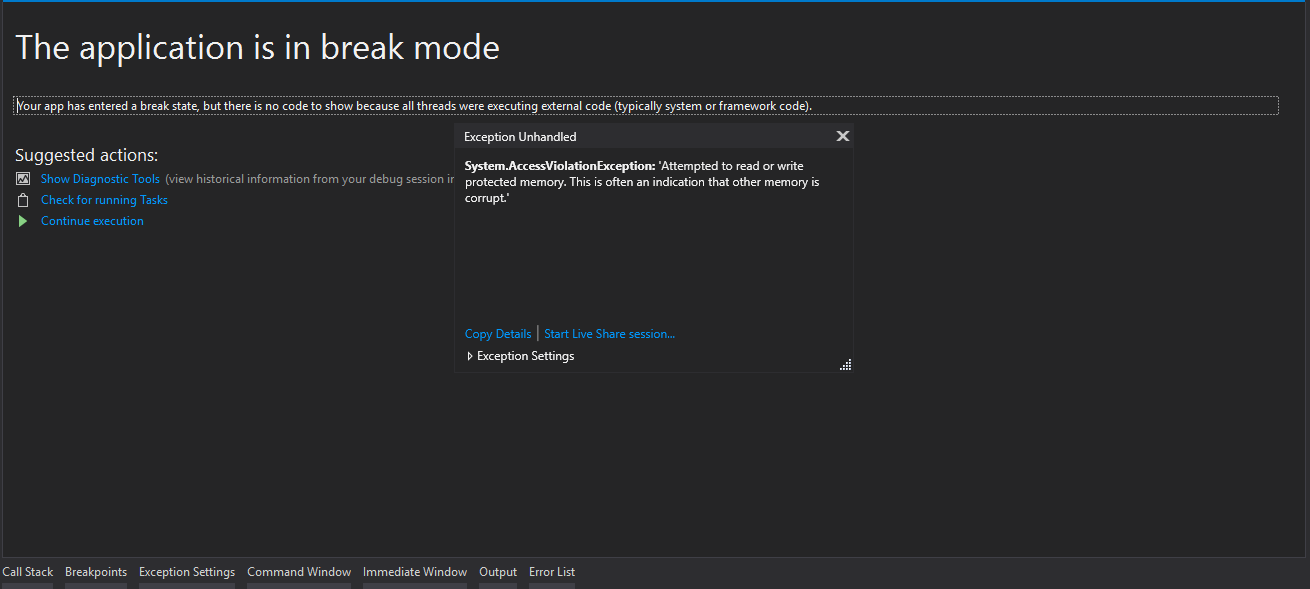
I would like to know how change length unit without throw exception?
Thanks in advance!

Does the model throw an exception when the model is not modified?
If you want to change the actual units of the model that would be far more complex operation. It is not enough to convert (scale) points. You will also need to adjust all length based attributes of all geometry (i.e. extrusion length and many others). Also, you will need to change the precision which is very important to join adjacent points and is therefore also dependant on the units.
Your current code will likely lead to invalid geometries which might cause the geometry engine to crash.

Does the model throw an exception when the model is not modified?
If you want to change the actual units of the model that would be far more complex operation. It is not enough to convert (scale) points. You will also need to adjust all length based attributes of all geometry (i.e. extrusion length and many others). Also, you will need to change the precision which is very important to join adjacent points and is therefore also dependant on the units.
Your current code will likely lead to invalid geometries which might cause the geometry engine to crash.
When model is not change, an exception is not thrown.
As I said earlier, there are many other aspects to consider if you want to convert the whole file into different units. It is usually much easier to change the setting in the authoring SW (it is often using its internal units and have reliable routines to convert everything on export) or to convert the processed geometry where you just deal with 3D points.
As I said earlier, there are many other aspects to consider if you want to convert the whole file into different units. It is usually much easier to change the setting in the authoring SW (it is often using its internal units and have reliable routines to convert everything on export) or to convert the processed geometry where you just deal with 3D points.
Can you show me an example of how to make these changes? I would be grateful for that.
Hi Renan,
if you read between the lines you'll see that Martin is suggesting that this is not trivial at all. The advice is actually to change these settings in the editor and exporting directly in the desired units.
In any case it's not clear why you would want to do that, because we support the federation of models with different units out of the box.
Also, if you want to convert everything to the same unit you can use the modelfactor.onemeter value to scale the information before presenting it in the UI.
I hope this helps, Claudio
On Thu, 13 Feb 2020 at 13:17, Renan Faccin [email protected] wrote:
As I said earlier, there are many other aspects to consider if you want to convert the whole file into different units. It is usually much easier to change the setting in the authoring SW (it is often using its internal units and have reliable routines to convert everything on export) or to convert the processed geometry where you just deal with 3D points.
Can you show me an example of how to make these changes? I would be grateful for that.
— You are receiving this because you are subscribed to this thread. Reply to this email directly, view it on GitHub https://github.com/xBimTeam/XbimGeometry/issues/246?email_source=notifications&email_token=ABJY7MM7PQMYTNQQEKJI4Y3RCU257A5CNFSM4KUBQU6KYY3PNVWWK3TUL52HS4DFVREXG43VMVBW63LNMVXHJKTDN5WW2ZLOORPWSZGOELUYBIQ#issuecomment-585728162, or unsubscribe https://github.com/notifications/unsubscribe-auth/ABJY7MOGS6JLADNJFRYSXR3RCU257ANCNFSM4KUBQU6A .
