

 wwmm
wwmm
Output effects ceased to exist on the wire
EasyEffects Version
6.2.6-3
What package are you using?
Other (specify below)
Distribution
Debian (testing)
Describe the bug
Recently installed pipewire, pipewire-pulse, wireplumber and easyeffects. Set up an equalizer and compressor on easyeffects and it was working correctly. After a PC restart, Easyeffects now shows the effects on the effects tab, but does not apply them to the audio stream. In Helvum, the effects are now missing. HOWEVER, I worked around the issue by recreating the same effects on the Input effects instead of the Ouput in Easyeffects. Then I rewired them in Helvum so they affect the sink instead of the source...
This is far from ideal and I can't find any error in logs that would explain this. Help.
Expected Behavior
Having effects in the Output tab should apply the effects to the sound output. They should be visible in Helvum like they were before.
Debug Log
Debug Log
$ G_MESSAGES_DEBUG=easyeffects easyeffects
(process:31558): easyeffects-DEBUG: 22:43:19.784: 	easyeffects.cpp:35	easyeffects version: 6.2.6
(process:31558): easyeffects-DEBUG: 22:43:19.784: 	easyeffects.cpp:45	locale directory: /usr/share/locale
(easyeffects:31558): easyeffects-DEBUG: 22:43:19.786: 	presets_manager.cpp:72	system input presets directory: "/etc/easyeffects/input";
(easyeffects:31558): easyeffects-DEBUG: 22:43:19.786: 	presets_manager.cpp:72	system input presets directory: "/etc/xdg/easyeffects/input";
(easyeffects:31558): easyeffects-DEBUG: 22:43:19.786: 	presets_manager.cpp:75	system output presets directory: "/etc/easyeffects/output";
(easyeffects:31558): easyeffects-DEBUG: 22:43:19.786: 	presets_manager.cpp:75	system output presets directory: "/etc/xdg/easyeffects/output";
(easyeffects:31558): easyeffects-DEBUG: 22:43:19.786: 	presets_manager.cpp:215	user presets directory already exists: /home/efi/.config/easyeffects/
(easyeffects:31558): easyeffects-DEBUG: 22:43:19.786: 	presets_manager.cpp:215	user presets directory already exists: /home/efi/.config/easyeffects/input
(easyeffects:31558): easyeffects-DEBUG: 22:43:19.786: 	presets_manager.cpp:215	user presets directory already exists: /home/efi/.config/easyeffects/output
(easyeffects:31558): easyeffects-DEBUG: 22:43:19.786: 	presets_manager.cpp:215	user presets directory already exists: /home/efi/.config/easyeffects/autoload/input
(easyeffects:31558): easyeffects-DEBUG: 22:43:19.786: 	presets_manager.cpp:215	user presets directory already exists: /home/efi/.config/easyeffects/autoload/output
(easyeffects:31558): easyeffects-DEBUG: 22:43:20.435: 	easyeffects.cpp:60	Exitting the main function with status: 1
Additional Information
No response

Your logs are too short. An EasyEffects instance was probably running in the background. Kill it easyeffects -q before trying to get logs.
Al have in mind that in other to save CPU power EasyEffects unlinks and disconnects its filters from the PipeWire graph when there is no active audio application playing to / recording from our virtual devices.

$ easyeffects -q; sleep 5; G_MESSAGE_DEBUG=easyeffects easyeffects

(easyeffects:36255): easyeffects-WARNING **: 01:16:11.430: 	lv2_wrapper.cpp:65	Could not find the plugin: http://drobilla.net/plugins/mda/Loudness

(easyeffects:36255): easyeffects-WARNING **: 01:16:11.430: 	lv2_wrapper.cpp:353	http://drobilla.net/plugins/mda/Loudness port symbol not found: loudness

(easyeffects:36255): easyeffects-WARNING **: 01:16:11.430: 	lv2_wrapper.cpp:353	http://drobilla.net/plugins/mda/Loudness port symbol not found: output

(easyeffects:36255): easyeffects-WARNING **: 01:16:11.430: 	lv2_wrapper.cpp:353	http://drobilla.net/plugins/mda/Loudness port symbol not found: link

(easyeffects:36255): easyeffects-WARNING **: 01:16:11.851: 	lv2_wrapper.cpp:65	Could not find the plugin: urn:zamaudio:ZaMaximX2

(easyeffects:36255): easyeffects-WARNING **: 01:16:11.851: 	lv2_wrapper.cpp:353	urn:zamaudio:ZaMaximX2 port symbol not found: thresh

(easyeffects:36255): easyeffects-WARNING **: 01:16:11.851: 	lv2_wrapper.cpp:353	urn:zamaudio:ZaMaximX2 port symbol not found: ceil

(easyeffects:36255): easyeffects-WARNING **: 01:16:11.851: 	lv2_wrapper.cpp:353	urn:zamaudio:ZaMaximX2 port symbol not found: rel

(easyeffects:36255): easyeffects-WARNING **: 01:16:11.981: 	rnnoise.cpp:68	The RNNoise library was not available at compilation time. The noise reduction filter won't work

(easyeffects:36255): easyeffects-WARNING **: 01:16:12.102: 	lv2_wrapper.cpp:65	Could not find the plugin: http://drobilla.net/plugins/mda/Loudness

(easyeffects:36255): easyeffects-WARNING **: 01:16:12.102: 	lv2_wrapper.cpp:353	http://drobilla.net/plugins/mda/Loudness port symbol not found: loudness

(easyeffects:36255): easyeffects-WARNING **: 01:16:12.103: 	lv2_wrapper.cpp:353	http://drobilla.net/plugins/mda/Loudness port symbol not found: output

(easyeffects:36255): easyeffects-WARNING **: 01:16:12.103: 	lv2_wrapper.cpp:353	http://drobilla.net/plugins/mda/Loudness port symbol not found: link

(easyeffects:36255): easyeffects-WARNING **: 01:16:12.529: 	lv2_wrapper.cpp:65	Could not find the plugin: urn:zamaudio:ZaMaximX2

(easyeffects:36255): easyeffects-WARNING **: 01:16:12.529: 	lv2_wrapper.cpp:353	urn:zamaudio:ZaMaximX2 port symbol not found: thresh

(easyeffects:36255): easyeffects-WARNING **: 01:16:12.529: 	lv2_wrapper.cpp:353	urn:zamaudio:ZaMaximX2 port symbol not found: ceil

(easyeffects:36255): easyeffects-WARNING **: 01:16:12.529: 	lv2_wrapper.cpp:353	urn:zamaudio:ZaMaximX2 port symbol not found: rel

(easyeffects:36255): easyeffects-WARNING **: 01:16:12.660: 	rnnoise.cpp:68	The RNNoise library was not available at compilation time. The noise reduction filter won't work

(easyeffects:36272): easyeffects-WARNING **: 01:16:18.502: 	lv2_wrapper.cpp:65	Could not find the plugin: http://drobilla.net/plugins/mda/Loudness

(easyeffects:36272): easyeffects-WARNING **: 01:16:18.502: 	lv2_wrapper.cpp:353	http://drobilla.net/plugins/mda/Loudness port symbol not found: loudness

(easyeffects:36272): easyeffects-WARNING **: 01:16:18.502: 	lv2_wrapper.cpp:353	http://drobilla.net/plugins/mda/Loudness port symbol not found: output

(easyeffects:36272): easyeffects-WARNING **: 01:16:18.502: 	lv2_wrapper.cpp:353	http://drobilla.net/plugins/mda/Loudness port symbol not found: link

(easyeffects:36272): easyeffects-WARNING **: 01:16:18.926: 	lv2_wrapper.cpp:65	Could not find the plugin: urn:zamaudio:ZaMaximX2

(easyeffects:36272): easyeffects-WARNING **: 01:16:18.926: 	lv2_wrapper.cpp:353	urn:zamaudio:ZaMaximX2 port symbol not found: thresh

(easyeffects:36272): easyeffects-WARNING **: 01:16:18.926: 	lv2_wrapper.cpp:353	urn:zamaudio:ZaMaximX2 port symbol not found: ceil

(easyeffects:36272): easyeffects-WARNING **: 01:16:18.926: 	lv2_wrapper.cpp:353	urn:zamaudio:ZaMaximX2 port symbol not found: rel

(easyeffects:36272): easyeffects-WARNING **: 01:16:19.061: 	rnnoise.cpp:68	The RNNoise library was not available at compilation time. The noise reduction filter won't work

(easyeffects:36272): easyeffects-WARNING **: 01:16:19.177: 	lv2_wrapper.cpp:65	Could not find the plugin: http://drobilla.net/plugins/mda/Loudness

(easyeffects:36272): easyeffects-WARNING **: 01:16:19.177: 	lv2_wrapper.cpp:353	http://drobilla.net/plugins/mda/Loudness port symbol not found: loudness

(easyeffects:36272): easyeffects-WARNING **: 01:16:19.177: 	lv2_wrapper.cpp:353	http://drobilla.net/plugins/mda/Loudness port symbol not found: output

(easyeffects:36272): easyeffects-WARNING **: 01:16:19.177: 	lv2_wrapper.cpp:353	http://drobilla.net/plugins/mda/Loudness port symbol not found: link

(easyeffects:36272): easyeffects-WARNING **: 01:16:19.597: 	lv2_wrapper.cpp:65	Could not find the plugin: urn:zamaudio:ZaMaximX2

(easyeffects:36272): easyeffects-WARNING **: 01:16:19.597: 	lv2_wrapper.cpp:353	urn:zamaudio:ZaMaximX2 port symbol not found: thresh

(easyeffects:36272): easyeffects-WARNING **: 01:16:19.597: 	lv2_wrapper.cpp:353	urn:zamaudio:ZaMaximX2 port symbol not found: ceil

(easyeffects:36272): easyeffects-WARNING **: 01:16:19.597: 	lv2_wrapper.cpp:353	urn:zamaudio:ZaMaximX2 port symbol not found: rel

(easyeffects:36272): easyeffects-WARNING **: 01:16:19.725: 	rnnoise.cpp:68	The RNNoise library was not available at compilation time. The noise reduction filter won't work
I think you misunderstand; it's not that the effects are disconnected or hidden, it's that while having several active audio feeds into easyeffects only the input side seems to cooperate and show/use the effects, while the output side effects remain unaccessible to Helvum and ignored like if the bypass was on
Show the full log. The warnings you selected are just related to the plugins you do not have installed in your system. In thiscase we have to see if the pipeline becomes active when something is playing to EasyEffects virtual sink.
it's that while having several active audio feeds into easyeffects only the input side seems to cooperate and show/use the effects, while the output side effects remain unaccessible to Helvum and ignored like if the bypass was on
It is not clear to me what you are doing. A few pictures of EasyEffects and Pavucontrol window while these streams are active may help to clarify. Also run the command pw-dot while these streams are active. Its output file can be viewd with the program xdot.

 dot file
on the first image you can see the output filters that are loaded, but these do not appear on the graph in Helvum or the dot file
on the second image is the input tab with the copied over filters that are linked to provide sound
dot file
on the first image you can see the output filters that are loaded, but these do not appear on the graph in Helvum or the dot file
on the second image is the input tab with the copied over filters that are linked to provide sound
I do not know what log you want me to include, the output to stdin is that and I can't find any other file related to pipewire.
but these do not appear on the graph in Helvum or the dot file
The equalizer and the multiband compressor are in the dot file
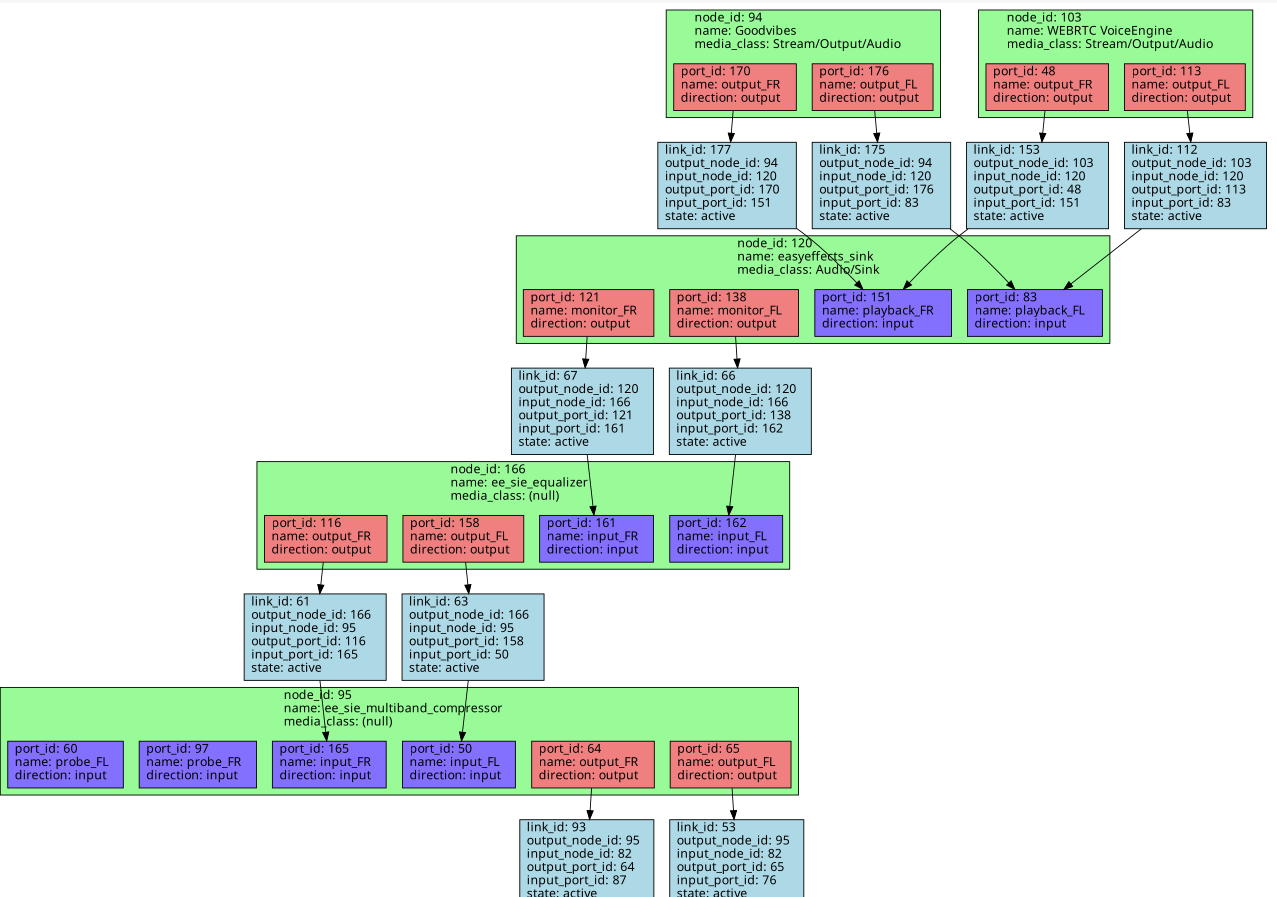 If Helvum is not displaying them while pw-dot is doing it then there is something that must have changed in Helvum and has to be reported to its developer.
I do not know what log you want me to include, the output to stdin is that and I can't find any other file related to pipewire.
That is strange. A full log has a lot more lines than the one you pasted here on Github. Maybe you terminal is hiding lines from you. You should have some about your hardware devices as well as lines about the filters being loaded and the pipeline latency.
As there is no activity in the equalizer level meters my first guess is that somehow its bypass button was activated
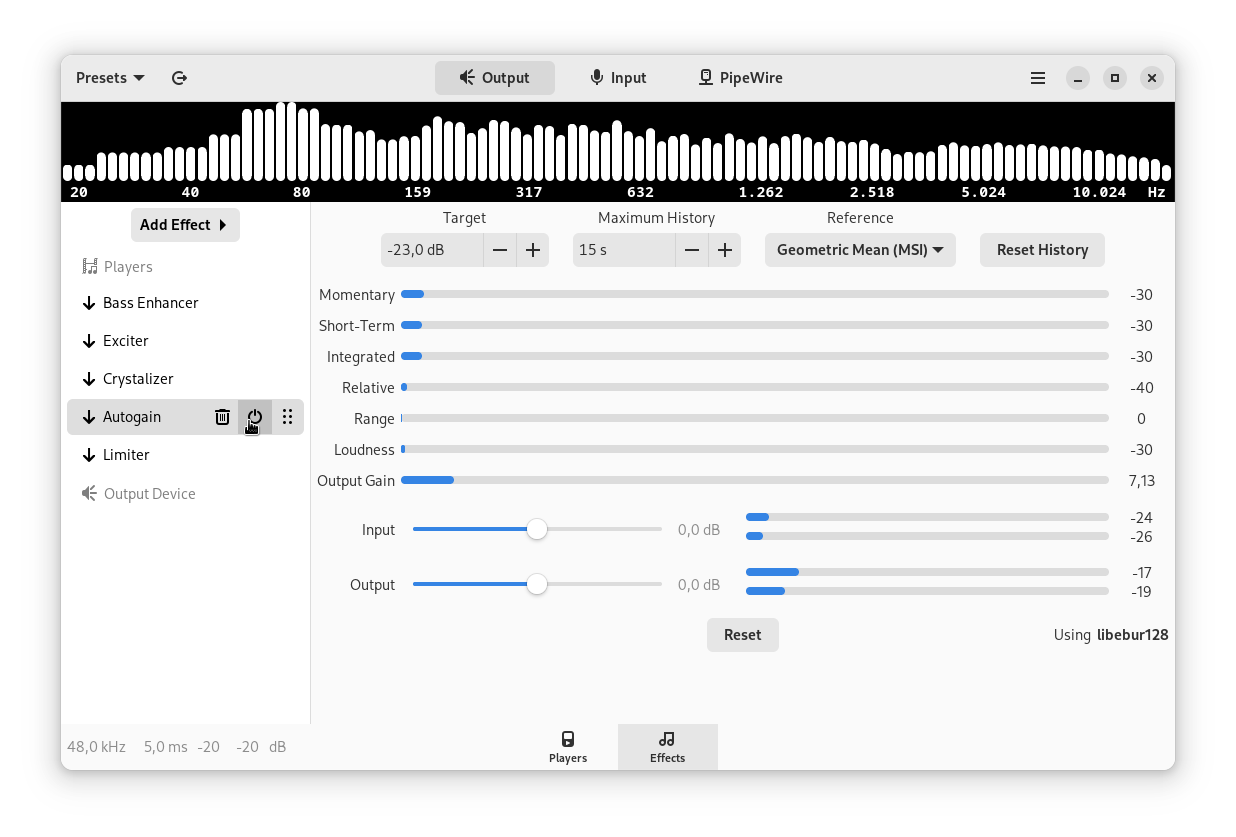 since our last release the bypass button has become a
 Enable button and it is located next to the trash icon that allows the plugin to be removed from the pipeline.
I will repeat what I said so it is clearer. The nodes you are looking at in the dot file are exactly as in Helvum, which is, not the ones I expect. In the screenshots you can see there should be FOUR nodes, two equalizers and two compressors, as I copied them. I have also made quadruple sure the bypass buttons are in the correct setting. And clicking them does not change anything anyway. Furthermore, the meters are working correctly. They display what I expect when sound is playing and I can see the node in Helvum as "spectrum". I have version 6.2.6-3 which is the latest in my repo, should I get it from another source? Also, remember that it was working correctly the first time I ran the program. I am aware of how it should work.
When adding or removing effects to the output side I see no changes in Helvum, no changes in the sound and no changes in the spectrum graph. When adding or removing effects to the input side I see the changes in Helvum, I notice the changes in the sound and I can see the changes in the spectrm graph. There is a clear difference (that shouldn't exist and didn't exist before) between the two tabs. Only the Input tab works as expected. The Output tab does not. The program as a whole is also receiving and outputting sound, just not applying the effects in the Output tab.
Regarding the logs, I don't think I can help you obtain what you want without further instructions. I do not have any kind of filtering on my terminal. It is just stock xfce4-terminal and bash.
In the screenshots you can see there should be FOUR nodes, two equalizers and two compressors, as I copied them.
Oh, I see. For some reason I was paying attention only to the output effects pipeline. Yes based on your image from EasyEffects input pipeline window there should be one equalizer and one multiband compressor node besides the one for the loudness. Even if the bypass button is pressed they should be in the pipeline.
I did a quick test with my microphone on my computer and they are working as intended. We will need to see you full log. Maybe it has some error message. Usually all that has to be done is running easyeffects -q following by G_MESSAGES_DEBUG=easyeffects easyeffects. There should be lots of line in when running both input and output effects.
Considering that the 3 plugins you are using are from the Linux Studio Plugins you may have an installation problem in its package. At least here on Arch Linux the package is named lsp-plugins. But I would expect a warning like the one about MDA if this package were not installed.
I am looking at you pw-dot output again and there is something unusual. The Equalizer and the Multiband Compressor nodes that should be in the microphone pipeline are linked to the nodes in the output pipeline. I have never seen something like this happening. Could it be that Helvum has somehow messed with the filters links?
The Equalizer and the Multiband Compressor nodes that should be in the microphone pipeline are linked to the nodes in the output pipeline.
The part of the image that says this is the start of the node name. ee_sie is a tag for the microphone pipeline and ee_soe is for things that should be in the output pipeline.
I said it before, but I will repeat. I had to link the equalizer and multiband compressors I copied over to the Input tab to my main sound line, the one that should be the output, because the Output tab is making filters that do not appear in the nodegraph. So yes, they are the ones in the Input tab, linked to my speakers, on purpose, as a workaround.
because the Output tab is making filters that do not appear in the nodegraph.
We will need to see the full log in order to know if they failed to be loaded or were unloaded right after being created.
I worked around the issue by recreating the same effects on the Input effects instead of the Ouput in Easyeffects. Then I rewired them in Helvum so they affect the sink instead of the source...
Only now I've noticed that part of the report. That is what happens when we read something at a time we should already be sleeping :smile:. At this moment I can't think of a reason why the plugin would work in one pipeline and not on the other. The code for them is almost identical. Weird.
I have the same issue with Easy Effects 6.2.6-2 and Pipewire 1:0.3.54-1 (Arch Linux). Everything was working before. I may try downgrading some packages.
The effect nodes are missing. Unlike @Efimero I don't even have the input effects. I cannot get any effects working, it's not limited to Linux Studio Plugins.
EDIT: Actually I was able to get the effects working by restarting Easy Effects. Perhaps this only occurs some of the time. Or maybe the initial Easy Effects process was bugged because it was started on login (possible before pipewire was ready).

Or maybe the initial Easy Effects process was bugged because it was started on login (possible before pipewire was ready)
Usually the consequences are more severe if EasyEffects is started before PipeWire is ready. Something else must be going on. So far I am still unable to see this issue happening on my computer. So @Ape if you see it again in a way you can reproduce try to get some logs so we can see what is happening when you try to add the filters to the pipeline.
Hello here! Running similar issue here.
All worked properly until I restarted my PC.
Now effects might be correctly applied if maximizing both Input and output:
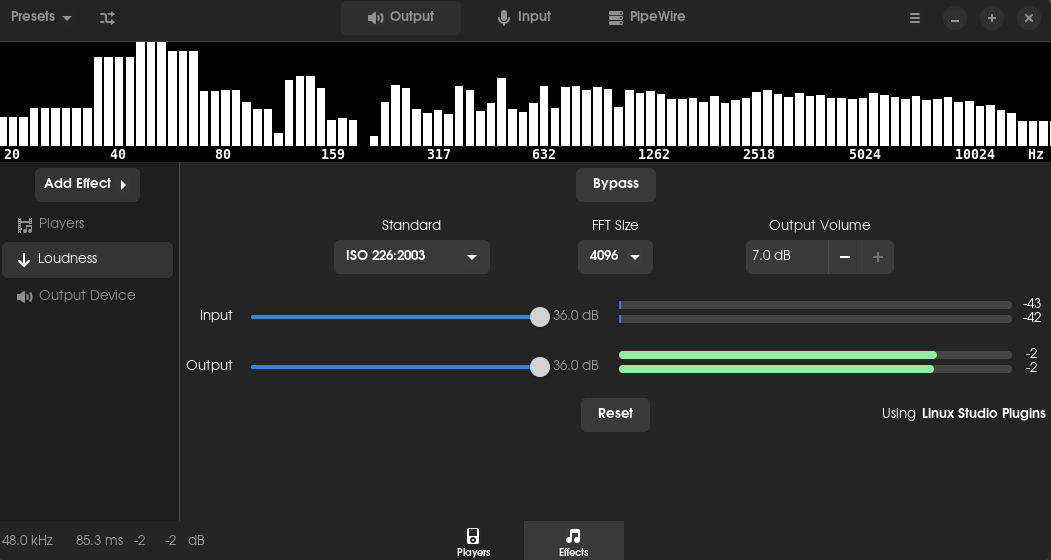 As you can see, output is maximized to be around 0db in that case.
If pressing button "Global Bypass" I can't hear almost anything:
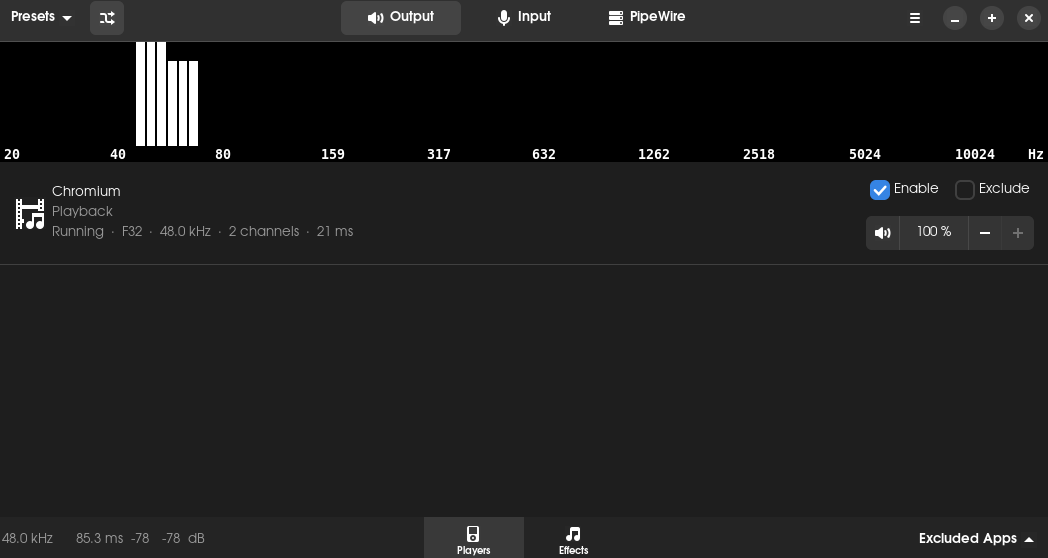 I/O at -80db
Before restart it was working as intended, using 0 input gain and output gain had the behavior that i am achieving now using +36db input and +36db output. Now, each time applying some effects, i have to move i/o sliders to max in order to achieve neutral sound results (that should be there when keeping it at 0).
I've tried restart system again, and reinstalling flatpack and both had no effects.
Fresh installed Pop!_OS 22.04 LTS on System76 Gazelle. EasyEffects 6.2.6.
Thanks!

If pressing button "Global Bypass" I can't hear almost anything
@xxated another user reported something similar recently and the source of the problem was that our virtual devices volume was somehow set to a very low value. Open Pavucontrol and check if this is what is happening. Unfortunately there are factors outside of our control that can lead to changes in the virtual devices volume.
If pressing button "Global Bypass" I can't hear almost anything
@xxated another user reported something similar recently and the source of the problem was that our virtual devices volume were somehow set to a very low value. Open Pavucontrol and check if this is what is happening. Unfortunately there are factors outside of our control that can lead to changes in the virtual devices volume.
Thanks a lot! That solved my issue!!!
Just updated to the latest (6.3.0) and now ALL effect nodes are gone, only the source, sink and level meter nodes are available. I checked with pw-cli and they are not listed, it's not Helvum hiding them or anything, they are not registered.
I checked with pw-cli and they are not listed, it's not Helvum hiding them or anything, they are not registered.
What do you see in EasyEffects logs? Is its pipeline active?
here you go, 3 files https://gist.github.com/Efimero/60c3c81753225355c3da0ebbd75cf0a3
No output device set. Aborting the link
That is weird but explains why there is no other node... Try to reset EasyEffects settings.
I purged the config with apt purge easyeffects and reinstalled, but the issue persists; even new effects added refuse to show up in the graph
I purged the config with apt purge easyeffects and reinstalled,
I am not sure this is really going to reset the configuration keys. Show a print of the dconf window in your system in the same path as the one below
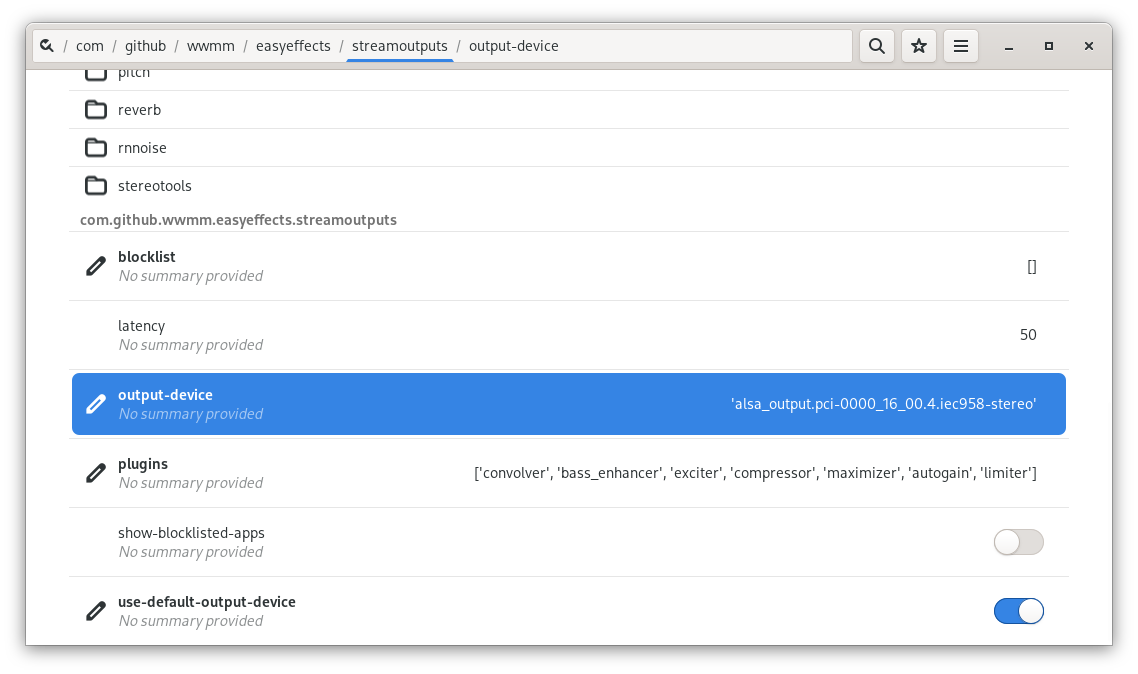 What is the value of
 outpu-device in your system? It should match your default output device if Use Default Output is enabled in EasyEffects configuration
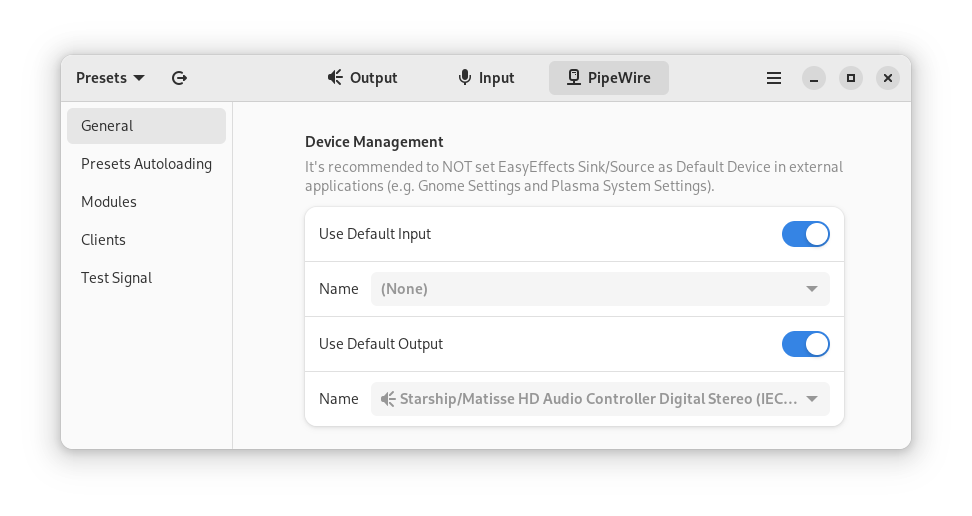
One way to reset EasyEffects settings is running easyeffects -r in a terminal.