

 wwmm
wwmm
update 6.2.6-1 has problem
Good morning. sir.
Glad to see easyeffects updated in the Arch repository.
I just applied the update and it run.
Not just one or two bugs.
It must be rolled back or patched.
A lot of things are messed up.
-
The 'monitor of audio' sometimes causes problems that are not properly ignored.
-
Selecting 'EasyEffects Source' as default input device in gnome settings does not work.
아치 저장소에 easyeffects 가 업데이트 된것을 보고 기뻤습니다.
바로 업데이트 적용하고 실행했습니다.
버그가 한두개가 아닙니다.
롤백하거나 패치해야 합니다.
많은것이 엉망입니다.
-
monitor of audio 가 때때로 제대로 ignore 되지 않는 문제를 일으킵니다.
-
gnome 설정에서 기본 입력장치로 easyeffects sorurce 를 선택하면 작동하지 않습니다.

Selecting 'EasyEffects Source' as default input device in gnome settings does not work.
Strange. I still can select it as default input device in gnome settings. Although it is the kind of thing you should avoid if possible it still works on my computer. Are you able to select it as default in Pavucontrol?
The 'monitor of audio' sometimes causes problems that are not properly ignored.
I did not understand this one. What kind of problems? At least that OBS "desktop stream" is still being ignore on my computer.

Easyeffects sync as output device, Not working in my laptop with Arch Linux. Changing to Headphone in gnome settings caused a significant difference in audio quality, the sound is bad. I tried to tweak in pavucontrol but after changing output device to headphones all the effects not working no matter what settings I change (changing back to easy effects in pavucontrol is dead silence)
Edit: Keeping the playback device as easyeffects sink and headphone as output device fallback works nice and Audio quality is very good by reducing easyeffects sink volume and increasing headphone volume to max(does this happen due to bad configuration in plugins?) but every time to change volume I have to change in pavucontrol. Keeping easyeffects sink has helped me to adjust sound directly from volume tab.

Keeping the playback device as easyeffects sink and headphone as output device fallback works nice and Audio quality is very good by reducing easyeffects sink volume and increasing headphone volume to max(does this happen due to bad configuration in plugins?) but every time to change volume I have to change in pavucontrol. Keeping easyeffects sink has helped me to adjust sound directly from volume tab.
As EasyEffects is designed assuming your hardware stays as the system default device you should avoid setting our virtual devices as default. Most of the time things work but in some cases things may brake depending on the order PipeWire initializes some objects. Unfortunately effects can only be applied to a few bad developed audio applications when our devices are the default... But if possible do not do that.
I never touch the volume of the EasyEffects virtual devices. You may have had audio clipping. But you can fix that by properly setting the hardware volumes or each plugin input/output gain. You can keep our virtual devices at 100% volume.
Selecting 'EasyEffects Source' as default input device in gnome settings does not work.
Strange. I still can select it as default input device in gnome settings. Although it is the kind of thing you should avoid if possible it still works on my computer. Are you able to select it as default in Pavucontrol?
The 'monitor of audio' sometimes causes problems that are not properly ignored.
I did not understand this one. What kind of problems? At least that OBS "desktop stream" is still being ignore on my computer.
I haven't been able to figure out exactly under what circumstances 'monitor of audio' can't be ignored. Sometimes 'monitor of audio' leads to 'easyeffects source'.
This could be a wireplumber problem.
I deleted wireplumber and installed pipewire-media-session .
yet testing..
And if I select 'EasyEffects Source' for the default input device in the gnome settings, it doesn't work.
My guess is that this is obviously a bug in EasyEffects.(6.2.6-1)
It worked fine in previous versions.
정확하게 어떤상황에서 'monitor of audio'가 ignore 되지 못하는지 알아내지 못했습니다. 가끔 'monitor of audio' 가 'easyeffects source' 로 연결됩니다.
이것은 wireplumber 의 문제일수도 있습니다.
나는 wireplumber 를 지우고 pipewire-media-session 을 설치했습니다.
yet testing..
그리고 gnome 설정에서 default input device 를 'EasyEffects Source' 를 선택하면 작동하지 않습니다.
내 생각에 이것은 분명 EasyEffects(6.2.6-1) 에 버그가 있습니다.
이전 버전들에서는 잘 작동했었습니다.
And if I select 'EasyEffects Source' for the default input device in the gnome settings, it doesn't work.
I have updated the master branch and as far as could see this "regression" is fixed. But like I said before unless you have a very strong reason to set our virtual devices as default do not do it. Keep you hardware as default whenever it is possible to do so.
But like I said before unless you have a very strong reason to set our virtual devices as default do not do it. Keep you hardware as default whenever it is possible to do so.
This has been stated to many times and some people still think EE sinks should be at system default.
What do you think of the following hint to the user?
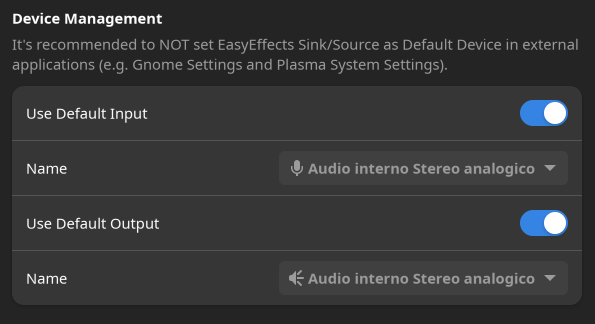

What do you think of the following hint to the user?
It is a good idea. Hopefully it will help to avoid issues related to it. Even if we try to add some kind of logic to take another device when ours are set as default handling configurations with multiple devices will be tricky. In the end we may use a device that is not the one the user wants to use...