
easyeffects
 easyeffects copied to clipboard
 wwmm
wwmm
Opening submenus (presets/options/add_plugins) locks up window manager
EasyEffects Version
6.1.2-r16.g24710337
What package are you using?
AUR (easyeffects-git)
Distribution
Manjaro
Expected Behavior
I should be able to use my window manager normally regardless of what menus are open
Actual Behavior
When I open up the submenus like the 'presets' or 'options' or 'add plugins' menus, I cannot use my kwin desktop until these subwindows are closed by clicking inside of the easyeffects main window to close them.
I cannot:
- Click on a window that is not easyeffects
- Switch desktops (neither via mouse or kbd shortcuts)
- Interact with anything other than the easyeffects submenu or easyeffects main window without closing the submenu first, whether that be via mouse or keyboard (even alt+tab doesn't work)
I can:
- Use the submenu properly
- Hit
escto close the submenu - Click the easyeffects main window to close the submenu
- Open & Close the application launcher by pressing the Super_L/Meta Key.
- Change consoles (but for some reason this breaks pipewire... 🤨 )
Additional Information
Tested with both Kwin and KwinFT
I wouldn't be surprised if this is a duplicate (I recall having had similar UI woes years back with pulseeffects) but I couldn't find the duplicate.
I don't think it contains anything useful (there's no output at all when the issue occurs) but here's a debug log: https://gist.github.com/Rabcor/4a544234f16fc992af1730766dc8b52d

This sounds like what modal dialogs do? eg see https://docs.gtk.org/gtk4/class.Dialog.html. Does EasyEffects create modal dialogs, and if so could it switch to non-modal ones?
I can see similar issues on GNOME when opening different dialogs. I can't swipe around with the trackpad or navigate with the keyboard much until the dialog is dismissed.

When I open up the submenus like the 'presets' or 'options' or 'add plugins' menus, I cannot use my kwin desktop until these subwindows are closed by clicking inside of the easyeffects main window to close them.
Randomly happens on GNOME too and when it does I have to press the esc key to close the menu. Probably a gtk4 bug. I do not see what could be done differently in the GtkPopover initialization.
Does EasyEffects create modal dialogs, and if so could it switch to non-modal ones?
Our menus are GtkPopover objects and not dialogs. We only create dialogs when the buttons that import files are clicked. Like the one that imports a preset file.

From GTK4 docs:
By default, GtkPopover performs a grab, in order to ensure input events get redirected to it while it is shown, and also so the popover is dismissed in the expected situations (clicks outside the popover, or the Escape key being pressed). If no such modal behavior is desired on a popover, gtk_popover_set_autohide() may be called on it to tweak its behavior.
Idk it seems like within the easyeffects gui it is functioning as intended, it just has problems when trying to go outside the easyeffects gui when a popover object is open. By the way that documentation is phrased it seems like when you click outside the window it should also close, but it is not doing that.
It could very well be a GTK4 issue.
If it only happens sometimes on Gnome but always in KDE, that difference might be because Gnome uses GTK but KDE uses Qt.
It definitely does not happen always on GNOME. And I think I did not see this issue happening after the last gtk and gtkmm update to version 4.4.0. I am doing some tests right now and so far things seems fine. If the issue is still here it became a lot harder to reproduce. So it really feels like some kind of gtk4 issue.
By default gtk enables the autohide property. As far as I could see this is the only option that seems related to the GtkPopover focus.
I already had gtk 4.4.0 installed when I originally posted the issue I think. I have now, it's still the same.
I have the same issue on GNOME 3.38.5. It even prevents me from loading e.g. a convolver impulse file, because I am unable to interact with the file selection window popping up. I can work around this by maximizing the easy effects window before importing and then clicking on it behind the file selection, therefore closing the problematic submenu.

I have the same issue on GNOME 3.38.5.
At this moment I have many gnome packages at least on version 40.0 and mutter on 40.5. Arch Linux has a mixture of versions when it comes to GNOME packages. This popover bug may still be a thing on older GNOME versions. I am still unable to reproduce it in the latest GNOME, GTK and GTKMM versions.
LOL at people suggesting that hanging X without the possibility of recovery is WAI. If that's WAI, you gotta reconsider using this popover thing. It quite literally hangs X every time I try to use it.

you gotta reconsider using this popover thing.
Sorry. I have absolutely no intention of doing that. PulseEffects was based on gtk3 and used popover menus with no problems. And as I have already said a few times the bug seems to have already been fixed by the GTK developers. Graphical toolkits are not free of bugs. It happens.
Irretrievably hanging X every time the user clicks the "Import Impulse" button is catastrophically bad user experience. So maybe not "reconsider", but this is a bad bug that needs attention. Hacker News just ran a story on AutoEq. A lot of people are trying this now, and it's hanging their X. Once it does that, they'll never try it again.
It quite literally hangs X every time I try to use it.
Xorg users have to report this kind of problem to GTK developers. Like myself they are probably using Wayland. But they are the toolkit developers. They have to make GTK work on Xorg somehow.
Irretrievably hanging X every time the user clicks the "Import Impulse" button is catastrophically bad user experience.
It is. But the place to fix this problem is GTK. The hangs are not caused by bad library use. The library has to be fixed by its developers. Specially when it comes to use on Xorg. For some reason gtk4 seems to be working better on Wayland.
And I agree with you strategically, but tactically this does not help users that are trying (and failing) to use this program right now.
Definitely doesn't help them. But not using popovers is not a viable approach for us. And they are one of the central features in gtk. So GTK has to fix them. They are the only kind of menu that can act as a container where you can put arbitrary widgets. It is not as simple as just using another menu widget. The usability of some functions we provide will be deeply changed in a way that I do not think it is better. Our presets menu is an example. Forget having widgets there without popovers... All the functions that are there will have to be removed from the menu and put somewhere else... I don't like the idea...
This is likely https://gitlab.gnome.org/GNOME/gtk/-/issues/3502, an X11 specific GTK4 popover issue. There isn't much that can be done here, as moving away from popovers sounds like considerable work. This issue can be avoided by using Wayland.
This issue can be avoided by using Wayland.
What isn't an option for many people. I am probably among the lucky ones that can use wayland with no issues now. I think gtk developers should give top priority to issues like these.
Actually Nvidia's current beta drivers support GBM, so I believe that wayland will probably be available to almost all quite soon.
Be that as it may though, wayland sitll has a lot of problems, so even if we would prefer to use wayland, sometimes a bug or missing feature in it would drive us to use x11 anyways.
Until the GTK 4 devs sort this out, a somewhat hacky way to import an Impulse Response into the Convolver is to change the file extension of the WAV file you want to import to ".irs" and copy it to ~/.var/app/com.github.wwmm.easyeffects/config/easyeffects/irs, then select it in the Convolver from there.

I noticed some interesting behavior. Opening a popover (eg. the settings menu, or an equalizer band) causes the popover to block all input to other apps' windows, until you click the main window or press Esc. Expanding and closing a dropdown/combo box causes the popover to block input to the main window, no longer block all input to other apps (but the popover remains on top of them), and not close itself until you press Esc with the EasyEffects window focused. Expanding a dropdown again reverts to the initial behavior until the dropdown is closed.
I suppose https://gitlab.gnome.org/GNOME/gtk/-/issues/3502 isn't going to be fixed urgently, and GTK4 popovers are going to remain practically unusable on X11 for now?
System info
Operating System: Arch Linux KDE Plasma Version: 5.23.4 KDE Frameworks Version: 5.89.0 Qt Version: 5.15.2 Kernel Version: 5.15.7-zen1-1-zen (64-bit) Graphics Platform: X11 Processors: 12 × AMD Ryzen 5 5600X 6-Core Processor Memory: 15.6 GiB of RAM Graphics Processor: NVIDIA GeForce GT 730/PCIe/SSE2

I suppose https://gitlab.gnome.org/GNOME/gtk/-/issues/3502 isn't going to be fixed urgently, and GTK4 popovers are going to remain practically unusable on X11 for now?
It is hard to say if gtk developers are working or not on this bug... I hope they are because the only reliable workaround that seems to exist so far is really annoying. If we disable the menu autohide some of these problems or maybe all of them are fixed. But then we necessarily have to click on the menu button to close it. With autohide disabled this becomes the only way to close them. I tried to use they this way for sometime and I have to say it is frustrating not being able to close the menu by clicking on somewhere else.
Maybe we could add a configuration option that allows the user to enable/disable the popover autohide for all of our menus. This way people could choose the less annoying scenario. I will try to do that when I have time.
Maybe we could add a configuration option that allows the user to enable/disable the popover autohide for all of our menus.
It is available in our master branch
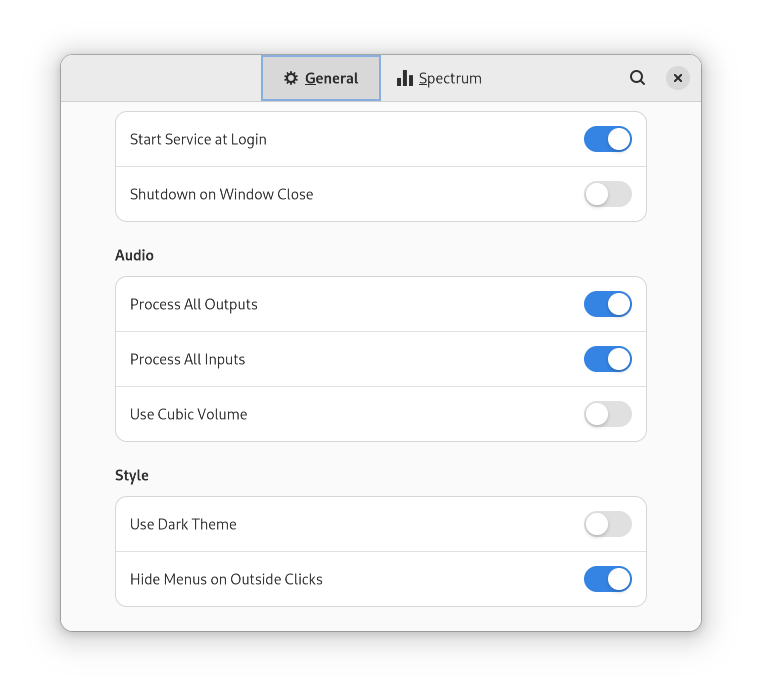 It applies to most of our menus like the presets menu, the equalizer band menu, the convolver menu, etc. But like I said before not having
 Hide Menus on Outside Clicks enabled can be really annoying. But as far as I can see clicking on the menu button when the gtk autohide is disabled seems to always work. At least on Wayland.
Neat! You could make things smoother by detecting when the user is running X and enabling that by default.
Neat! You could make things smoother by detecting when the user is running X and enabling that by default.
There are users on KDE having this problem even on Wayland. GTK developers have to fix this situation somehow.
KDE Wayland users, running native Wayland EasyEffects or XWayland EasyEffects?
KDE Wayland users, running native Wayland EasyEffects or XWayland EasyEffects?
This detail I do not know. The report was initially done on #1293 and I asked the user to repeat it here.
I imagine GTK switches to Wayland automatically if the user is in an Wayland session. Or this is something it only does on gnome?
See https://github.com/wwmm/easyeffects/issues/1293#issuecomment-994288619. The issue on KDE Wayland is different than the one reported here. It's less severe when in KDE Wayland, and specific to KDE.
I believe that one should be reported separately since on KDE Wayland, clicks on the app are not registered, but on GNOME Wayland they are.
Yes GTK for a few years now runs in Wayland mode automatically.
I believe that one should be reported separately since on KDE Wayland, clicks on the app are not registered, but on GNOME Wayland they are.
Although it makes sense to have a new issue for it at the end of the day there won't be an advantage because we can not fix these cases where a GtkPopover gets stuck. For us it is enough to know that some people are having problems. The solution will have to come from gtk.
Just ran into this issue on Fedora 37 on Gnome (Xorg) and latest easyeffects flatpak from flathub (easyeffects v7.0). If someone else encounters this, the 6.3 version from Fedora project repositories works fine (install with "dnf install easyeffects").
Here is how to get out of the locked window. Press Ctrl-Alt-F3 (or F4, any Fx other than your window session) to get to a command prompt. Login and run "killall easyeffects". Switch back to your window session with Ctrl-Alt-F2.
The reason I tried the flatpak is that there are some quirks in the 6.3 version, too.
-
I'm using the default Dark Theme in Gnome and I there is no visible indication in which state the buttons "Enable/disable the global bypass" and "Enable/disable this effect" are in. So I have to watch the input/output levels to see if the effect is on/off.
-
The convolver graph is also strange. It shows a grap from 0.00 to 0.09 s, but the graph x y axis have way too large scale, so the signal shown is a tiny one above the 0.00 number. Also the x y numbers in the upper right corner have no relation to where the mouse is in the window (at least what the x scale shows).
Not sure if I should report these issues separately or if they are known. I have no intention to test the 7.0 version further until the gtk4 issues are sorted.
