

 wp-media
RUCSS compatibility with Mandatory Cookies
Before submitting an issue please check that you’ve completed the following steps:
- [x] Made sure you’re on the latest version
3.11.4.2 - [x] Used the search feature to ensure that the bug hasn’t been reported before
Describe the bug
When RUCSS is used on website using dynamic cookies, SaaS is generating the Used CSS against the website without considering the dynamic cookie.
This will result in generating a slight excess in style in most cases, which can be tolerated, with a risk of breaking the website in some of them.
An example where this would be problematic:
The Real Cookie Banner plugin. It has a setting that blurs the content of the page after showing the popup banner.
It results in adding the following CSS as part of the Used CSS:
body > :not(#a90a3e813-caa6-4718-aec5-8492f0dae523,.rcb-customize-banner-container,#bkBgScrollPrevent,#trp_ald_modal_container) { filter: blur(2px); }#bkBgKeepPos > :not(#a90a3e813-caa6-4718-aec5-8492f0dae523,.rcb-customize-banner-container,#bkBgScrollPrevent,#trp_ald_modal_container) { filter: blur(2px); }
This portion will keep the content blurred on the cached page.
The rocket_usedcss_content was used to remove the filter content to allow RUCSS to be used on the website.
To Reproduce Steps to reproduce the behavior:
- Enable the Real Cookie Banner and set the content to be blurred
- Add the following mandatory cookie
real_cookie_banner-blog:1 - Use RUCSS
- See error
Expected behavior
Ideally, in this case, we should have sent the request to SaaS to add the following cookie real_cookie_banner-blog:1 when generating the Used CSS from the website.
The information about the cookie could be found on the wp-rocket-config file on the following variable $rocket_cache_mandatory_cookies.
Alternatively, we can build a compatibility file covering a case by case by adjusting the Used CSS if needed. That might turn up to be high maintenance over time.
Screenshots N/A
Additional context Ticket - https://secure.helpscout.net/conversation/1956114542/357420?folderId=3864735
Backlog Grooming (for WP Media dev team use only)
- [ ] Reproduce the problem
- [ ] Identify the root cause
- [ ] Scope a solution
- [ ] Estimate the effort

Related: https://secure.helpscout.net/conversation/1944914010/354952/

Hey WP Rocket team!
Here is Matthew, developer behind Real Cookie Banner. 😀
More and more customers are running into the issue and our plugin is no longer working correctly when using RUCSS feature. The root cause for this is, that if your cloud service is adding the URL to queue, the cookie banner is always shown as your crawler did not yet give consent to it (no cookie as @DahmaniAdame described):
https://github.com/wp-media/wp-rocket/blob/dd630a1924376afe3035ad6dfe2b3c8b98004387/inc/Engine/Optimization/RUCSS/Controller/UsedCSS.php#L238-L245
Possible solutions:
(Recommended) Allow to define further parameters for the job URL
When WP Rocket sends the URL to the cloud service, allow defining some further parameters for the request body so e.g. we can add another query parameter beside nowprocket=1. This allows us to completely disable the cookie banner for WP Rocket RUCSS requests.
https://github.com/wp-media/wp-rocket/blob/dd630a1924376afe3035ad6dfe2b3c8b98004387/inc/Engine/Optimization/RUCSS/Frontend/APIClient.php#L25-L34
Allow to detect WP Rocket RUCSS cloud service
When WP Rocket sends the URL to the cloud service, allow us to receive a modified (?) user-agent or HTTP header X-Rocket-RUCSS: 1 so we can disable the cookie banner completely.
Do not only provide a safe-list of CSS selectors
Instead, also allow to completely exclude CSS <style tags from processing the Unused CSS. Means: E.g. declare a <style rucss-exclude="1" and your coverage system simply skips this tag and does neither treeshake nor mark it as "used". I do not exactly if this works, as under the hood, you are using Chrome's devtools for this.

@matzeeable thank you for jumping in.
As sorry for the delay :)
Real Cookie Banner was cited here as an example as it illustrated perfectly a potential use case that might cause trouble with our Remove Unused CSS :)
We did some tinkering about the specific case of Real Cookie Banner, and we found a turnaround that will be implemented on our side.
(Recommended) Allow to define further parameters for the job URL
That will likely be the fix to this specific GitHub issue :) This will add a layer of complexity to our SaaS, so, we are waiting for more use cases to go that path.
Allow to detect WP Rocket RUCSS cloud service
That option will make us miss the banner's markup and, consequently, not add it to the resulting Used CSS.
Do not only provide a safe-list of CSS selectors
We are leaning toward something similar to that.
We discussed internally the possibility of using a block list where specific styles will simply not be included in our generated Used CSS.
It was tested on our staging server and worked.
I like the attribute idea 👍 I will share it with the devs to consider it.
For now, we have prepared a helper plugin to temporarily fix the issue until the fix is officially deployed.
https://drive.google.com/file/d/1ZjSq29YOZPwiIKd6IYz3THd3VkQ0JlDb/view?usp=sharing
Hi again @DahmaniAdame !
Thanks for the workaround solution. Does the rocket_usedcss_content filter only contain the CSS stylesheet or also the <style tag, so we can e.g. exclude tags by custom attribute (<style ignore-me></style>)?
Allow to detect WP Rocket RUCSS cloud service
Is there an ETA for this? And would it make sense to also modify the user agent, so we can also do a client-side check of navigator.userAgent (e.g. when using a NGINX+Redis page cache)?
Does the
rocket_usedcss_contentfilter only contain the CSS stylesheet
It filters the resulting Used CSS. It only contains the CSS code.
The only workable solution available for the time being is:
function wpr_filter_css( $css ) {
    $css = str_replace( '{filter:blur(2px)}', '{}', $css);
    return $css;
}
add_filter( 'rocket_usedcss_content', 'wpr_filter_css' );
Ideally to be used only when the blur feature is enabled.
Is there an ETA for this?
The fix will require implementing the solution + a filter on our plugin as well. No ETA for now as the team is busy with the release of our revamped Preload.
And would it make sense to also modify the user agent, so we can also do a client-side check of navigator.userAgent (e.g. when using a NGINX+Redis page cache)?
We sent the following user agent at some point, WPRBot, but unfortunately, it caused some plugins to behave unexpectedly.
Besides, as I mentioned previously, it will create more problems than solutions as we will be missing the banner's markup :)
Same problem on our websites running WP-Rocket and RCB. Thanks for the quick-fix.

@DahmaniAdame Thanks for your follow-up. Unfortunately, the rocket_usedcss_content does not work when we try to exclude "dynamic" CSS. Is there any other filter we can use to exclude CSS?
Is there any other filter we can use to exclude CSS?
Unfortunately, no.
Unfortunately, the rocket_usedcss_content does not work when we try to exclude "dynamic" CSS.
You won't be excluding a dynamic CSS. The above filter targets the filter property without any selectors:
{filter:blur(2px)}
Isn't it what you are using on this sample style that is used to blur the page?
body > :not(#a90a3e813-caa6-4718-aec5-8492f0dae523,.rcb-customize-banner-container,#bkBgScrollPrevent,#trp_ald_modal_container) { filter: blur(2px); }#bkBgKeepPos > :not(#a90a3e813-caa6-4718-aec5-8492f0dae523,.rcb-customize-banner-container,#bkBgScrollPrevent,#trp_ald_modal_container) { filter: blur(2px); }
https://secure.helpscout.net/conversation/1986512852/363444?folderId=377611

@DahmaniAdame any news about this?
I run into a more "big" problem with RUCSS and WP Rocket. We are currently planning to rewrite our cookie banner in CSS-in-JS with scoped class names:
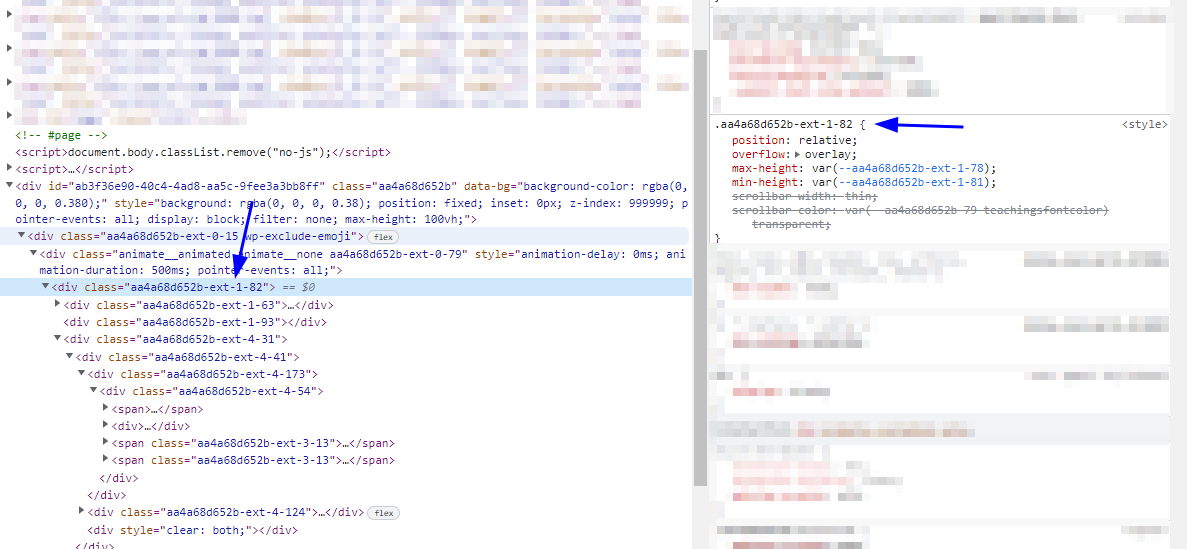
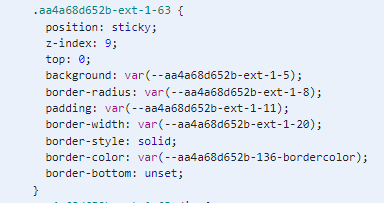
The stylesheet is generated client-side, as SSR is not supported with React in PHP (PHP + React Server Components = no 😀). So, when I did a short test, the complete, dynamic stylesheet gets into the used CSS. This is useless, as the identifier aa4a68d652b gets regenerated at runtime on the next page refresh. We really need to have a way to exclude complete <style tags, as this can become very messy in the Used CSS.
@matzeeable thank you for the update.
When checking the page, we allow running scripts to some extent. That's why your implemented CSS-in-JS CSS got picked up.
That should be fine if the identifier is unique and added to the page.
Is the style somehow overlapping?
We did test a blocking mechanism on SaaS. That can prevent selectors from getting added to the Used CSS. A pattern for the identifier can be used for example.
If there is no way around that but to block the style, I can check with the devs to see if the blocking mechanism can be pushed to production.
@mostafa-hisham for the testing purposes we could do a PR with a filter, ultimately, it should go to the backend for unique items.
