

 wp-media
Error message shall be displayed to user if RUCSS failed (rucss tables arenot created)
Before submitting an issue please check that you’ve completed the following steps:
- Made sure you’re on the latest version => yes
- Used the search feature to ensure that the bug hasn’t been reported before => yes
Describe the bug When enabling RUCSS and tables couldn't be created in DB, a failure message shall be displayed to the user
To Reproduce Precondition:
- Enable RUCSS => resources & used CSS tables are created in database
- Delete those tables from the database
Steps to reproduce the behavior:
- Disable RUCSS and save
- Enable RUCSS
- Success message is displayed although processing 0 of 0
Expected behavior An error message is displayed to the user
Screenshots
If applicable, add screenshots to help explain your problem.
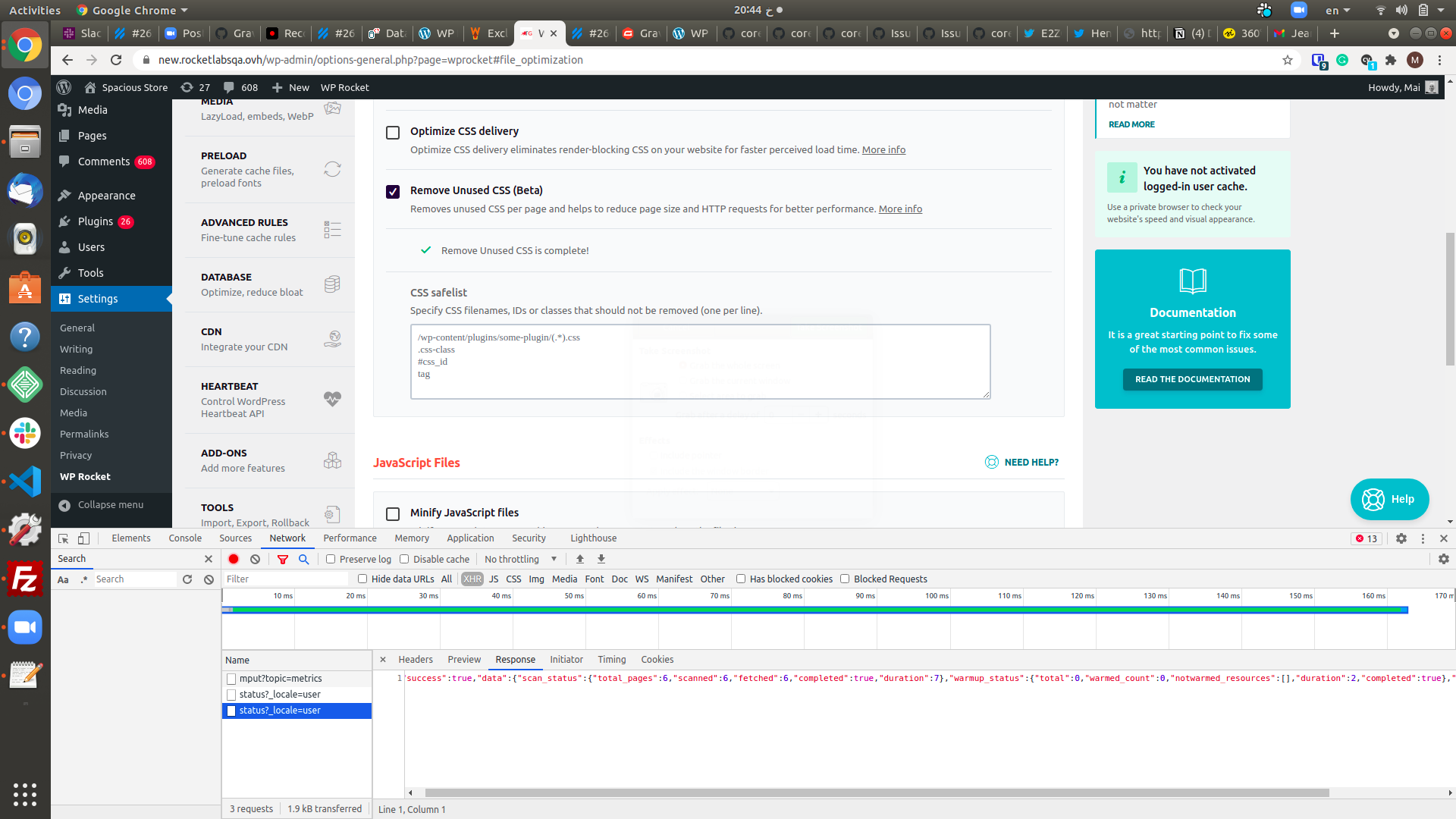
Additional context Add any other context about the problem here.
- uninstall then install the plugin and activate WPR currently won't create tables due to this issue https://github.com/berlindb/core/issues/108 => to fix this now, you will need to delete resources options wpr_rucss_resources_version and wpr_rucss_used_css_version
- In debug mode currently if we recheck RUCSS after step3 => will display that fetched is done n out of n, the process is done 0 out of 0 and RUCSS is complete
Backlog Grooming (for WP Media dev team use only)
- [ ] Reproduce the problem
- [ ] Identify the root cause
- [ ] Scope a solution
- [ ] Estimate the effort


Related ticket: https://secure.helpscout.net/conversation/1645065559/297803/

Related ticket - https://secure.helpscout.net/conversation/1645344219/297879/

Related - https://secure.helpscout.net/conversation/1669836026/302972?folderId=273766
Likely related: https://secure.helpscout.net/conversation/1742526549/316557/

Related - https://secure.helpscout.net/conversation/1736871992/315893/
Tables were not created because of a faulty DB_CHARSET and DB_COLLATE combo.
No information was relayed to the user.

@vmanthos @webtrainingwheels If you have any ideas for the text needed for the notices, you're welcome to share :)

Reproduce the problem
I was able to reproduce this issue
Identify the root cause
We don't have a method to check and display notice when related RUCSS tables are not created.
Scope a solution
- Import the
ResourceandUsedCSSDatabase class intoWP_Rocket\Engine\Optimization\RUCSS\Admin\Settings
use WP_Rocket\Engine\Optimization\RUCSS\Database\Tables\Resources;
use WP_Rocket\Engine\Optimization\RUCSS\Database\Tables\UsedCSS;
- Then create a method to check if the usedcss table exists
$this->rucss_usedcss_table->exists()
Then display the valid text.
Estimate the effort
[S]

The following text should be fine:
WP Rocket could not create the
{{names_of_tables)}in the database which is/are necessary for the Remove Unused CSS feature to work. Please reach out to our support.
@webtrainingwheels Can you please check this?
Most of the time this won't be an issue with WP Rocket, but:
- with the host which prevents writing to the database or
- the database settings, e.g.
DB_COLLATE: https://wp-media.slack.com/archives/C029G1B5HD2/p1643185904044200
If @camilamadronero can write a doc, we can replace the "Please reach out to our support." with a link to that.
@vmanthos Thanks for the ping and I certainly can put together a new doc! I'm following this issue to see if using a doc is the final decision. And in the meantime, the fixes mentioned in the thread are fairly technical, so I'm just wondering if those are the ones to document.

One note: we don't need to check for the resources table, as it's no longer used, and is going to be removed in 3.12

Most of the time this won't be an issue with WP Rocket, but (...)
Let's write some code together that can help your team(s) confirm that database tables can be created before the utility (BerlinDB) tries and fails in front of your users 💖
99% of the time, if WordPress was able to create its own database tables, BerlinDB and WP Rocket should be able to too. If web-hosts are known for locking something down that you/we rely on, BerlinDB should handle those gracefully, and provide useful feedback for developers to use to make decisions about how to handle those situations in their applications (like WP Rocket here! 💗)
If I may offer a suggestion about the error message specifically, it may not be best to communicate the exact reason for this failure to users, since there may not be much they can do about it themselves (other than contact you).
For example, if the Notes app in your cell phone was unable to recover from some critical database error, how would you expect your next steps to be communicated and in a way that comforts you and maintains the integrity of the software. It's a lot to consider; it's delicate, and also somewhat urgent feeling at the time.
(Hope you don't mind me lurking and chiming in. Sorry if I'm rambling or derailing anything 😅)


Related: https://secure.helpscout.net/conversation/1992140978/364599/ The cause was something new, in this case, it was due to object cache: Further details here: https://wp-media.slack.com/archives/C029G1B5HD2/p1663255224632399