

 wp-media
Improved Error Message For cURL Error 28 Blocked Self-requests Issue
When the self-requests for optimization are being blocked by a user's server due to cURL error 28 (or similar), we could offer a popup informing them about what is happening and linking to our documentation:

<div id="swal2-content" class="swal2-content" style="display: block;">The HTTP requests required for image optimization are currently being blocked by your server. <a href="https://imagify.io/documentation/optimization-is-stuck/" rel="noopener" target="_blank">More info and possible solutions</a>.</div>

Thinking about this a little more, I know there are "in-between" cases where optimization works for some images, but times out for others. So it could be a better approach to just improve the error messages in both the Media Library and "View Details" section of the Bulk Optimizer page, but still allow optimization attempts to continue rather than stopping things with a popup. Something like this possibly, that links to Optimization is Stuck.
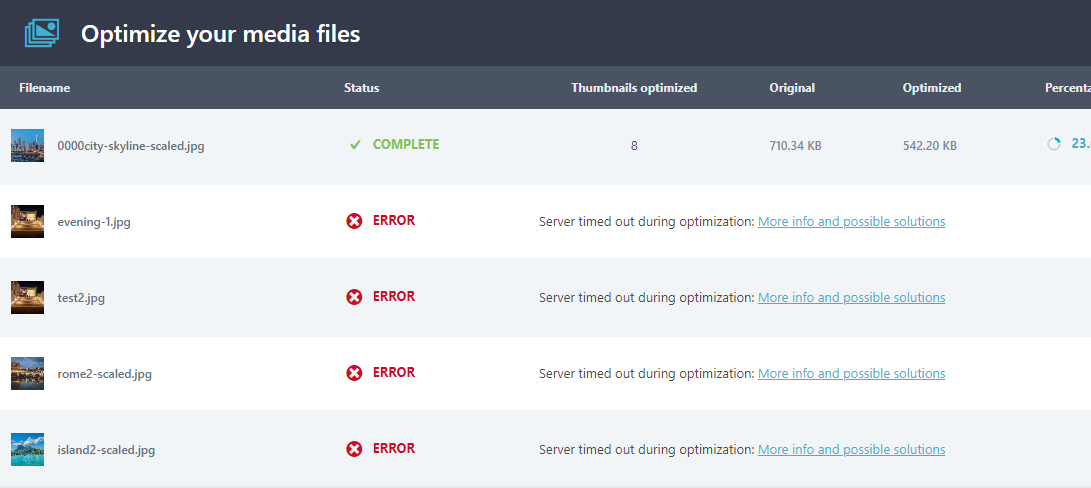
<td colspan="5">Server timed out during optimization: <a href="https://imagify.io/documentation/optimization-is-stuck/" target="_blank">More info and possible solutions</a></td><td colspan="5">Server timed out during optimization: <a href="https://imagify.io/documentation/optimization-is-stuck/" target="_blank">More info and possible solutions</a></td>
Please note the change will have to be done only on the Media Library page. The Bulk Optimization won't contain the details anymore started 2.1.

@joejoe04 Do you know in the imagify_translate_api_message() function which errors this corresponds to?

As far as I know, the errors are mostly related to cURL error 28 and Unknown errors. Could also be related to permissions errors too possibly. Sorry, I'm really not exactly sure.
Current messages that are related to cURL and unexpected responses:
- Could not initialize a new cURL handle.
- Our server returned an invalid response.
- cURL is not available on the server.
Are those the ones we want to replace with the new message?
Sorry, I'm not sure I've often or ever seen those. Here are examples of what I was talking about.
I do see one here of the 'new cURL handle' one: https://secure.helpscout.net/conversation/1417561334/237178 https://i.vgy.me/iHqatU.png
But as far as what I was talking about, it was more like these:
There are errors like these when the connection is refused for some reason. https://secure.helpscout.net/conversation/1471579748/252551 https://i.vgy.me/fMrVaO.png Could instead have something like: 'Connection for optimization was not allowed. See our documentation for more info.' (and link to helpful documentation)
'Our server returned error 500.' We could do the same kind of thing for these and link to helpful doc. https://secure.helpscout.net/conversation/1440816855/243643 https://i.vgy.me/5cFM7c.png
It's been a while, but I'm almost positive that cURL error 28 messages appear in the sam place for images in the Media Library, but I can't find an example. You could maybe ask Marko and Ioanna about it. Anyway, if there are related error messages that appear here (or anywhere else), we could make the error message something like: 'Optimization failed due to timeout. See our documentation for more info.'
There are also cases like this where there is no error message given at all. If users try to optimize images individually in the Media Library, the gif spins for a long while like it's stuck optimizing, then just goes back to the 'Optimize' button. An error message indicating why the image wasn't optimized and pointing to documentation might be helpful for users when this is happening. https://secure.helpscout.net/conversation/1483383884/255978
I know the Bulk screen now doesn't show error messages, but including this because this same message sometimes is displayed in the Media Library for images too and users usually don't know exactly what it means. https://secure.helpscout.net/conversation/1387004394/228725 https://secure.helpscout.net/conversation/1461362174/249900 https://i.vgy.me/vWuaeo.png
I remember there was also an issue where cURL error 28 or similar could sometimes trigger this "Out of Quota" message to appear. Not sure if this has already been addressed, but thought I'd share this here just in case: https://secure.helpscout.net/conversation/1406933076/234453 https://secure.helpscout.net/conversation/1280751133/194439 https://secure.helpscout.net/conversation/1577645352/281590 https://i.vgy.me/cJ3Ugx.png
Also, when users are trying to add API Key, they can get cURL error 28 messages too: https://secure.helpscout.net/conversation/1466143495/251205 https://i.vgy.me/6aftzi.png
Hope this helps and let me know if you have more questions about the above