

 wp-graphql
Filtering by ACF field (toally lost!)
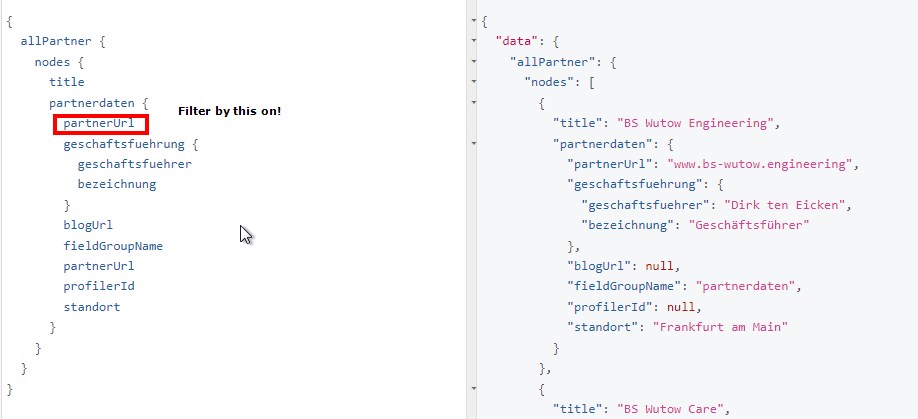
Hello community,
i have problems finding the right syntax and no other idea than to ask the community for help: I have a CPT "Partner" and want to filter for Partners, where an ACF-field within the ACF field-set (?) "partnerdata" called "partnerUrl" is equal to an value like "www.test.com" ...
How in the world could i do this? I tried for ages and could filter and everything after so many things - but not an ACF field that is within an field-set (if this is the correct term)... "partnerdata" is attached to "Partner"-Type an i can also access each value of it - just filtering is the problem cause i couln't find the correct snytax :(
Thanks to all of you that took the time to read this newbie question.
Bes wishes, Ben

@Fire4All did you find any solution? I'm still looking for a way of search a Field inside a Field group.
Tried following this blog post but didn't manage to work. https://www.wpgraphql.com/2020/04/14/query-posts-based-on-advanced-custom-field-values-by-registering-a-custom-where-argument/
In my case the field statustag is inside a field group property_info. Both with the Show GraphQL = true.

@thewinger the blog post tutorial works to me! follow my action and filter based on the original
add_action('graphql_register_types', function () {

  $customposttype_graphql_single_name = "Partner";

  register_graphql_field('RootQueryTo' . $customposttype_graphql_single_name . 'ConnectionWhereArgs', 'state', [
    'type' => 'String',
    'description' => __('The state acronym of the partner object to filter by', 'your-textdomain'),
  ]);
});

add_filter('graphql_post_object_connection_query_args', function ($query_args, $source, $args, $context, $info) {

  $partner_object_state = $args['where']['state'];

  if (isset($partner_object_state)) {
      $query_args['meta_query'] = [
          [
              'key' => 'state',
              'value' => $partner_object_state,
              'compare' => '='
          ]
      ];
  }

  return $query_args;
}, 10, 5);
In my case, there is a custom post type called Partner with a custom field called state.

👋🏻 we're not currently planning to support filtering out of the box as Meta Queries are known to be pretty harmful for WordPress servers and exposing that ability to a public API could be problematic.
For now, the best option is to follow tutorials like above to provide support for filtering that you feel is safe to support for your specific application.
We do plan to investigate this more to determine if there's "safe" and "performant" ways to support filtering by ACF values but no ETA on when that might happen.
Also, note that we're re-building this plugin over here: https://github.com/wp-graphql/wpgraphql-acf and will be tagging it as stable and releasing it on WordPress.org in the not-too-distant future.
