

 wordpress-mobile
Offline post uploading loop when device came back online
It was reported in 5276070-zd-woothemes that multiple copies of media files and posts were uploaded to the site when the device went from offline to online.
Expected behavior
It was expected that the media files and posts edited offline will only be uploaded once.
Actual behavior
The app uploaded multiple copies of the media files and went into a loop uploading posts to the site.
Steps to reproduce the behavior
- Turn on Airplane mode on the device. Make sure the device has no internet access.
- Go to the WPiOS app and create a new post.
- Add a gallery block and choose a few photos from the device
- Observe that the app shows errors uploading the photos. This is expected since the device is offline.
- Close the editor to go back to the post listing. (Not sure if this step is needed but I did this when I was doing testing)
- Turn off the Airplane mode and connect the device to the internet.
- Go back to the WPiOS app, and notice the app started uploading the offline content.
- Multiple notifications in the app showing the upload was successful.
- Notice duplicate copies of media files uploaded in My Site > Media, and multiple copies of the same post were uploaded in My Site > Posts.
Screen recording and screenshots
Screen recording: https://d.pr/v/NmUc2Q/h8ngkHqecn
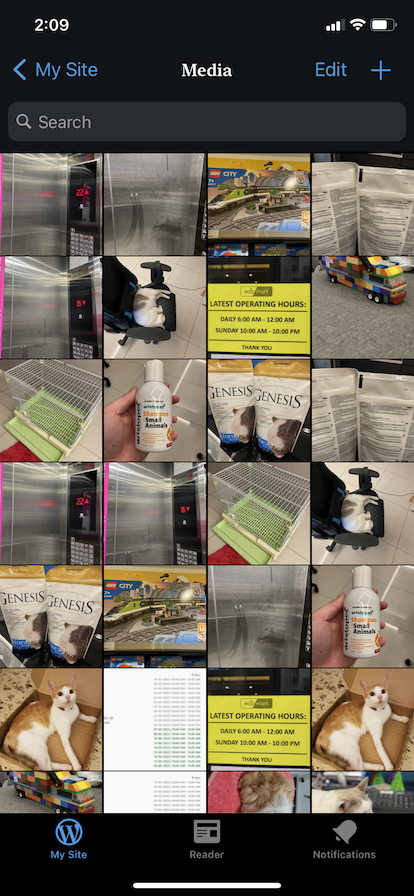
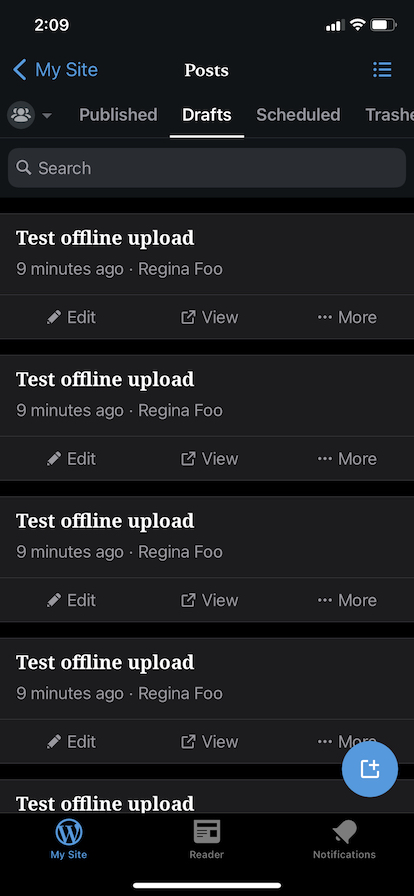
Tested on iPhone 11, iOS 15.5, WPiOS 20.0.1

Just want to mention that the user had a different experience in offline upload:
I followed your steps, put pictures and text into a test post offline, then connected my tablet to wifi. The app immediately started uploading pictures and stayed in that mode for than 15 minutes. without showing any of the pictures as fully loaded. During that time, it added 3-4 copies of each picture to my media library and never uploaded the test post. I finally closed the app to stop the uploading.
URL of the site is: https://kjtboulder.me/
Awaiting a screen recording from the customer ⌛
