
WordPress-iOS
 WordPress-iOS copied to clipboard
 wordpress-mobile
Stats: File Downloads section shows for Jetpack sites (and doesn't work)
Expected behavior
per Jetpack stats support documentation:
Note: WordPress.com stats on Jetpack sites does not track or show you Totals, Followers, and Shares on your stats page. It also does not track file downloads for any files hosted on your server, such as PDF links.
File downloads should show for WordPress.com sites and not Jetpack sites in the app.
Actual behavior
The section shows and indicates "An error occurred"
Steps to reproduce the behavior
This happens with any Jetpack plan (including free).
- Create a site, or log into an existing site on the iOS app
- Go to Stats
- Scroll down past Videos and confirm that you can see File Downloads
Tested on iPhone 6S+, iOS 13.3, WPiOS 13.9

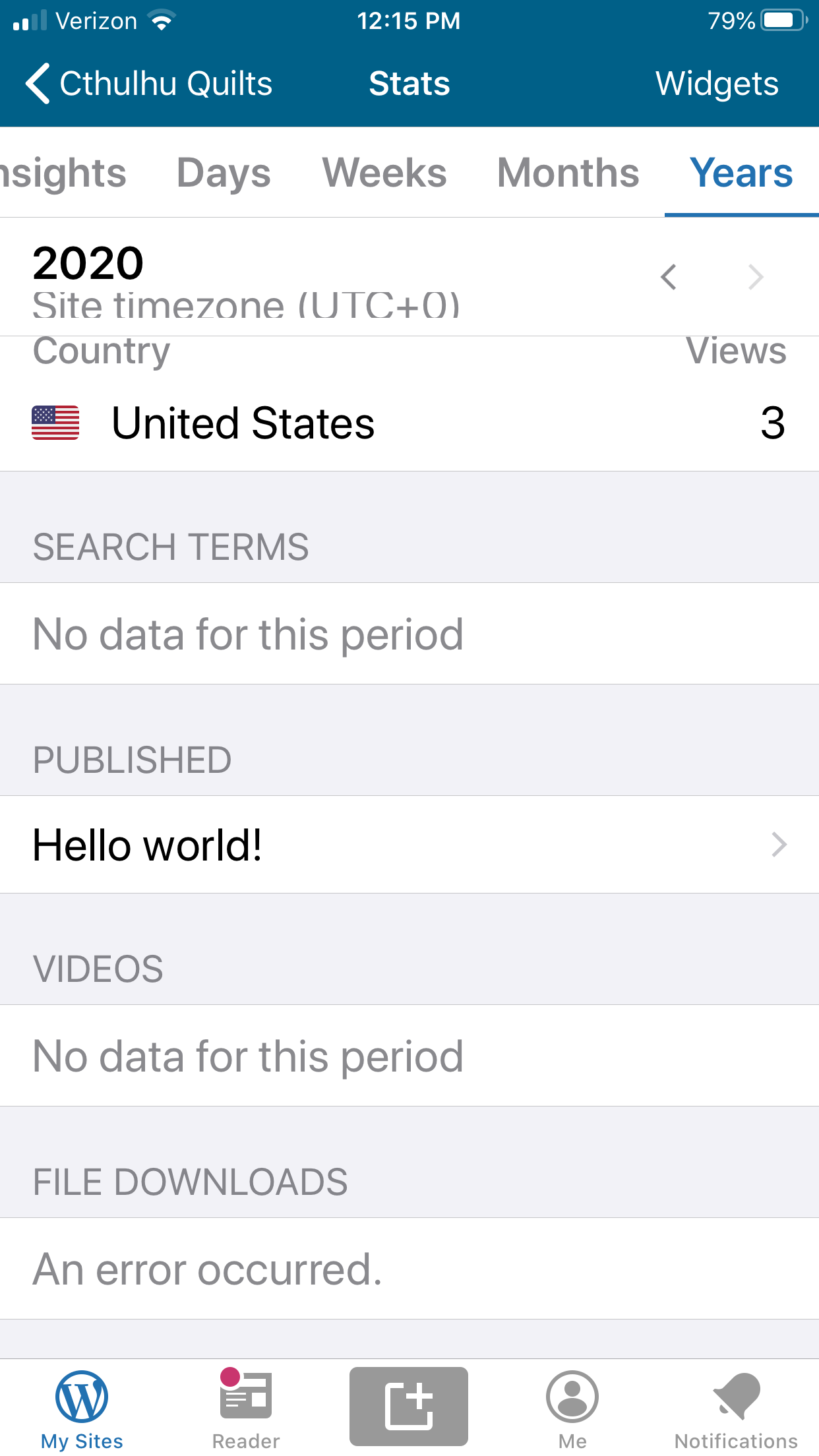

I got the exact same issue on ticket #5445436-zen
See the image below for reference
Please click here if you are unable to see the image above

I got the exact same issue on ticket #5445436-zen
See the image below for reference
Please click here if you are unable to see the image above
Adding details of Users device: mobile make is Apple iPhone 12 Pro Max app version is 20.3 (20.3.0.2)
