

 wordpress-mobile
Better Error Messaging for Sites with Captchas
Captcha prevents the WordPress app from authenticating and logging into a site (my understanding is because we can't support all the many many ways captcha is implemented). When attempting to log into a site that has a captcha form, I expect to be informed of why login failed. Instead, we receive this message: "It looks like this username/password isn't associated with this site."
This can result in resetting the password a bunch of times even though the problem is not, in fact, with the password.
Steps to reproduce the behavior
Choose or make a test site with a captcha plugin active. Attempt to login on the app via “log in by entering your site address”. This will allow you to enter the domain name (URL) of your site. Enter the username and password you'd normally log in with. Notice that you get a message about the username/password, even though it is correct.
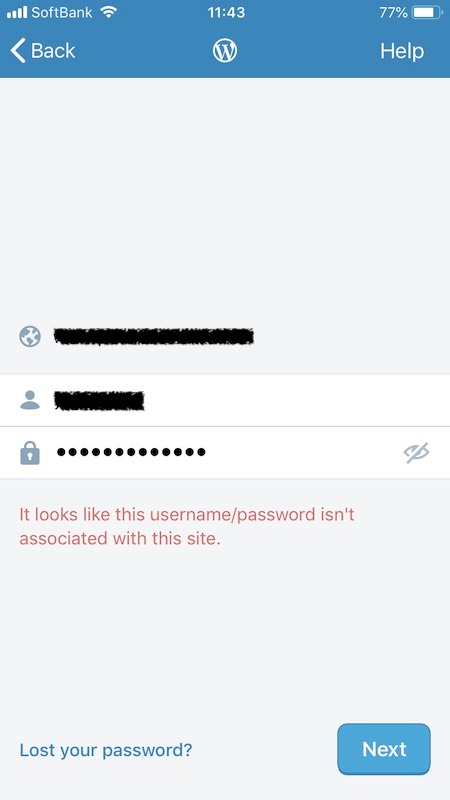
User report in #1848119-zen

This issue has been marked as stale because:
- It has been inactive for the past year.
- It isn't in a project or a milestone.
- It hasn’t been labeled
[Pri] Blocker,[Pri] High, orgood first issue.
Please comment with an update if you believe this issue is still valid or if it can be closed. This issue will also be reviewed for validity and priority (cc @designsimply).
![stale[bot] avatar](https://avatars.githubusercontent.com/in/1724?v=4 "Published by a pub.dev verified publisher")
@rachelmcr I don't have a site with reCAPTCHA to replicate the error, but I know that Woo Mobile faced this kind of issue when the Application Passwords feature launched. To get around this, they added a Webview option to users can login directly via WP-Admin - maybe we could implement something similar if this issue is still occurring:

