
WordPress-Android
 WordPress-Android copied to clipboard
 wordpress-mobile
[Tooling] Fix raw screenshots automation
Fixing various issues in the screenshot automation.
Warning: This PR still depends on https://github.com/wordpress-mobile/release-toolkit/pull/409 so we will need to land that one in
release-toolkit, then update thefastlane/Pluginfileafter we created a new toolkit release, before we can merge this one here.
See also this update comment summarizing the changes once I considered the PR ready for review.
Raw Screenshots
- [x] 👷 Completely reimplement the logic to launch emulators using Ruby and Fastlane
- [x] Implement code to install the correct
system-imagedepending on the API level we need + the current machine's architecture (Intel vs M1), usingsdkmanager - [x] Re-implement the logic to create an AVD from a device, api level and system-image, using
avdmanagerinstead of thecopy-device.sh+fixup-android-emulator.shshell scripts - [x] Clean up and get rid of the
fastlane/emulators/*.iniand associated scripts - [x] Re-Implement the logic to kill previous emulators and launch a new
emulatorgiven an AVD, with the proper parameters - [x] Move the new code from
fastlane/helper/android_emulator_helper.rbto therelease-toolkitonce it's confirmed to be stable --> https://github.com/wordpress-mobile/release-toolkit/pull/409 - [x] Re-Implement the
screenshotslane (taking the raw screenshots) and make it call the built-in fastlane action (capture_android_screenshots) directly now instead of our localfastlane/action/take_android_emulator_screenshots.rbone
- [x] Implement code to install the correct
- [x] ⬆️ Update Screengrab library to latest version
- [x] 🔧 Fix the
AndroidManifest.xmlpermissions for debug - [x] 🕵️ Investigate and fix crash on
WPLocaleTestRule- [x] 🐛 Fix NPE crash with the
Contextnot yet initialized in theAppInitializer.ktsingleton andWordPress.ktsingleton by the time the test rule is applied — with the help of @ovitrif (see those commits) - [x] 🔧 Align our custom implementation of
WPLocaleTestRulewith the new driving logic used by latest fastlane/screengrab version - [x] ⛓️ Use a
RuleChainof fastlane'sLocaleTestRule+ our ownWPLocaleTestRuleto apply one on top of the other — and ensure fastlane's own internal logic in theirLocaleTestRuleimplementation is called and not shadowed by our own rewriting of it as before
- [x] 🐛 Fix NPE crash with the
- [x] 🕵️ 🐛 Investigate why passing
fr-FRdoesn't change the locale (butfrdoes).- According to fastlane's doc, we're supposed to pass
fr-FR,de-DE, etc to thelocaleparameter, and that will end up being the name of the locale folder used infastlane/metadata/. - But in practice it seems that Screengrab's
LocaleUtil.localeFromStringexpects something else (is it an Android-likede-rDE/zh-rCNformat? Or is it failing to find the locale for some other reason?). And if we pass a different locale code which works (like justfrinstead offr-FR) and changes the UI appropriately… then thefastlane/*locale folder that will be created will be incorrect… - ⚠️ This might be tricky to debug, since setting a
-e testLocaleInstrumentation Argument (from "Run/Debug Configurations" window) from Android Studio doesn't seem to work (the test locale that is read from the test and theLocaleTestRulereturnsnullwhen running the test from Android Studio), and the passing of thetestLocaleonly works when invoking the test usingam instrument -e testLocale …from the command line (like fastlane's screengrab does)… but when running form the CLI we can't debug to inspect how the test locale is (incorrectly) parsed. And all the parsing methods that might be at fault are private to the Screengrab binary library, so that doesn't help debugging via some test code either.
- According to fastlane's doc, we're supposed to pass
- [ ] 🕵️ Investigate why the JPScreenshotTest crashes on ZenDesk initialization (see below)
- ➡️ Tracked separately https://github.com/wordpress-mobile/WordPress-Android/issues/17130
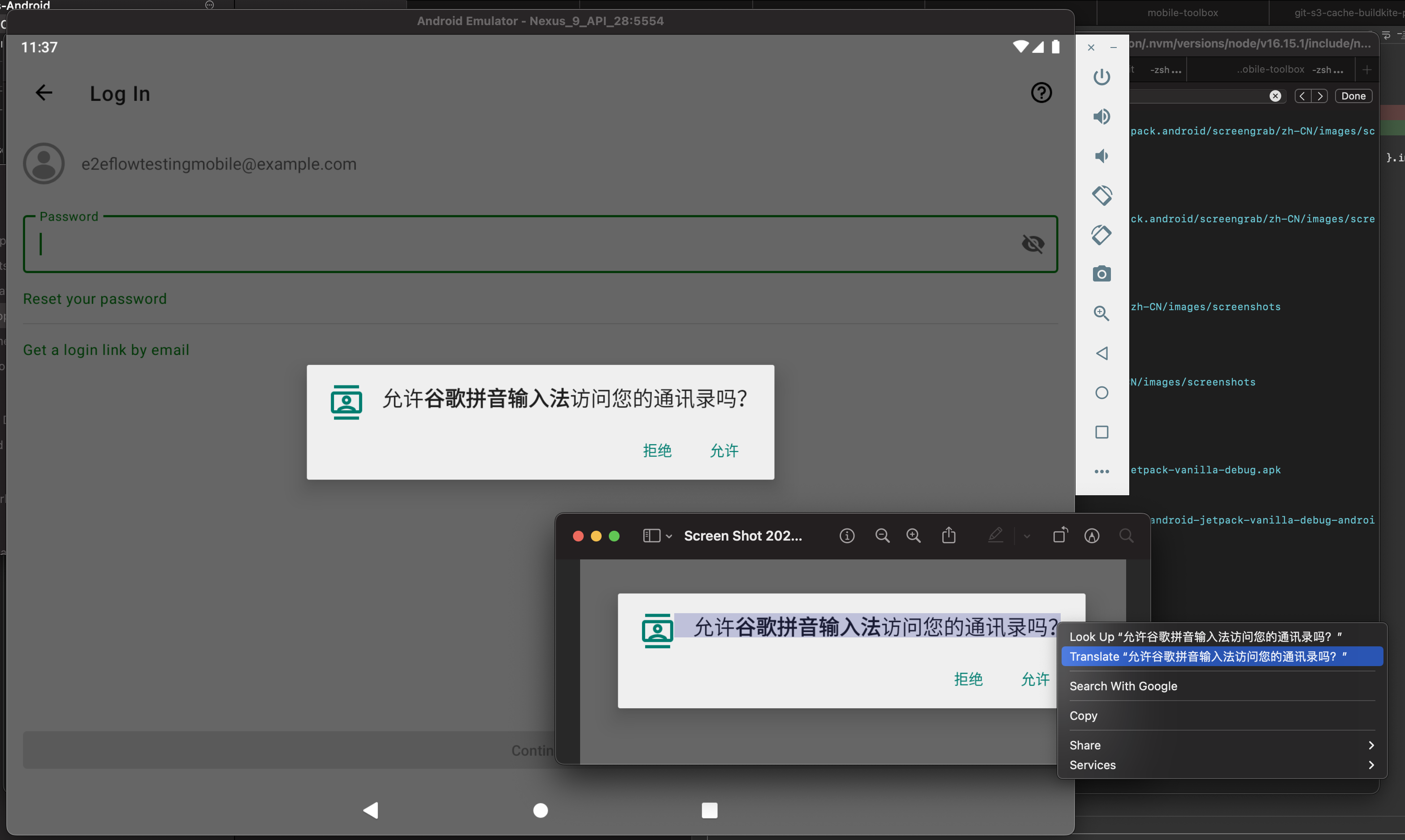
- [x] 🐛 Check the case of
zh-CNwhich seems to prompt if we want to "Allow Google Pinyin input method" when the app starts, which interrupts the UI Test (see screenshot below). Can we useadb shellto force-disable this prompt? - [ ] 👷 Make the raw screenshots be saved in a separate temporary folder for WordPress vs Jetpack (see FIXMEs in 6eec4cfbbf5b155ae770956a176902cea481fbff)
- ➡️ Kept for a future refinement PR
- [x] Test again the whole pipeline of running fastlane screenshots for multiple devices and multiple locales and ensure it switches from one to another as expected (i.e. that there's no leak across test run boundaries) and saves the PNGs in the expected folders
Promo Screenshots
I will address those ones in a _separate_ PR, to keep that one focused only on fixing the raw screenshots.
- [ ] Test the lane (not completely sure what's still broken vs left to be done since I didn't get that far last time given raw screenshots, which are an input for this, were still broken)
- [ ] Update the
screenshots.jsonto fix the device models and screenshot names being referenced - [ ] Update the device frames and background in
playstoreresto match newer device models - [ ] Circle back with team Kāhu and Design team to update the compositing coordinates and config in
screenshots.jsonwith the new promo copies and their expected positioning/layout/rendering.
Other
- [ ] Update
SCREENSHOT_DEVICE_SETUP.mddocs ➡️ Will be done in dedicated PR - [x] Circle back with Annmarie and the Kāhu team to decide if it's expected that, given how the UI tests are written, some raw screenshots are asked to be taken in
lightmode and other screens switch todarkmode before doing the screenshot. ➡️ Tracked separately in https://github.com/wordpress-mobile/WordPress-Android/issues/17133
Crash Log and issue details from items above (now solved)
ZenDesk Crash when trying to run the JPScreenshotTest on "phone" device (Pixel 3) in zh-CN
$ /Users/olivierhalligon/Library/Android/sdk/platform-tools/adb -s emulator-5554 shell am instrument --no-window-animation -w \
-e testLocale zh-CN \
--no-hidden-api-checks \
-e appendTimestamp false \
-e class org.wordpress.android.ui.screenshots.JPScreenshotTest \
com.jetpack.android.test/org.wordpress.android.WordPressTestRunner
[19:58:54]: ▸ org.wordpress.android.ui.screenshots.JPScreenshotTest:
[19:58:54]: ▸ Process crashed while executing jPScreenshotTest(org.wordpress.android.ui.screenshots.JPScreenshotTest):
[19:58:54]: ▸ java.lang.IllegalArgumentException: Zendesk needs to be setup before this method can be called
[19:58:54]: ▸ 	at org.wordpress.android.support.ZendeskHelper.enablePushNotifications(ZendeskHelper.kt:197)
[19:58:54]: ▸ 	at org.wordpress.android.push.GCMRegistrationIntentService.sendRegistrationToken(GCMRegistrationIntentService.java:86)
[19:58:54]: ▸ 	at org.wordpress.android.push.GCMRegistrationIntentService.lambda$onHandleWork$0$org-wordpress-android-push-GCMRegistrationIntentService(GCMRegistrationIntentService.java:53)
[19:58:54]: ▸ 	at org.wordpress.android.push.GCMRegistrationIntentService$$ExternalSyntheticLambda0.onComplete(Unknown Source:2)
[19:58:54]: ▸ 	at com.google.android.gms.tasks.zzi.run(com.google.android.gms:play-services-tasks@@18.0.1:1)
[19:58:54]: ▸ 	at android.os.Handler.handleCallback(Handler.java:873)
[19:58:54]: ▸ 	at android.os.Handler.dispatchMessage(Handler.java:99)
[19:58:54]: ▸ 	at android.os.Looper.loop(Looper.java:193)
[19:58:54]: ▸ 	at android.app.ActivityThread.main(ActivityThread.java:6669)
[19:58:54]: ▸ 	at java.lang.reflect.Method.invoke(Native Method)
[19:58:54]: ▸ 	at com.android.internal.os.RuntimeInit$MethodAndArgsCaller.run(RuntimeInit.java:493)
[19:58:54]: ▸ 	at com.android.internal.os.ZygoteInit.main(ZygoteInit.java:858)
[19:59:09]: ▸ INSTRUMENTATION_RESULT: shortMsg=Process crashed.
🖼️ Running Screenshots in zh-CN interrupts the UI tests with an alert from the system asking if we want to enable Google Pinyin input method

To Test
ℹ️ See https://github.com/wordpress-mobile/release-toolkit/pull/409 for a more detailed set of instructions for testing this.
- Run
bundle exec fastlane screenshots app:wordpress, go take a very long walk while it runs, and check that all the expected raw screenshots are generated infastlane/screenshots/rawfor all locales and both device types - Run
bundle exec fastlane screenshots app:jetpack, go take a very long walk while it runs, and check that all the expected raw screenshots are generated infastlane/screenshots/rawfor all locales and both device types
Optionally, during iterative testing, you can limit the runs to a subset of devices and locales, e.g. bundle exec fastlane screenshots app:wordpress device:phone locale:ar,fr-FR,zh-CN to avoid running it for all Mag16 and both devices for each app.
Though ultimately you will need to test all locales and both devices to be sure that:
- The device codes are correct and thus the screenshots show the UI in the expected language for each locale (instead of using English, or using the locale from the previous run of the emulator…)
- The device models used are as expected, and that those devices exist and can have their
system-imagebe downloaded, their AVD be created, their emulator launched, and the permissions needed by fastlane/screengrab are set on those devices without any error (e.g. without them needing root access, or failing to get a permission for that emulator model and system image…)

 📲 You can test these changes on WordPress by downloading wordpress-installable-build-pr17096-8f36ef0.apk
 |
💡 Scan this QR code with your Android phone to download and install the APK directly on it. | |
| App | WordPress | |
| Build Flavor | Jalapeno | |
| Build Type | Debug | |
| Commit | 8f36ef09c98f218dd9bcabfd85cc24988e7dcff7 | |

 📲 You can test these changes on Jetpack by downloading jetpack-installable-build-pr17096-8f36ef0.apk
 |
💡 Scan this QR code with your Android phone to download and install the APK directly on it. | |
| App | Jetpack | |
| Build Flavor | Jalapeno | |
| Build Type | Debug | |
| Commit | 8f36ef09c98f218dd9bcabfd85cc24988e7dcff7 | |
Update: Ready for Review
All critical/blocking tooling bugs around the screenshots lane (raw screenshots) have been solved now. So I think that PR is ready to review and land now 🎉
Warning: This PR still depends on https://github.com/wordpress-mobile/release-toolkit/pull/409 so we will need to land that one in
release-toolkit, then update thefastlane/Pluginfileafter we created a new toolkit release, before we can merge this one here.
Remaining, non-blocking tooling refinements for a future PR
Those will be done in separate PRs.
- Make
fastlane screenshots app:<app>generate the raw screenshots in different folders for WordPress vs Jetpack - See if we can avoid the red messages that appear in the logs when fastlane tries to delete old screenshots for the device's sdcard and can't find any. This will likely need to be fixed inside
fastlane's code itself - Update
SCREENSHOT_DEVICE_SETUP.mddocs - Test, and fix if needed, the
promo_screenshotslane now that we have working raw screenshots that we can use as input
Remaining non-tooling fixes (UI test failures in Android) — fixed separately
The are also things that will need fixing, but on the Android code of the UI tests themselves (ZenDesk crash, Hilt flaky crash, light vs dark mode…).
- Those have been gathered under this parent GitHub issue
- All those are not tooling-related, but Android-code-related (UI test not passing); so they will be fixed separately.
- I made a call for help internally [ref: pcdRpT-MB-p2] and @AjeshRPai responded to the call; he's currently already working on some of those (for example https://github.com/wordpress-mobile/WordPress-Android/pull/17166)
| Warnings | |
|---|---|
| :warning: | This PR is assigned to a milestone which is closing in less than 4 days Please, make sure to get it merged by then or assign it to a later expiring milestone |
| :warning: | PR has more than 300 lines of code changing. Consider splitting into smaller PRs if possible. |
Generated by :no_entry_sign: dangerJS
![peril-wordpress-mobile[bot] avatar](https://avatars.githubusercontent.com/u/1306301?v=4 "Published by a pub.dev verified publisher")
Hello @ParaskP7 anf thanks a lot for testing this PR!
Could you indicate which configuration you tested? M1 vs Intel and which way you installed the Android command line tools?
As for the crash you reported when testing with Jetpack, thanks for that, but this is a known one, already tracked here. 🙃
As it is not related to the tooling itself but is instead a flaky issue with Hilt only on the JPScreenshotTest.java test and Android code itself, this will be investigated separately (likely by @AjeshRPai) later 🙂
👋 @AliSoftware !
Could you indicate which configuration you tested? M1 vs Intel and which way you installed the Android command line tools?
Sure, I tested with Mac on Intel chip and installed the Android command line via the AS (SDK Manager).
As for the crash you reported when testing with Jetpack, thanks for that, but this is https://github.com/wordpress-mobile/WordPress-Android/issues/17129. 🙃
Great, yes, I was thinking that's the case, but wanted to note that anyway since in the testing instructions you are mentioning that we can also test with the relevant Jetpack fastlane command (then go for a long walk, etc.). I just wasn't sure... thank's for confirming that for me! 🙇
As it is not related to the tooling itself but is instead a flaky issue with Hilt only on the JPScreenshotTest.java test and Android code itself, this will be investigated separately (likely by @AjeshRPai) later 🙂
👍

Recalling the apps-infra team for review now that the release-toolkit 5.6.0 has been shipped and this PR can point to it — which should now make it ready to merge once approved. 🙏 🙇
Just resync'd the PR with trunk, to fix conflicts that appeared as trunk continued to evolve since the month this PR has been waiting for review.
@wordpress-mobile/apps-infrastructure Can someone add their review please, so we can finally merge it before it diverges again? This is blocking my progress on the rest of my current project Thread 😢