

 wordpress-mobile
Percent sign should be localized
Expected behavior
Shortly, the percent sign should be localized according to the current language's rules.
The percentage symbol % should be at the start of the number (%100) in some languages (Turkish, Arabic), and the end of the number (100%) in some languages (English, French...). There are also rules for spacing between the sign and the number that can be checked over: https://en.wikipedia.org/wiki/Percent_sign#Form_and_spacing
Strings which has percent sign:
<string name="stats_traffic_increase">+%1$s (%2$s%%)</string>
<string name="stats_traffic_change">%1$s (%2$s%%)</string>
<string name="scan_progress_label" translatable="false">%1$s%%</string>
<string name="stats_most_popular_percent_views">%1$d%% of views</string>
<string name="backup_download_progress_label">%1$s%%</string>
<string name="restore_progress_label">%1$s%%</string>
WordPress.com in Turkish:
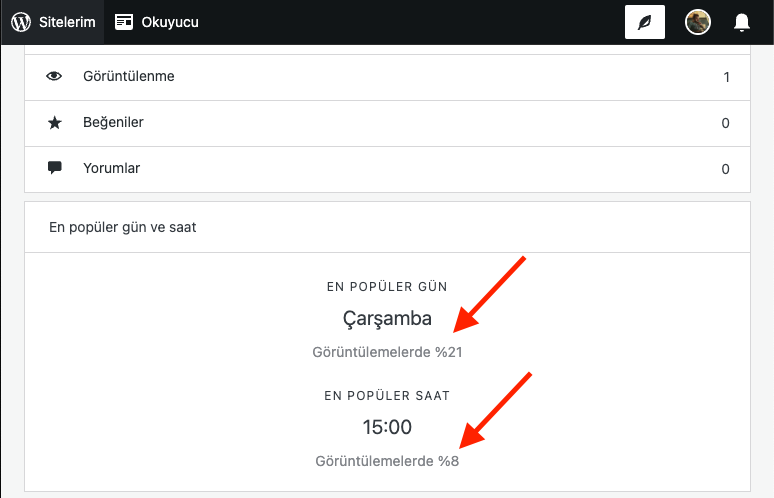
Actual behavior
The percent sign is the end of the number in Turkish.
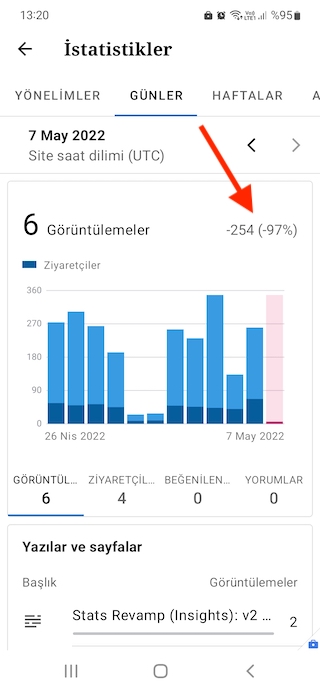
Steps to reproduce the behavior
- Change your device language to Turkish from OS settings. Settings navigation can change according to your device, but it's easier to search the "language" keyword in settings.
- Open WordPress app.
- Go to stats either using quick links or menu.
- Switch to DAYS ("GÜNLER" in Turkish) tab.
- Check the percent sign and notice it's the end of the number instead of the start.
