
woocommerce-gateway-paypal-express-checkout
 woocommerce-gateway-paypal-express-checkout copied to clipboard
 woocommerce
No billing address returned when paying from the cart page
Chat with this issue: 6414425-hc
Also 7446710-hc
Steps to reproduce:
- Use the smart button
- Choose an address associated with the PayPal account
- The result only returns a shipping and not a billing address
I get redirected to the shop page after choosing an address there:
Link to image here: http://cld.wthms.co/i6SrDA.
(This is reproduced locally)

Input from @dechov:
Sure – thanks! From a brief bit of testing, it looks like it can be reproduced from the Cart page with or without Smart Payment Buttons. The shipping address being copied to the billing address seems like another consequence of the same issue.
I've looked into this a bit and am not seeing a billing address returned from the PayPal API. Not sure what we should do about this, if anything – this was previously brought up in https://github.com/woocommerce/woocommerce-gateway-paypal-express-checkout/issues/73.
It appears [#, #] as if the billing address would be returned if the "Require Billing Address" setting is enabled (in the plugin settings and the PayPal account), and that the plugin would handle this properly.

Would it not be an option to at least use the shipping field as billing field if no other options are available?
I believe this is what it does upon placing the order, but we can look into doing it earlier (when the order confirmation page is presented).
@dechov when I did the testing for a full order - no billing address showed up in the order at all.
7446710-hc came into chat about the same issue. This causes an error related to the Billing address as it is not valid.

We also have that issue. If a customer pays via the PayPal Express checkout Button it only returns the name and email - sometimes it returns a shipping address. If it even does not return a shipping address where should we send the packages to?

i'm getting this on smart button checkout when trying to purchase subscriptions (woocommerce extension) and the payment settings in admin won't let me save this option "Require Billing Address"
Sorry, it seems there are no available payment methods which support subscriptions. Please contact us if you require assistance or wish to make alternate arrangements.


We sell digital subscriptions, but as virtual products. To get an address for sending a qualified invoice (B2B business), we patched the \WC_Gateway_PPEC_Plugin::needs_shipping (patch attached).
At the moment the filter returns true, only. We will add a field to the product-post_type to return true/false if the product needs a qualified invoice (future development)


I think this is directly related to #656 but I'll let someone from Lambda confirm. cc @james-allan due to your answer in #656
I've run a bunch of tests with different product types and settings and these are the results.
To summerise:
- PayPal will only ever return a single set of address fields and under some circumstances no address fields. On PayPal's form, the only address fields are labelled as the shipping address.
- When purchasing virtual products, there are no address fields at PayPal (shippable product at PayPal vs virtual product at PayPal)
- If you purchase a shippable product (not virtual), PayPal will return the address the customer chose to ship to while at PayPal, and that address will be saved on the order as both the shipping and billing address.
- If you purchase a virtual product, no address is selected at or returned from PayPal. I have to assume that if you have the require billing address setting enabled, which is apparently no longer available (see #643), the billing address will be returned. I cannot verify this though as I don't have a PayPal merchant account with that feature enabled.
Given those points, I don't exactly know how to proceed with this issue.
Testing notes below.
Why is no address chosen at PayPal for virtual products?
If you compare the PayPal requests while purchasing virtual and shippable products you can see that there's a NOSHIPPING arg which determines if PayPal will display and return a shipping address.
See this diff: https://www.diffchecker.com/I5b0VYCN
If you look at the NOSHIPPING arg PayPal docs, it says:
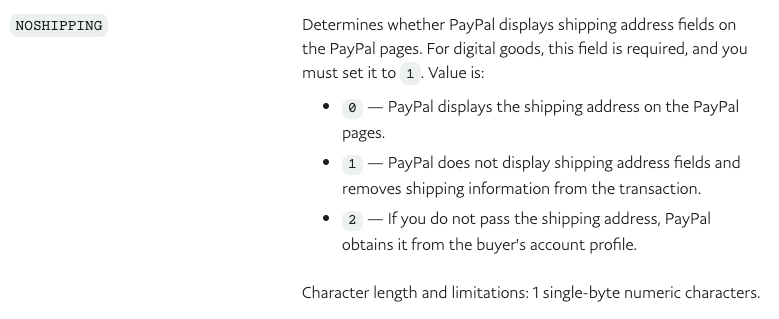
https://developer.paypal.com/docs/classic/api/merchant/SetExpressCheckout-API-Operation-NVP/?mark=SetExpressCheckout#setexpresscheckout-request-message
| Product type | Logged in? | Shipping Calculations enabled? | Results |
|---|---|---|---|
| Virtual | Yes | Yes |
|
| Yes | No |
|
|
| No | Yes |
|
|
| No | No |
|
|
| Shippable | Yes | Yes |
Notes: If you change the shipping address at PayPal, PayPal will return that address and that will be saved on the order for both billing and shipping (https://d.pr/i/Ri5E5q, https://d.pr/i/5Dpbv5) |
| Yes | No |
|
|
| No | Yes |
|
|
| No | No |
|

@james-allan - since this is intended on the PayPal side of things (at least, that's what it seems like), I would suggest that:
- In the cases where no billing address is returned but a shipping address is, we populate the billing address with the shipping one.
- In the cases where not data is provided (virtual ones), is there a way that we can go around PayPal? E.g. by asking customers to add a billing address before continuing?
In the cases where no billing address is returned but a shipping address is, we populate the billing address with the shipping one.
Yep, we do that already.
Shipping address returned from PayPal: https://d.pr/i/BJVNPy That address is saved on the order under both address types: https://d.pr/i/nDnWV5
is there a way that we can go around PayPal? E.g. by asking customers to add a billing address before continuing?
Because these PayPal buttons are on the cart page, no, there isn't a way to collect the billing address from the customer. We could build a new billing form which would ask for billing details before they go off to PayPal but that would be more work than it's worth because it would just be better that we prevented these buttons being displayed under these circumstances. Essentially forcing customer to go via the checkout page where they would need to enter a billing address.
This next idea isn't great but I thought I would mention it for completeness. Another option would be to send the customer to PayPal with the NOSHIPPING set to false (requires shipping). If we did that, it would be like the customer is purchasing a shippable product, they would be asked to select a shipping address, PayPal would return us the chosen shipping address and we could use that as the billing address. That's not ideal though since billing != shipping and that would cause a lot of customer confusion if they are selecting a shipping address for a non-shippable product.
Not sure about that either @james-allan - how about this as a super, super lowkey solution.
Somewhere in the PayPal Checkout settings (or maybe individual product settings) we warn very clearly that PayPal Checkout doesn't require a billing address so there's no way that we can register any address with virtual products. Something like:
Note: PayPal Checkout does not require a billing address. This means that for a cart with virtual products only no address will be registered in the order. For other situations, the shipping address will be used to populate the billing address as well.
An update about this. We've spoken to PayPal about this problem and we will be working through whether we can rely on the 'require billing address' setting for stores which sell digital goods or whether we need to look at other approaches like we've discussed above like forcing digital/virtual goods through the checkout etc.
Any updates on this? I've got this problem as well. i sent a message to Paypal Technical Support. let's see what comes back.
