

 woocommerce
Product changes are not syncing to Facebook
🔎 Isolate the bug
- [x] I have confirmed this occurs in the most recent version of WordPress, WooCommerce, and Facebook for WooCommerce.
- [x] I have confirmed this occurs when only WooCommerce and Facebook for WooCommerce are active and when using a default WordPress or WooCommerce theme.
✍️ Describe the bug
Product changes such as price, description, and stock are not being automatically synced to Facebook. If a new price is entered for a product in WooCommerce, the old price remains on the Facebook catalog/shop. Also, deleted and out of stock products remain on Facebook.
I've tried reinstalling Facebook for WooCommerce and forcing the sync using the sync products button but that didn't help. I've even tried deleting each item at Facebook end and spoken to Facebook business support. They have said the issue is at the WooCommerce end and possibly has to do with the pixel.
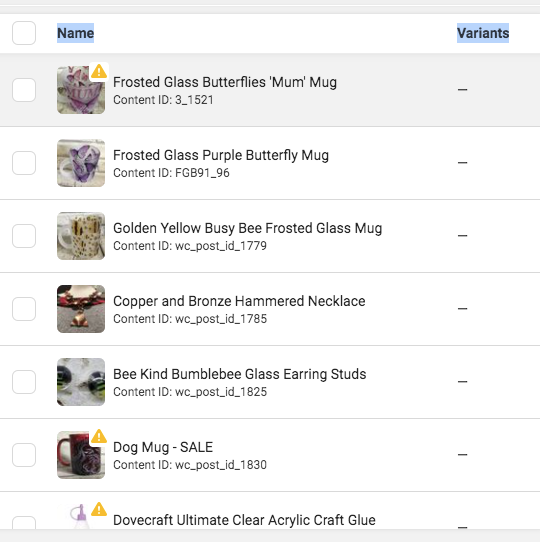
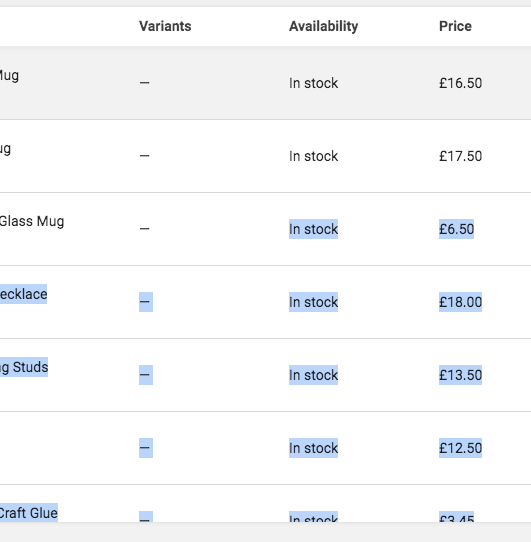 These are two sides of incorrect items and prices only a handful of what is stuck on Facebook
https://www.facebook.com/BeguilingBeeEmporium https://beguilingbeeemporium.co.uk
🚶♀️ Steps to reproduce
- Create a product so it's synced to Facebook
- Create a Facebook shop with your catalog
- Update your product price (etc) in WooCommerce
- You'll notice the changes aren't synced to Facebook.
✔️ Expected behaviour
Product changes should automatically sync to Facebook

Hi @BeguilingBee,
Thank you for bringing this issue to our attention. I have reasons to believe this is caused by a bug - though it has not been confirmed by our development team. I've made a few modifications to your report to better describe the issue and I'll be drawing our development team's attention to this issue so they can look into it.
In the meantime, you can resolve the issue by editing the affected product(s), locating the Facebook Product Sync sidebar box, and using it to Reset Facebook metadata or Delete product(s) on Facebook so it can resync with the correct data:
Full Image: https://d.pr/i/0kPL6x
As a heads up, we do not provide support via this channel. If you have any support questions, please create a support thread.

Also in:
5410141-zen https://wordpress.org/support/topic/offer-price-microdata/ https://wordpress.org/support/topic/sale-price-is-not-removed-after-on-facebook-after-removing-it-on-the-site/ https://wordpress.org/support/topic/still-showing-sale-prices-since-sale-ending/ https://wordpress.org/support/topic/product-stop-syncing-when-out-of-stock/ https://wordpress.org/support/topic/old-products-in-instagram-shop/ https://wordpress.org/support/topic/product-in-draft-apears-in-facebook-catalog/ https://wordpress.org/support/topic/sale-prices-keep-showing-even-after-resync/ https://wordpress.org/support/topic/sale-price-cannot-be-cancelled/
Hi, my name is Douglas Singer and I am a full stack web developer for Edge Webware.
Our team experienced two separate issues which I believe may be related to a single root cause.
- Our customer's product changes are not syncing to Instagram by way of Facebook, as reported by other users in this thread.
- When we attempt to filter by Facebook Sync and Show, our server hangs (our timeout is set to 300 seconds) and throws a 504. (We host the customer's website that is experiencing the issue.)
In triaging the second problem, we identified the precise SQL query that is causing our 504, as follows. Notice the multiple LEFT JOINS on the postmeta table. Because our postmeta table is over a million rows, we calculate a query execution time of hours, if not days:
SELECT hf_posts.ID FROM hf_posts LEFT JOIN hf_postmeta ON ( hf_posts.ID = hf_postmeta.post_id ) LEFT JOIN hf_postmeta AS mt1 ON ( hf_posts.ID = mt1.post_id AND mt1.meta_key = '_wc_facebook_sync_enabled' ) LEFT JOIN hf_postmeta AS mt2 ON ( hf_posts.ID = mt2.post_id ) LEFT JOIN hf_postmeta AS mt3 ON ( hf_posts.ID = mt3.post_id AND mt3.meta_key = 'fb_visibility' ) WHERE 1=1 AND ( ( ( hf_postmeta.meta_key = '_wc_facebook_sync_enabled' AND hf_postmeta.meta_value = 'yes' ) OR mt1.post_id IS NULL ) AND ( ( mt2.meta_key = 'fb_visibility' AND mt2.meta_value = 'yes' ) OR mt3.post_id IS NULL ) ) AND hf_posts.post_type = 'product' AND ((hf_posts.post_status = 'publish')) GROUP BY hf_posts.ID ORDER BY hf_posts.post_date ASC LIMIT 0, 110
Our hypothesis is that the long query time is not only the cause of our second issue, but may also be at the root of the product changes failing to sync.
Thank you for your attention to this. Happy to provide more details about how we identified the problem if desired.

@edgewebware
Hello Douglas,
Thanks for providing additional information on the issue. I haven't been able to reproduce or isolate the issue myself, so your comment helps. Could you share additional information about your store? Could you share with me a System Status Report? (To download the WooCommerce system status, select the menu: WooCommerce → Status. Then click on the Get system report button)

system_report_hamptonfit_woocommerce.txt
@rawdreeg
Thank you for your reply.
Status report attached -- let me know what other information you may need about the store.
Product changes such as price, description, and stock are not being automatically synced to Facebook. If a new price is entered for a product in WooCommerce, the old price remains on the Facebook catalog/shop. Also, deleted and out of stock products remain on Facebook.
I think there are a few different issues reported here. I am breaking up this issue into separate issues to better track these fixes:
the old price remains on the Facebook catalog/shop. Also, deleted and out of stock products remain on Facebook.
https://github.com/woocommerce/facebook-for-woocommerce/issues/2261
Also, deleted and out of stock products remain on Facebook.
https://github.com/woocommerce/facebook-for-woocommerce/issues/2256, #2277
