
facebook-for-woocommerce
 facebook-for-woocommerce copied to clipboard
 woocommerce
Unlinked products lingering in Facebook catalog
✍️ Describe the bug
It's possible to have unlinked or “shadow” products in the Facebook catalog which used to be synced but are no longer linked to the WooCommerce site. The IDs of the products on FB don’t match anything in the WooCommerce DB. These products might be a duplicate of an actively-synced product or they may be now-deleted products in WooCommerce.
In at least one instance (4419208-zen), the shadow products came from the bug where Draft products were being synced to the FB catalog.
When attempting to delete these products on Facebook, they get this message or a variation of it:
Permanently remove this item from the catalogue. To delete this item, remove it in the same way that it was added.
Meaning, Facebook is directing the merchant to delete the product from WooCommerce, but there's nothing in WooCommerce to delete.
🚶♀️ Steps to reproduce
Difficult to reproduce; no known steps at this time.
I've tried reproducing this by disconnecting the Facebook for WooCommerce extension and reconnecting multiple times, deleting products in between, but the products are correctly deleted/updated/synced every time.

4419208-zen , where products were seemingly also left in the catalog after the Draft product sync issue.
4787580-zen also seems like it might be this. In this case, the user has deleted all products from the WC side. They have thousands left on the FB side, but cannot delete them via our code here:
https://woocommerce.com/document/facebook-for-woocommerce-delete-or-reset-all-facebook-products/
... since they don't exist in WC any longer. FB support also told them that they (FB) cannot delete the catalog either "because it was made from woocommerce".


The only way around this is to Edit the item from within Facebook, make a minor change to the product, then manually delete it from within Facebook:
Screenshot link: https://cloudup.com/cqUg8fEMsdC
A solution would consist of getting this code to work as expected:
https://woocommerce.com/document/facebook-for-woocommerce-delete-or-reset-all-facebook-products/
For sites already experiencing this issue, a nice solution would be to add a feature like "Delete all orphaned products from Facebook" that checks all synced products with published products in WooCommerce and makes a request to delete the item on Facebook otherwise.
Ideally, any product that is deleted/trashed/moved to draft in WooCommerce should make a request to delete the item in Facebook.

Great find with the workaround, @johndcoy
A solution would consist of getting this code to work as expected:
woocommerce.com/document/facebook-for-woocommerce-delete-or-reset-all-facebook-products
I haven't tested this yet, but from the look of it, the script deletes all product still in users DB. In cases where the products are completely deleted (programmatically deleted, for example), some orphan products will remain on the FB catalog.
For sites already experiencing this issue, a nice solution would be to add a feature like "Delete all orphaned products from Facebook" that checks all synced products with published products in WooCommerce and makes a request to delete the item on Facebook otherwise.
The suggestion assumes that the deleted products are still available in the trash, or we keep a reference of all deleted products (in some cases, users have moved sites or the old posts' metadata have been cleared, for example). We can try to get all products in the connected catalog and compare them with all published products and delete the deltas (we'll need a way of confirming the product marked for deletion).
This topic needs more discussions imho.

Adding a conversation I had in here p1655324358160569-slack-C7U3Y3VMY with more info regarding the snippet

Adding a conversation I had in here p1655324358160569-slack-C7U3Y3VMY with more info regarding the snippet
@rawdreeg Since the output of that snippet seems inconsistent one idea coming from that conversation is about adding some WP Debug lines in the snippet with some outputs to check whats going on in the cases of "not working"
cc: @gabrielbonifacio
We can try to get all products in the connected catalog and compare them with all published products and delete the deltas (we'll need a way of confirming the product marked for deletion).
@rawdreeg It's a good idea! I just think it could take a long time to process that on large catalogs.
What if we also worked on a tool where the user enters the product ID on a field and then a manual delete operation is triggered? They could get the product ID of the orphaned product from Facebook's catalog.

Thanks @puntope,
@rawdreeg Since the output of that snippet seems inconsistent one idea coming from that conversation is about adding some WP Debug lines in the snippet with some outputs to check whats going on in the cases of "not working"
Good suggesting. This would be a good start.
@gabrielbonifacio
What if we also worked on a tool where the user enters the product ID on a field and then a manual delete operation is triggered? They could get the product ID of the orphaned product from Facebook's catalog.
That's definitely worth exploring. There is also another discussion in #1964 with some suggestions worth exploring.

We have fixed a few of the issues that would cause a product to become unlinked:
- #2256
- #2259
@tijosh,
FB now allows bulk deletion from the FB Catalog Manager:
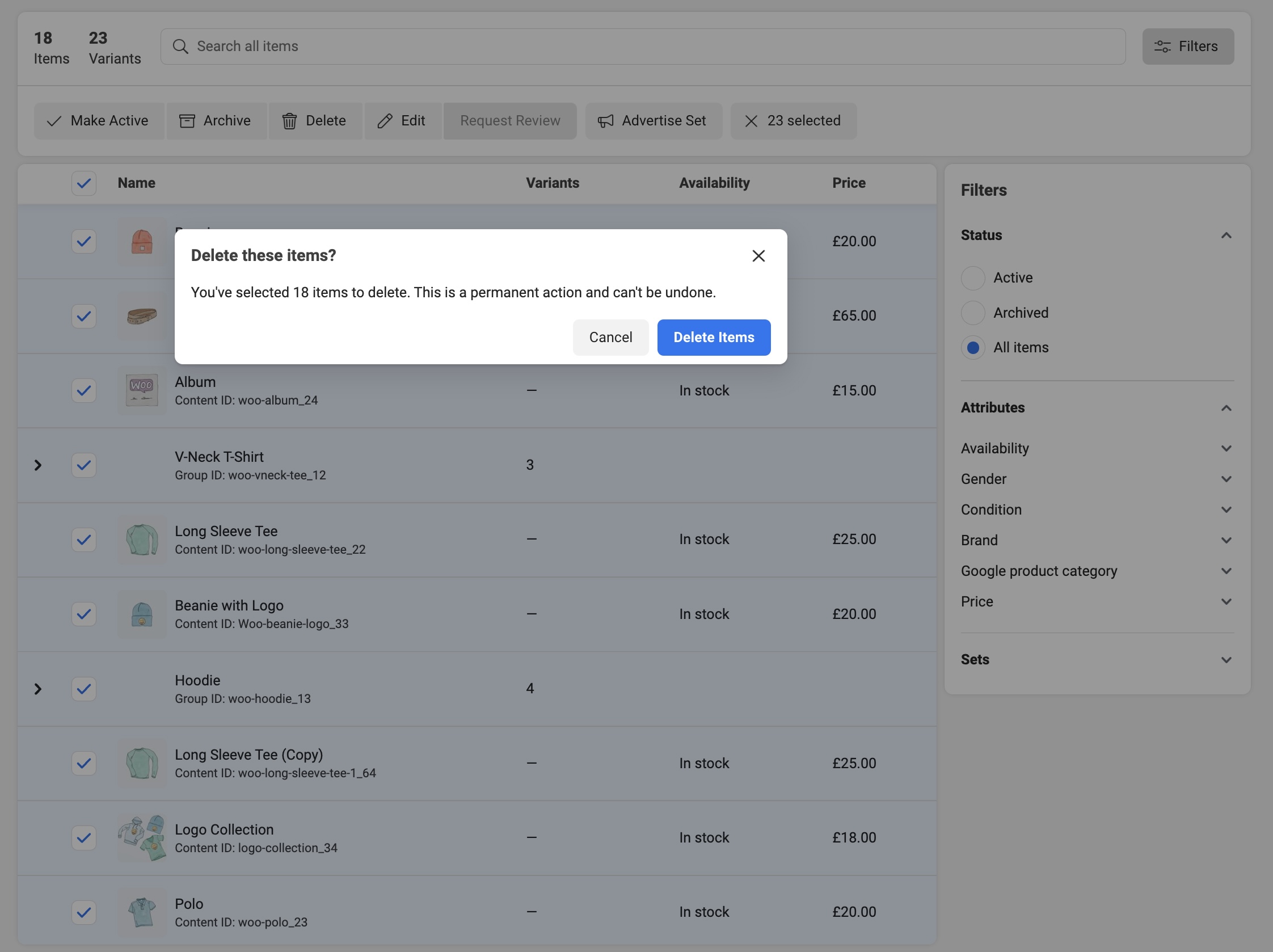
Could you confirm? This means we can probably close this issue.
@rawdreeg in my testing, I'm not able to delete items added via WooCommerce:
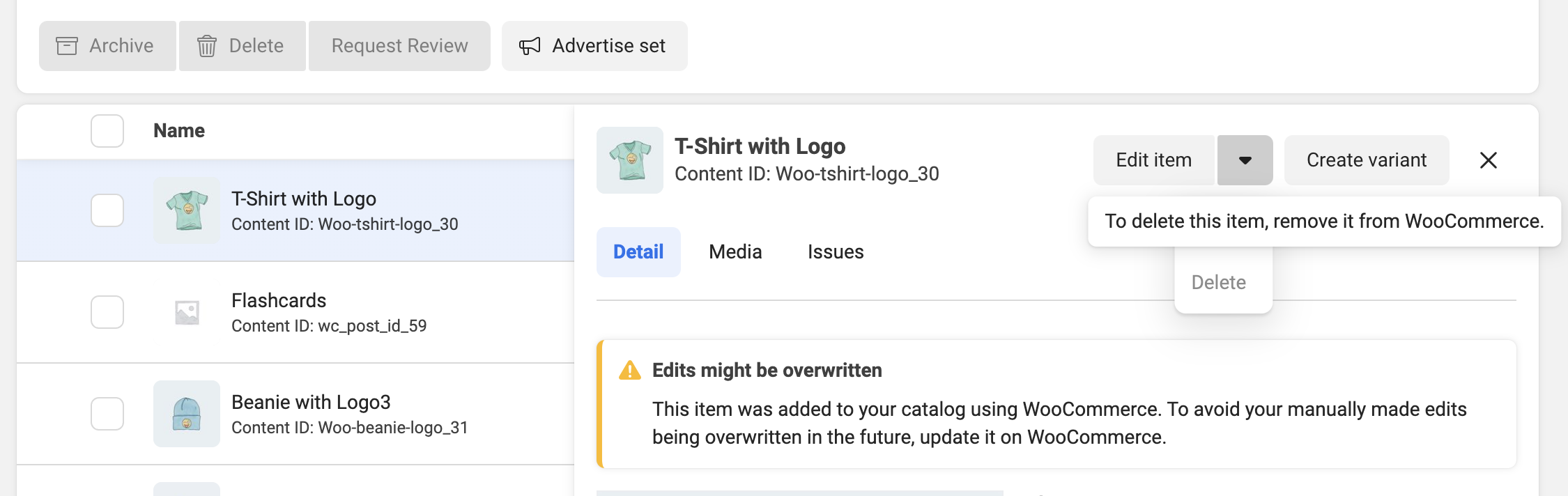
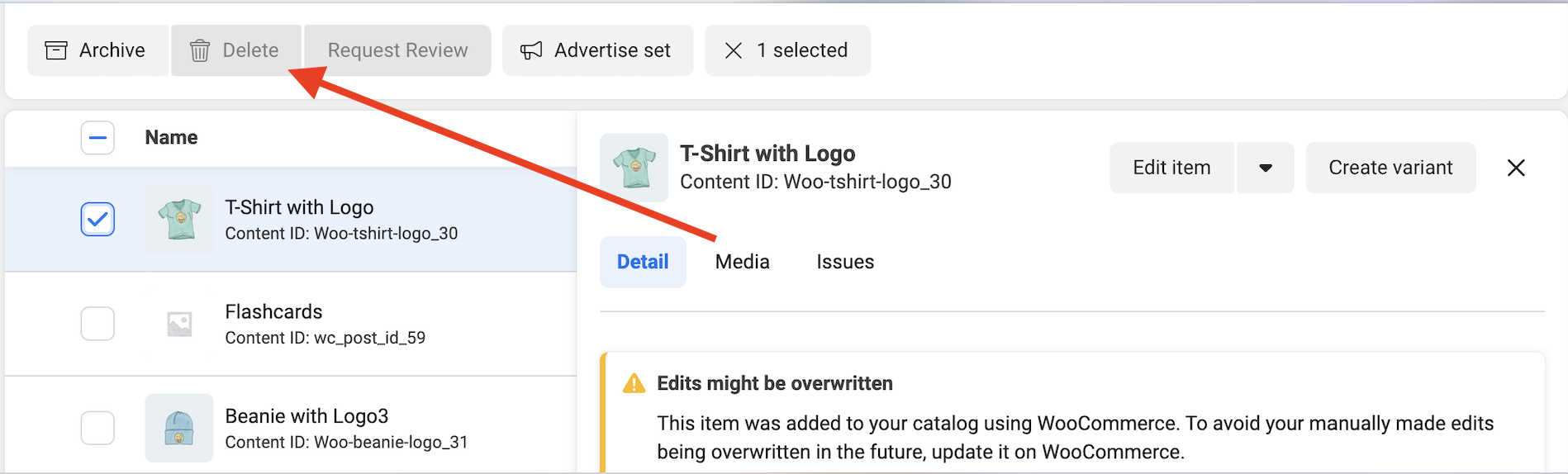
Ah. Interesting. Maybe this is only available to new catalogs? I haven't been able to confirm. But I try the journey. See attached:
https://user-images.githubusercontent.com/4209011/197043692-82666189-6a07-45e6-a7fb-50794759ab6b.mov
I believe we've covered everything we could from our end, short of deleting catalog items on disconnection, which I don't think we should do.
short of deleting catalog items on disconnection
It's been a while since I've tested this, but the "Delete all products" snippet previously didn't work to remove the unlinked products on Facebook. Is there a reason that wouldn't work? I agree that deleting the catalog contents on disconnection isn't ideal, but it seems like the snippet should work when conscientiously used.
In either case, I think the best way forward for any future occurrences would be to:
- Disconnect the extension
- Delete the Facebook catalog and create a new one.
- Reconnect the extension
There have been a lot of improvements to the extension since this issue was opened, with diminishing occurrences of the original issue.
It's been a while since I've tested this, but the "Delete all products" snippet previously didn't work to remove the unlinked products on Facebook. Is there a reason that wouldn't work? I agree that deleting the catalog contents on disconnection isn't ideal, but it seems like the snippet should work when conscientiously used.
The script looks at the product currently available in the user's Woo store, then delete those. Unlinked products are bound to get missed.
Deleting the whole catalog on the user's behalf is tricky because a catalog can have more than one source. So it's one thing if they do it, but if we do it on their behalf and delete the wrong product, that's an issue.
I know of at least one other case where a user asked Meta support to delete the product (https://github.com/woocommerce/facebook-for-woocommerce/issues/1530#issuecomment-1262368984).
There have been a lot of improvements to the extension since this issue was opened, with diminishing occurrences of the original issue
We now ensure that if the user trash or excludes a product from syncing, the product is also removed from the store.
The PR for this issue has been released in https://github.com/woocommerce/facebook-for-woocommerce/releases/tag/3.0.5.
