
WFN
 WFN copied to clipboard
 wokhan
[request] CLI options
I'd like to thank all developers for working on this project!
Would you please implement command line options to change default actions so that we can automate this (in batch scripts) without relying on mouse interaction?

Hi! Thank you, glad you like WFN! Regarding your request, I'm not sure I see a use case, but let me try: you'd like to handle block/prompt differently according to external events (like time, location,or whatever?)? Or is it for automated deployment? Or is it something else I'm missing? 😊

Hi again and thanks for the very prompt reply,
you'd like to handle block/prompt differently according to external events (like time, location,or whatever?)? Or is it for automated deployment?
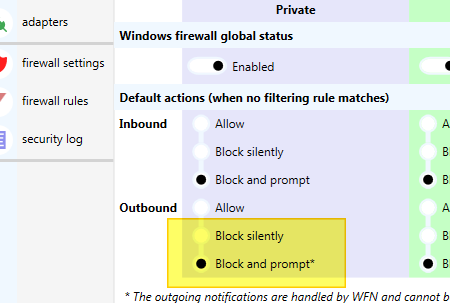
Currently it takes me each time too many clicks to toggle outbound state between block and prompt.
- WFN.exe
- User Account Control (UAC)
- Menu: Firewall Settings
- Block OR prompt
- Apply`
With CLI options, I could run a shortcut for similar actions. 😊
Hi @hoasis2 , the steps are not necessary anymore in the next release (see Roadmap) - we'll try to provide a beta release asap.
To give you an idea, the new version of Notifier (Notification window) can be started stand-alone, independent of the Firewall Setting in the WFN console. In addition it can be minimized to the system tray where it stays silent without showing notifications.

Dear @harrwiss , thanks for the clarification. I hope it will be something like this in the screenshot.
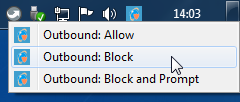
Hi @hoasis2, thanks for clarifying 👍
It looks at the moment like this (wip):
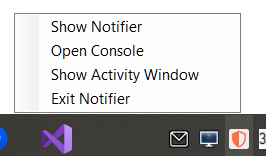
To block Allow/Block ALL outbound traffic with a single click we would have to add these options as well - to be considered.