
react-native-ui-lib
 react-native-ui-lib copied to clipboard
 wix
wix
Card.Image syntax error
I try your library with RN. I wish to try the card component with an image but the compiler give this error:

Why? I follow your docs.
"@react-native-community/blur": "^4.2.0",
"@react-navigation/native": "^6.0.12",
"@react-navigation/native-stack": "^6.8.0",
"galio-framework": "^0.8.0",
"react": "18.0.0",
"react-native": "0.69.4",
"react-native-gesture-handler": "^2.5.0",
"react-native-reanimated": "^2.10.0",
"react-native-safe-area-context": "^4.3.3",
"react-native-screens": "^3.16.0",
"react-native-svg": "^13.0.0",
"react-native-svg-transformer": "^1.0.0",
"react-native-ui-lib": "^6.20.1"

This is just a syntax error, you need wrap your uri with quotes:
source={{uri: "https://xxx"}}

There is an error into the docs

I tried again but the image don't appear.
<Card.Image source={{ uri: "https://github.com/wix/react-native-ui-lib/blob/master/demo/src/assets/images/card-example.jpg"}}/>

you need to set height to Card.Image, try height="100%" or a fixed value such as 200
I tried. Don't work in any manner into Card tag.
`/* eslint-disable @typescript-eslint/no-unused-vars */ import React, { Component } from 'react'; import { SafeAreaView, ScrollView, StatusBar, StyleSheet, useColorScheme,
} from 'react-native'; import { View, Text, Card, Button, Icon, TouchableOpacity, Toast, Incubator, Image } from 'react-native-ui-lib';
class Page extends React.Component<Props> {
render() {
const { navigation } = this.props;
return (
    <View flex padding-page>
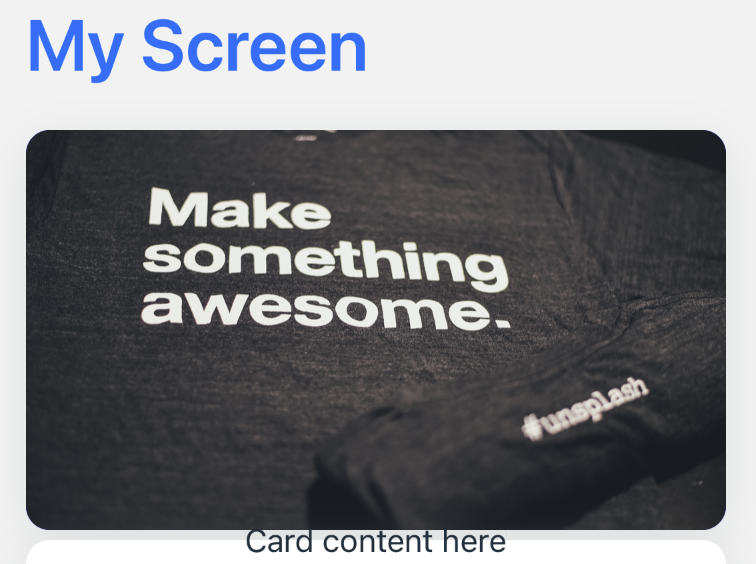
        <Text heading marginB-s4 blue30>My Screen</Text>
        <Card height={200} center marginT-5 onPress={() => console.log('pressed 1')}>
            <Card.Image height={200} source={{ uri: "https://images.unsplash.com/photo-1461988320302-91bde64fc8e4?ixid=2yJhcHBfaWQiOjEyMDd9&fm=jpg&q=80"}}/>

            <Card.Section
                content={[{ text: 'Card content here', text70: true, grey10: true }]}
                contentStyle={{ alignItems: 'center' }}
            />
        </Card>
        <Card height={200} center marginT-5 onPress={() => console.log('pressed 2')}>
            <Card.Section
                content={[{ text: 'Card content here', text70: true, grey10: true }]}
                contentStyle={{ alignItems: 'center' }}
            />
            <Image height={200} source={{ uri: "https://images.unsplash.com/photo-1461988320302-91bde64fc8e4?ixid=2yJhcHBfaWQiOjEyMDd9&fm=jpg&q=80" }}></Image>
        </Card>
        <Text body>This is an example card </Text>
        <Image height={200} source={{ uri: "https://images.unsplash.com/photo-1461988320302-91bde64fc8e4?ixid=2yJhcHBfaWQiOjEyMDd9&fm=jpg&q=80" }}></Image>
        <Button label="Button" body bg-blue30 square></Button>

  </View>
);
} }
export default Page;`
I tried you code and the image not showed as you said.
After searching source code ,I find width and height to Card.Image were used to set container size, not image actually, you can try this code:
<Card
  height={200}
  style={{backgroundColor: 'blue'}}
  center
  marginT-5
  onPress={() => console.log('pressed 1')}>
  <Card.Image
    source={{
      uri: 'https://images.unsplash.com/photo-1461988320302-91bde64fc8e4?ixid=2yJhcHBfaWQiOjEyMDd9&fm=jpg&q=80',
    }}
    style={{
      // add this, and remove width/height of Card.Image, set them on Card
      width: '100%',
      height: '100%',
    }}
  />
</Card>
By the end, the official doc really has many issues, it's not ready to use I think.
You are right. The docs seems in alpha version and then I think that this UI is not ready to use on mass.
This issue has been automatically marked as stale because it has not had recent activity. It will be closed if no further activity occurs. Thank you for your contributions.
![stale[bot] avatar](https://avatars.githubusercontent.com/in/1724?v=4 "Published by a pub.dev verified publisher")